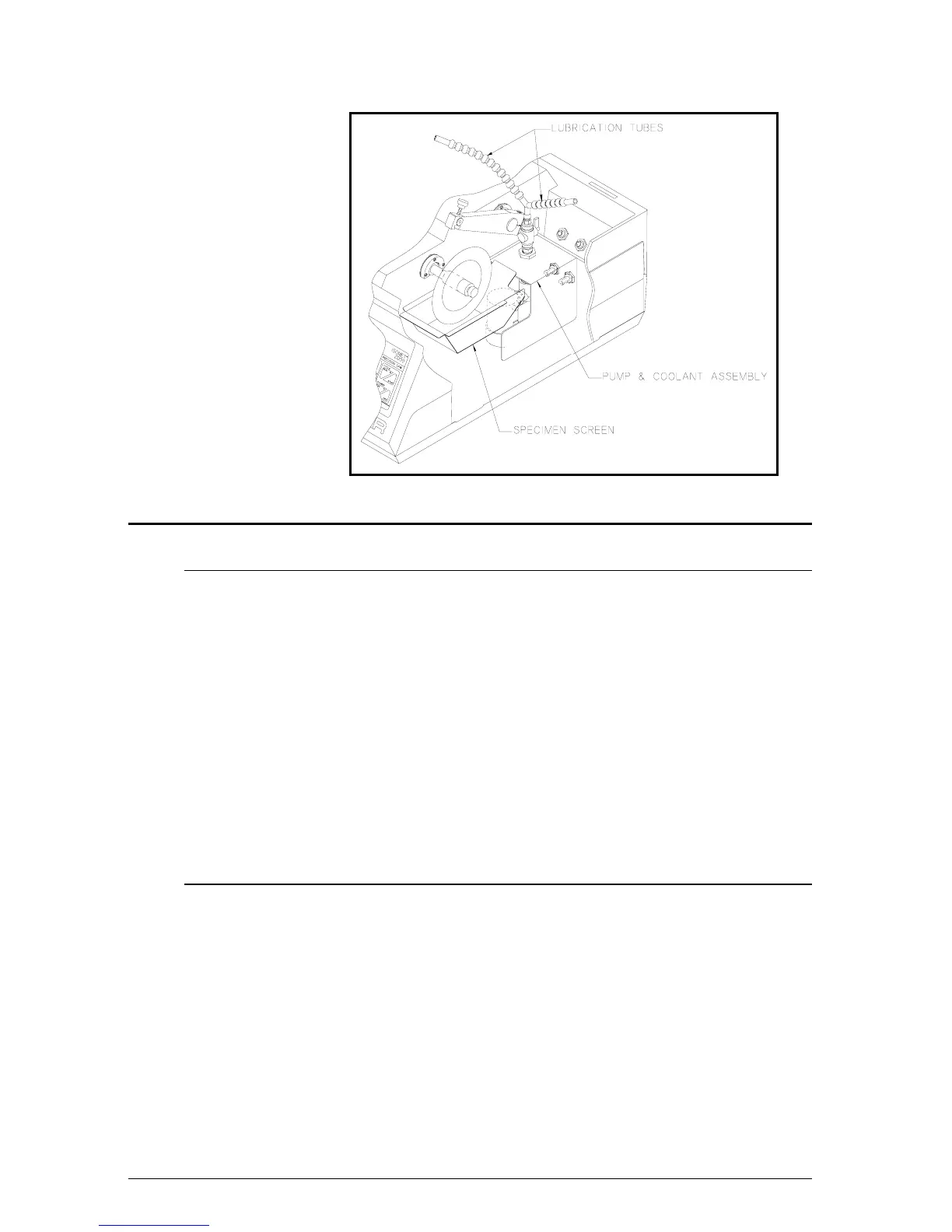
Figure 3 Internal Lubrication System
Operation
Energizing the Unit
1. Attach the blade and flanges as described in blade installation
section. Refer to Application Guide for proper blade selection.
2. Plug the unit into an appropriate power source.
NOTE Some types of GFI protection circuitry on the market are very sensitive
and may trip prematurely during machine start-up. If this happens, the
BUEHLER Service Department should be contacted to recommend a
solution.
3. Check the circuit breaker on the rear of the unit. It should be in
the (I) On position. Press the POWER ON Button. The green
LED control light should energize as well as all the LED
displays. The unit is now ready for specimen loading.
Specimen Loading
Several chucks are available to hold specimens of many different sizes
and shapes. (See Accessories and Supplies.) Select the proper chuck
for the particular application and attach to the support arm.
1. Open the hood and press the RAISE Button in the Arm section
on the Control Panel. See Figure 5. Raise the Support Arm all
the way up.
2. Attach the Chuck to the Support Arm with the Thumb Screw.
See Figure 4.
3. Clamp specimen into the Chuck.
5
MA112480-20 03/06/00


 To Next Page