Page 25
PROGRAMMING THE BREWER (cont.)
PROGRAMMING FUNCTIONS - LEVEL 2 (cont.)
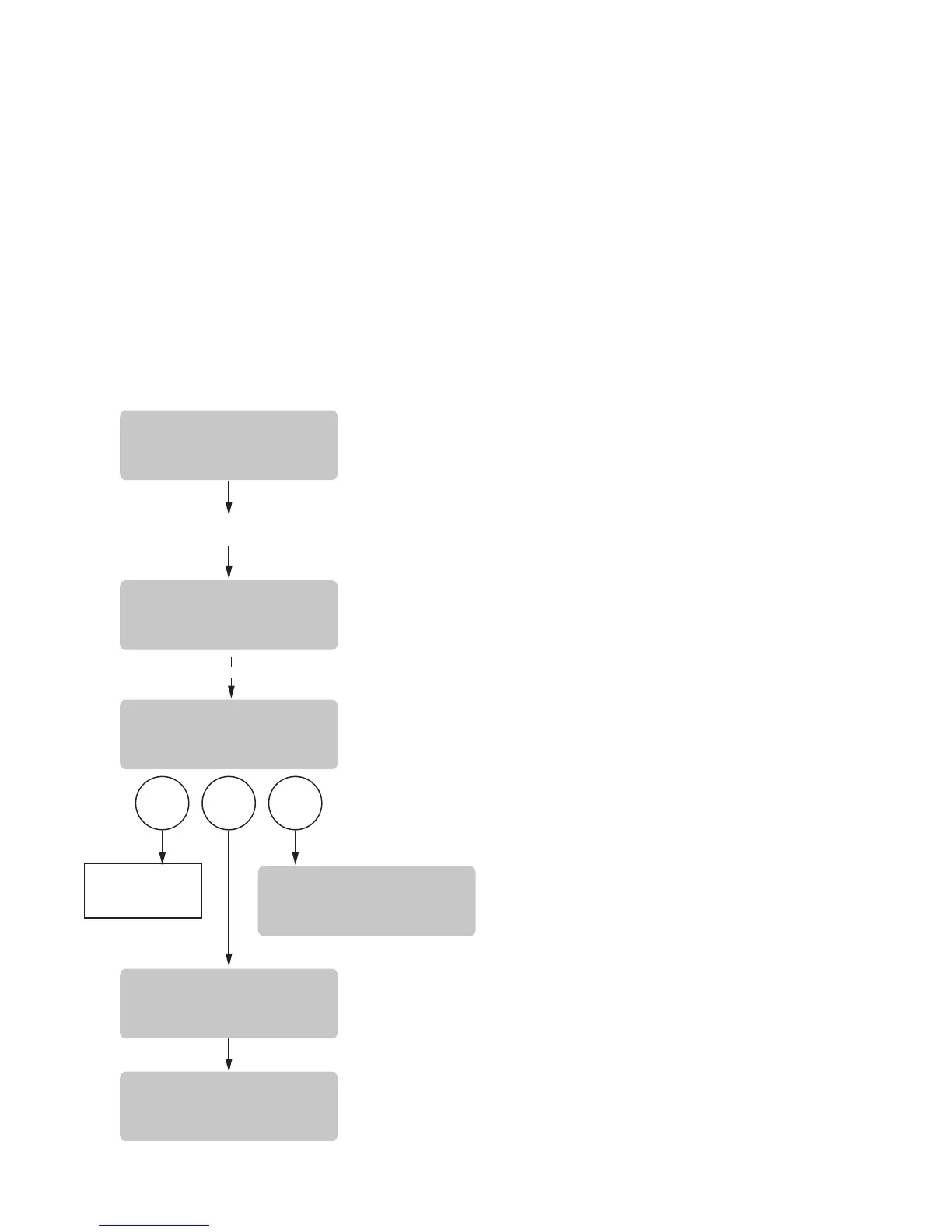
SET NEW RECIPE
Using a RECIPE CARD to load coffee names and brew
settings
The G9-2T DBC or MHG Grinder’s memory contains
certain coffee names. If the operator uses a coffee name
that is not already stored in the grinder’s memory, a
RECIPE CARD can be obtained from the factory. The
RECIPE CARD would include all the information needed
to set up that particular coffee name. The information
BREW
A
BREW
B
BREW
C
5 SEC.
POSITION CARD UNDER
SENSOR COIL
SCROLLS THROUGH
ALL BREW SETTINGS
FOR THAT RECIPE
READY TO BREW
WATER TEMP: 200°
READY TO BREW
WATER TEMP: 200°
CARD CONTAINS
RECIPE FOR
(COFFEE NAME)
SHOW QUIT SAVE
(COFFEE NAME)
SETUP COMPLETE
(COFFEE NAME)
NOT SAVED
P3083
37077 030508
from the RECIPE CARD is loaded into the grinder’s
memory, then into the brewer’s memory by holding
the chip area up to the equipment’s SENSING COIL.
This information can include the coffee name, BREW
VOLUMES, PULSE BREW TIMES and DRIP OUT TIME
for that particular coffee name. These can all be loaded
in seconds.
Contact Bunn-O-Matic Corporation for the availability
of RECIPE CARDS and the RECIPE WRITER used to
program the RECIPE CARDS.
NOTE: Instructions to program the brewer and grinder
are printed on the RECIPE CARD, along with the coffee
name that is being programmed.
Procedure to program the coffee name:
1. Remove the funnel (if present) from the funnel
rails.
2. Position the RECIPE CARD vertically, so that the
top end of the CHIP is beneath the SENSING COIL
(located on the middle of the underneath side of
the front display panel).
3. After a short pause the display will read CARD CON-
TAINS RECIPE FOR then will change to (COFFEE
NAME) SHOW QUIT SAVE. All brewing parameters
for that coffee flavor are now transferred from the
CARD to the brewer.
4. To show (view) this information, press and release
SHOW. The display will scroll through all of the
brew settings for that recipe. This display will then
return to CARD CONTAINS RECIPE FOR then will
change to (COFFEE NAME) SHOW QUIT SAVE.
5. If all brew settings are correct, press SAVE. The
display will read (COFFEE NAME) SETUP COM-
PLETE. All brew settings for that name are now
stored in the brewer’s memory.
6. If the brewing information is not correct, or it is
desired to exit the setup before the settings are
loaded into the brewer’s memory, press QUIT. The
display will read (COFFEE NAME) NOT SAVED. The
display will then return to the MAIN SCREEN.



 To Next Page