- 13 -
Mute
<RXFDQSUHVV to mute the sound of your set top box. The sound will be muted once this button is pressed.
7RFDQFHOPXWH\RXFDQSUHVV button again or use the V +/- buttons.
On-Screen Information
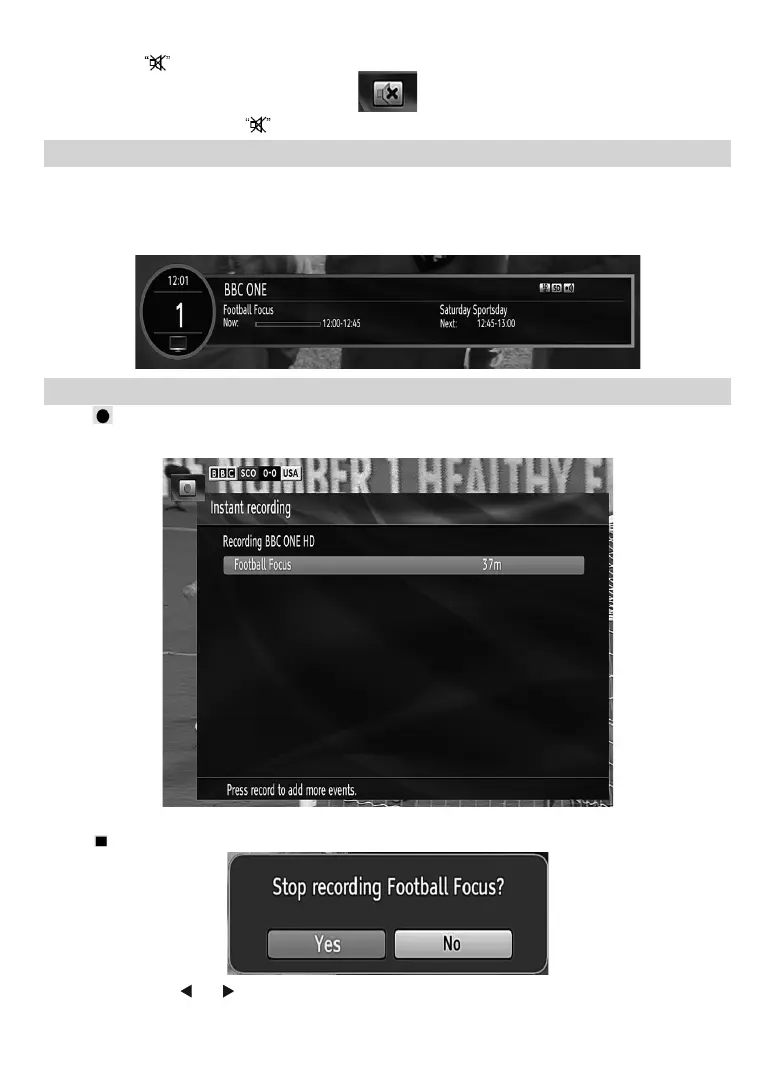
<RXFDQSUHVVWKHINFO button to display on-screen information. Details of the station and current programme
will be displayed on the information screen.
7KHLQIRUPDWLRQVFUHHQZLOOWKHQGLVSOD\WKHFXUUHQWHYHQWQDPHQH[WHYHQWQDPHVWDUWLQJDQGHQGLQJWLPH
GXUDWLRQEDUSURJUDPPHPRGHDQGWKHFKDQQHOQXPEHUDQGQDPH
Instant Recording
3UHVV (RECORD) button to start recording an event instantly while watching a programme. The following
OSD appears on the screen:
5HFRUG26'ZLOOWKHQEHGLVSOD\HGIRUDVKRUWWLPHDQGWKHFXUUHQWHYHQWZLOOEHUHFRUGHG
3UHVV
(STOP) button to cancel instant recording. The following OSD will be displayed:
Select Yes by using “ ” or “ ” / OK buttons to cancel instant recording.
Note: :KHQWZRUHFRUGLQJVDUHDFWLYH\RXFDQRQO\ZDWFKFKDQQHOVZKLFKDUHRQWKHVDPHPXOWLSOH[HV



 To Next Page