- 34 -
+LJKOLJKWNo by using “ ” or “ ” button to cancel installation.
+LJKOLJKWYes by using “
” or “ ” button and press OK button WRVWDUW¿UVWWLPHLQVWDOODWLRQ
$IWHU\RXVHOHFWYesIDFWRU\VHWWLQJVZLOOEHORDGHG
,QVWDOODWLRQZL]DUGZLOOJXLGH\RXWKURXJKWKHLQVWDOODWLRQSURFHVV6HHWKHVHFWLRQ³First Time Installation”
in previous chapters for more information on this process.
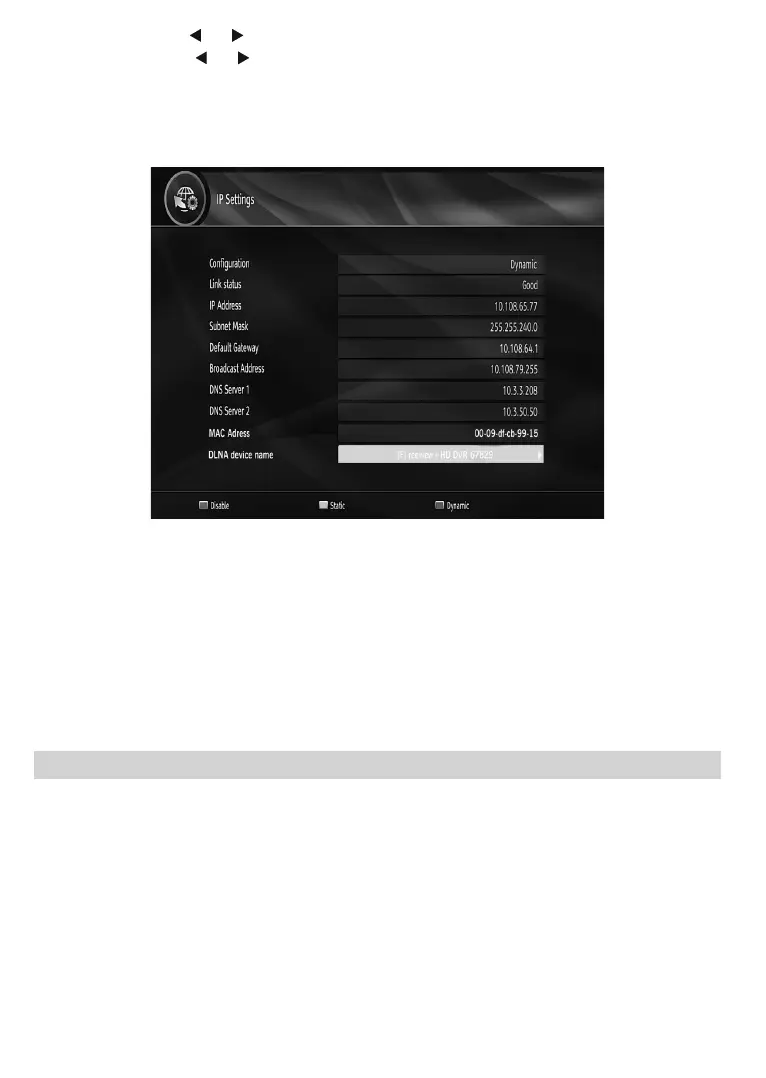
IP Settings
<RXFDQFRQ¿JXUH\RXUUHFHLYHU¶V,3VHWWLQJVE\XVLQJWKLVPHQXVFUHHQ
3UHVVYELLOW button to set static IP settings.
8VHBLUEEXWWRQWRFRQ¿JXUHG\QDPLF,3VHWWLQJV
<RXFDQSUHVVREDEXWWRQWRGLVDEOH,3FRQ¿JXUDWLRQ
,QRUGHUIRUWKHHWKHUQHWKRVWWRZRUNFRUUHFWO\ZLWK\RXULQWHUQHWFRQQHFWLRQLWQHHGVWRKDYHDXQLTXH,3
address. In most cases all of the parameters can be provided by the DHCP server in their router. In this
case you should use the “Dynamic” option.
,QWKHXQOLNHO\HYHQWWKDW\RXGRXQRWKDYHD'+&3VHUYHULQ\RXUURXWHURULI\RXSUHIHUWRDVVLJQ\RXURZQ
,3DGGUHVVWKHQWKH³Static” option can be used. You will need to enter a unique IP address along with the
default gateway and DNS server. In most domestic networks the default gateway and DNS server will both
be the IP address of the router.Available MAC address will be displayed on MAC address line.
Internet Portal
<RXFDQDFFHVVLQWHUQHWSRUWDOXVLQJ\RXUVHWWRSER[7RGRWKLVDQDFWLYHLQWHUQHWFRQQHFWLRQLVUHTXLUHG
$IWHUWKHFRQQHFWLRQLVHVWDEOLVKHG\RXFDQVHOHFW³,QWHUQHW3RUWDO´RSWLRQIURPWKHPDLQPHQXWRDFWLYDWHWKH
portal. You can access several applications using this portal.
Use navigation buttons to do selections.



 To Next Page