- 15 -
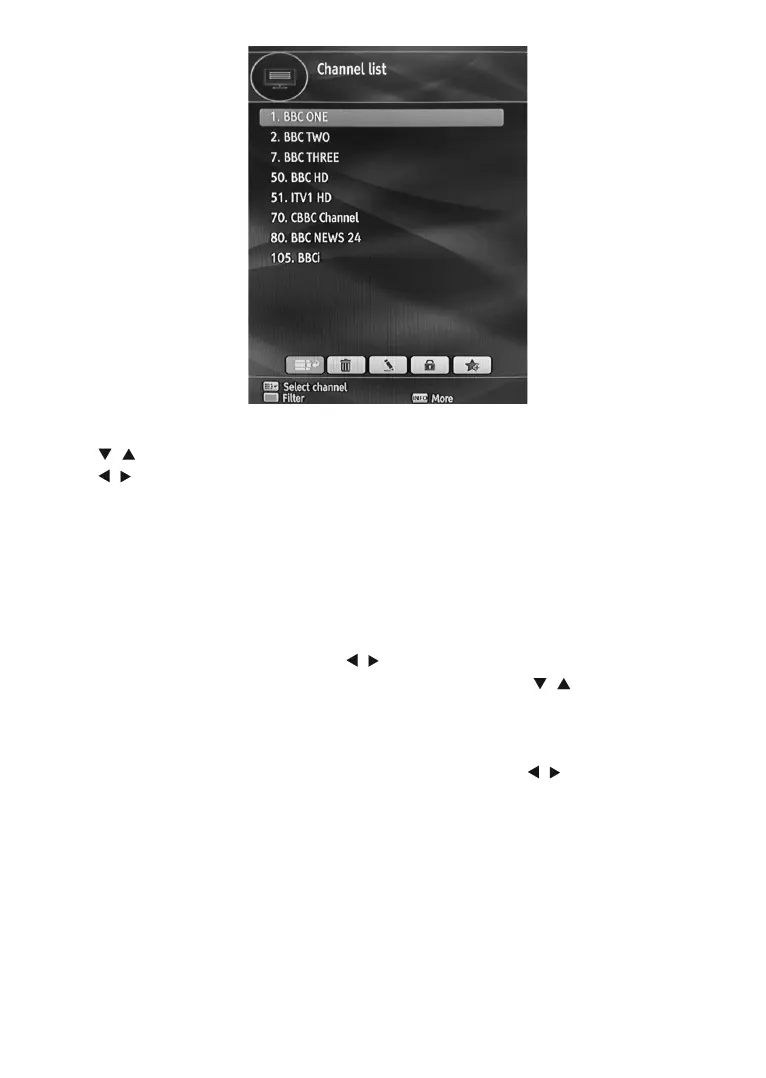
Operating the Channel List
3UHVV³ ”/“ ” button to select the channel that will be processed.
3UHVV³
”/“ ” button to select a function on Channel List menu.
8VHP+/P- buttons to move page up or down.
3UHVVBLUEEXWWRQWRYLHZ¿OWHULQJRSWLRQV
3UHVVYELLOW button to tag/untag a channel.
3UHVVGREEN button to tag all channels.
8VHINFO button to view more information.
3UHVVMENU button to exit.
6HOHFWLQJD6SHFL¿F&KDQQHO
Select option should be highlighted by using “ ”/“ ” button.
7RZDWFKDVSHFL¿FFKDQQHO\RXVKRXOGKLJKOLJKWWKHGHVLUHGFKDQQHOXVLQJ³
”/“ ” button and press OK button.
Selected channel will be displayed.
,IWKHVHOHFWHGFKDQQHOLVSDVVZRUGSURWHFWHGWKHSDUHQWDOORFNSDVVZRUGZLOOEHUHTXLUHG
Deleting Channels
6HOHFWWKHFKDQQHOWKDW\RXZDQWWRGHOHWHDQGVHOHFW'HOHWHRSWLRQXVLQJ³ ”/“ ” buttons . Press OK button
to continue.
$PHVVDJHZLOOEHGLVSOD\HGWRFRQ¿UP\RXUGHFLVLRQ6HOHFWYESWRGHOHWHWKHVHOHFWHGFKDQQHOVHOHFWNO
to cancel. Press OK button to continue.
Deleting Multiple Channels:
6HOHFW'HOHWHDQGKLJKOLJKWWKHFKDQQHO\RXZDQWWRGHOHWH
3UHVVYELLOW key. The channel will be marked. Move to the next channel you want to delete.
0DUNWKHRWKHUFKDQQHOV\RXZDQWWRGHOHWHOLNHWKHVDPHZD\DQGSUHVV OK.
<RXZLOOVHHDFRQ¿UPDWLRQPHQX6HOHFW<(6LQWKHPHQX7KHVHOHFWHGFKDQQHOVZLOOEHGHOHWHG
To mark all the channels in the channel list at once you can use GREEN key.
Note: $FKDQQHOFXUUHQWO\EHLQJZDWFKHGFDQQRWEHGHOHWHG
Renaming Channels



 To Next Page