- 21 -
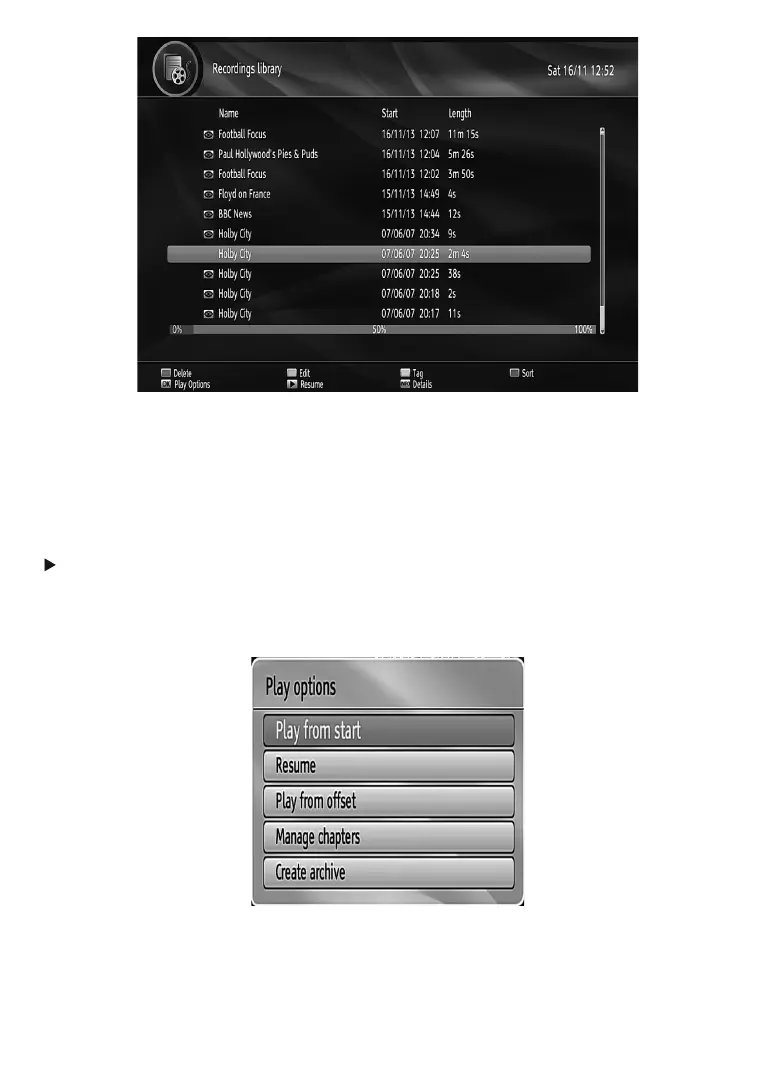
Red bar: Indicates the used space of the recordings on the hard disk.
Green bar: Displays the approximate capacity required for the timers currently set.
RED button (Delete) :Erases the selected recording.
GREEN button (Edit): Makes changes on the selected recording.
YELLOW button( Tag): Tag/untag a recorded programme.
BLUE button (Sort): Changes the order of the recordings. You can select from a wide range of sorting options.
OK button: Displays playing options:
(Resume): Resumes the playback.
1RWH9LHZLQJPDLQPHQXDQGPHQXLWHPVZLOOQRWEHDYDLODEOHGXULQJWKHSOD\EDFN
INFO (Details): Displays the short extended programmes in detail.
Play Options
Play from start: Plays the recording from the beginning.
Resume: Begins playing from the last stopped position.
Resume: Resumes the recording.
Play from offset:%HJLQVSOD\LQJIURPWKHWLPHZKLFKLVHQWHUHG



 To Next Page