- 22 -
Manage chapters :,WZLOOGLVSOD\DQ\PDUNHGFKDSWHUV7RVHWFKDSWHUPDUNVSUHVVWKH0HQXEXWWRQGXULQJ
playback and enter the “Chapter Options” menu) and begin with playback from the selected chapter.
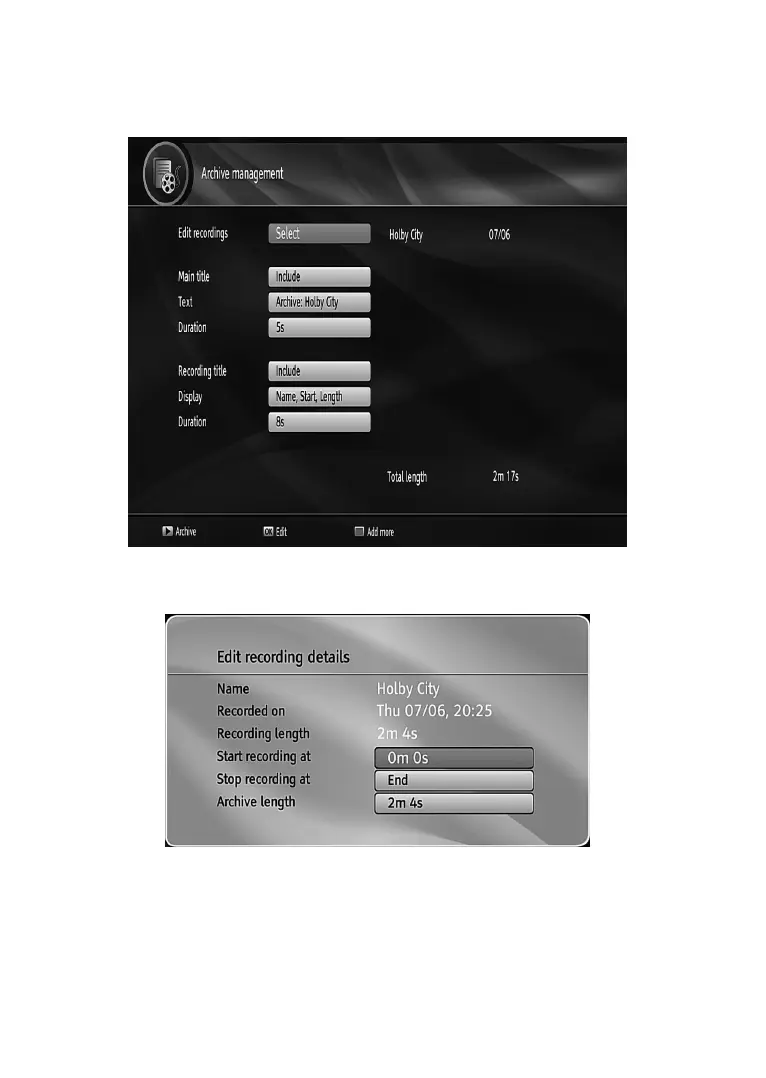
Create archive (Archive management):7RXVHWKLVIHDWXUH\RXVKRXOGWDJWKH¿OHVWREHDUFKLYHG¿UVWE\
using the YELLOWEXWWRQ:KHQDOO WKHGHVLUHGUHFRUGLQJVDUH WDJJHGSUHVVOK button to display Play
Options and then select Create Archive:KHQ¿QLVKHGSUHVVPlay button to start archiving.
Edit Recordings
Press OK button when Edit Recordings is highlighted. Then select the recordings that are to be archived.
:KHQ¿QLVKHGSUHVVOK button and the following menu will be displayed:
,QWKLVPHQXRQO\Start recording at and Stop recording at options are active. If you have already split
WKHUHFRUGLQJ\RXFDQVHOHFWDQ\FKDSWHU,ILWLVQRWVSOLWLQFKDSWHUVWKHEHJLQQLQJDQGHQGLQJWLPH
of the
recording will automatically be the beginning and ending time of the archiving.
Main Title
,I\RXZDQWWRGLVSOD\DPDLQWLWOHVHOHFWInclude,IQRWVHOHFWSkip.
Text
After you have selected the IncludeRSWLRQLQWKH³0DLQ7LWOH´PHQX\RXFDQHGLWWKHPDLQWLWOH



 To Next Page