- 23 -
Duration
Set the duration of the appearance of the main title on the screen.
Recording Title
,I\RXZDQWWRGLVSOD\DUHFRUGLQJWLWOHVHOHFWInclude,IQRWVHOHFWSkip.
Display
<RXFDQDGGQDPHVWDUWGDWHWLPHRUOHQJWKLQIRUPDWLRQWR\RXUDUFKLYHG¿OHE\XVLQJGLVSOD\RSWLRQ
Duration
Set the duration of the appearance of the Edit recording title menu main title on the screen. Displaying
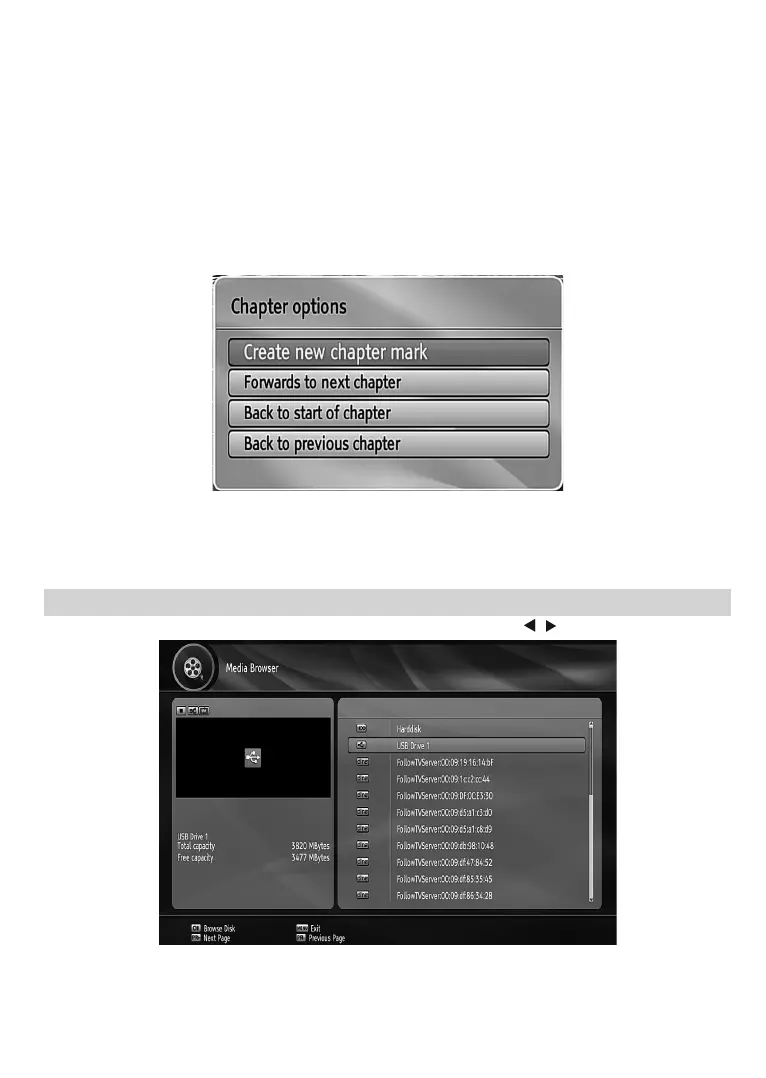
Chapter Options
'XULQJSOD\EDFNRIDUHFRUGLQJLI\RXSUHVVWKHMENUEXWWRQChapter Options menu will be displayed.
Create New Chapter Mark: You can set a chapter mark anywhere you want.
Forwards to Next Chapter: Goes to the next chapter if there is more than one chapter available.
Back to Start Of Chapter: Goes to the beginning of the current chapter. This is the last played chapter.
Back to Previous Chapter: Goes back to the previous chapter if there is more than one chapter available.
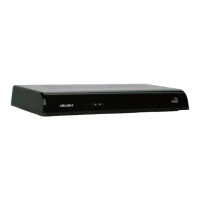
Media Browser
7RGLVSOD\0HGLD%URZVHUVHOHFWMedia Browser in the main menu using “ ”/“ ” buttons and press OK.
Note:$YDLODEOHPHGLDVHUYHUVFRQQHFWHGWRWKHVDPHQHWZRUNZLOOEHGLVSD\HGWRR3UHVV8SRU'RZQEXWWRQ
to select one and press OK to browse the selected media server.



 To Next Page