- 17 -
6HOHFWDOLVWE\SUHVVLQJ³ ”/“ ´EXWWRQV7KHQVHOHFWDFKDQQHOE\XVLQJ ”/“ ” buttons. Press OK button to
add selected channel to the favourites list.
6WDULFRQLQGLFDWHVWKDWWKHVHOHFWHGFKDQQHOLVDGGHGWRWKHIDYRXULWHVOLVW
<RXFDQSUHVVOK button again to remove the selected channel from the list.
Button Functions:
OK: Adds/removes a station.
BLUE'LVSOD\V¿OWHULQJRSWLRQV
YELLOW: Tags/untags a channel.
GREEN: Tags/untags all.
Viewing Electronic Programme Guide (EPG)
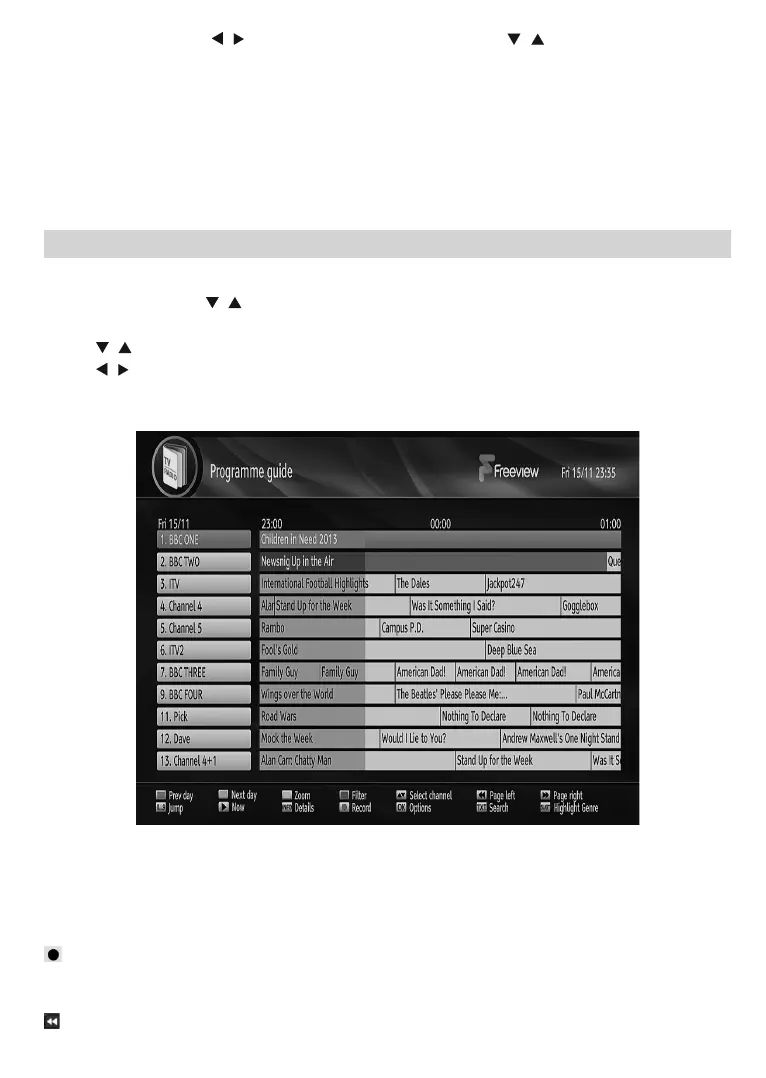
You can view the electronic programme guide (EPG) to view information about available programmes. The
ER[JHWVFKDQQHOSURJUDPPHLQIRUPDWLRQZHHNO\E\PHDQVRIGD\(3*6HOHFWProgramme Guide from
the main menu by using “
”/“ ” buttons. Press OK to continue.
HINT:<RXFDQDOVRSUHVVWKHGUIDE EXWWRQWRYLHZWKHEPGPHQX
3UHVV³
”/“ ” buttons to navigate through channels.
3UHVV³
”/“ ” buttons to navigate through the programme list.
3OHDVHQRWHWKDWHYHQWLQIRUPDWLRQLVXSGDWHGDXWRPDWLFDOO\,IWKHUHDUHQRHYHQWLQIRUPDWLRQGDWDDYDLODEOH
IRUFKDQQHOV(3*ZLOOEHGLVSOD\HGZLWKEODQNV
Red button (Prev Day): Displays the programmes of previous day.
Green button (Next day): Displays the programmes of the next day.
Yellow button (Zoom): Expands programme information.
Blue button (Filter): 9LHZV¿OWHULQJRSWLRQV
INFO (Details): Displays the programmes in detail.
: Records the selected programme.
Numeric buttons (Jump): Jumps to the preferred channel directly via numeric buttons.
OK (Options): Displays programme options including “Select Channel” option.
: Scrolls page left.



 To Next Page