- 28 -
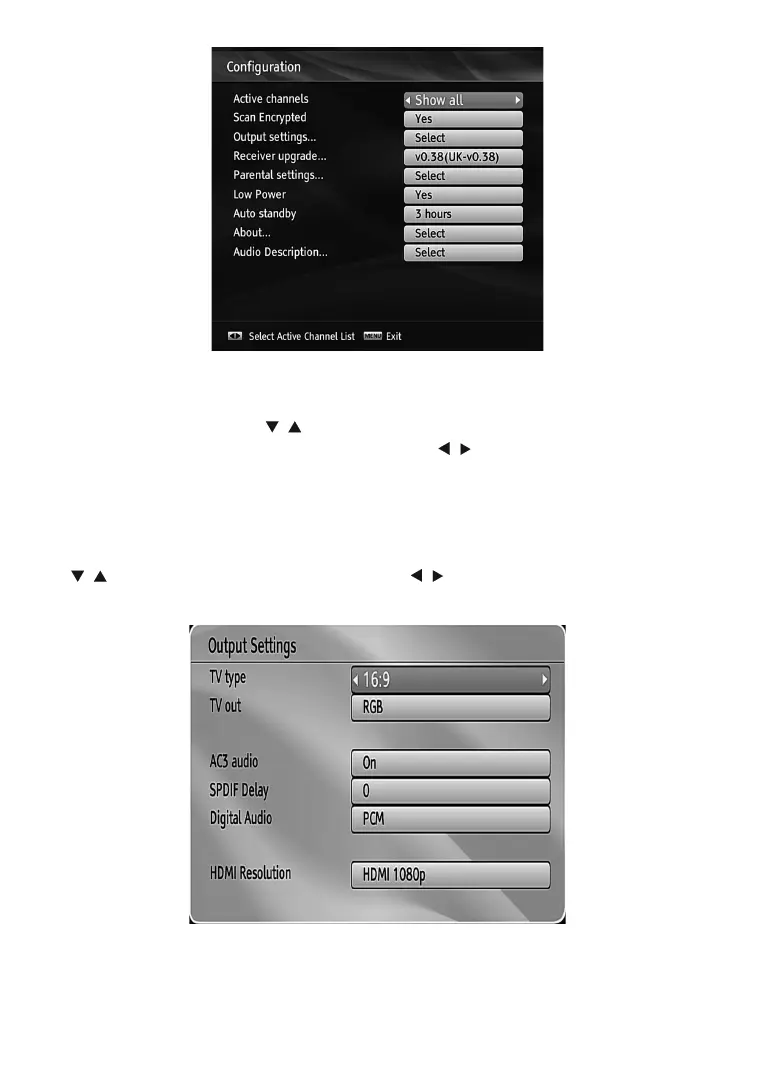
Active channels
<RXFDQVHOHFWEURDGFDVWVWREHOLVWHGLQWKHFKDQQHOOLVW7RGLVSOD\VSHFL¿FW\SHVRIEURDGFDVW\RXVKRXOG
use Active channel list setting.
6HOHFWActive Channels by using “
”/“ ” buttons.
<RXFDQVHOHFWDEURDGFDVWW\SHRSWLRQIURPWKHOLVWE\XVLQJ³
”/“ ” button. Available modes are: TV Only,
Radio Only, Text Only, Favourites or Show All (if available).
3UHVVWKHMENU button to save the recent changes and exit.
Scan Encrypted
:KHQWKLVVHWWLQJLVRQVHDUFKSURFHVVZLOOORFDWHWKHHQFU\SWHGFKDQQHOVDVZHOO,ILWLVVHWDV2IIHQFU\SWHG
channels will not be located in automatic search or manual search.
8VH³
”/“ ” buttons to highlight Scan Encrypted and press “ ”/“ ” buttons to select YES or NO.
Output Settings
TV Type
'LJLWDOWHUUHVWULDOWHOHYLVLRQFKDQQHOVFDQEHEURDGFDVWLQDZLGHVFUHHQIRUPDWZKLFKPXVWEHRXWSXWGLIIHUHQWO\
to normal and widescreen TV sets.
7KLVIXQFWLRQGH¿QHVWKHVFUHHQIRUPDWRIWKHFRQQHFWHG79WRHQDEOHEURDGFDVWV¶EHLQJGLVSOD\HGFRUUHFWO\



 To Next Page