English
23
2 Quick Operation
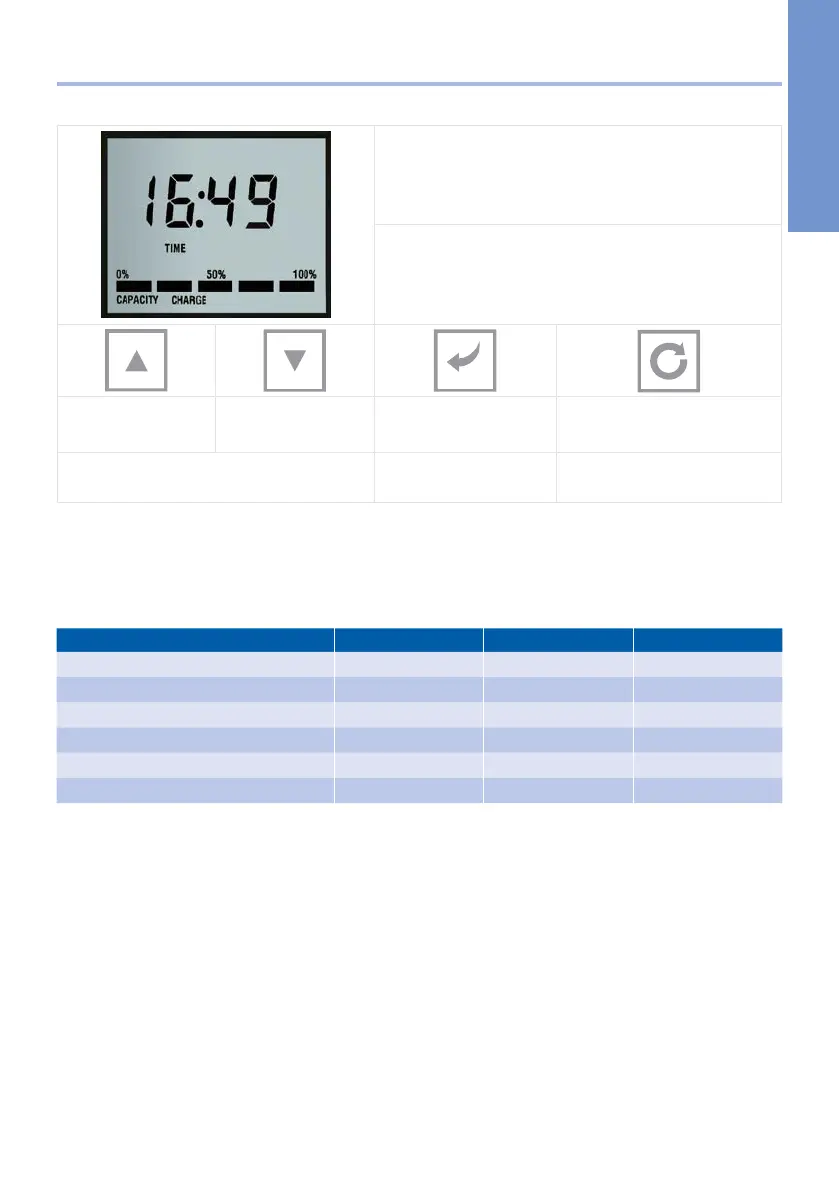
2.1 Display and control elements
f upper large display line (Time): current time
f Lower line (Capacity Charge): remaining capacity
in%.
[UP]
[arrow up]
[DOWN]
[arrow down]
[SET/RETURN] [RECHARGE]
[REGENERATION]
Moves cursor and changes entries Confirms entries Programming recharge tonight
2.2 Standard factory settings
Duration of the step times: Depending on the internal settings of the unit (a few minutes)
Regeneration time: free input at RECHARGE TONIGHT
Hardness of drinking water / capacity: 300 ppm, 1566 litres for 10 litre model
BWT bestsoft 4 / 11 Standard UK EU
Display Yes Yes Yes
Operating range UK/EU 1,7 ... 5,0 bar 1,0 ... 8,0 bar
Recharge tonight Yes Yes Yes
Salt alarm No OPTION OPTION
Salt setting - care cubes (CC) UK/EU Yes Yes
Salt setting - block salt (BS) UK only Yes No
2.3 Initial softener settings / Setting the time of day
On first powering up the softener the digits of the display will flash while the valve rotates to service
position, the valve can be heard moving, this can take a few minutes. On locating service position the
display will prompt the installer to set the time. Start by pressing the [SET/RETURN] key, this will make
the hour digit flash, press the [UP/DOWN] key to adjust to the correct hour, once set, press the [SET/
RETURN] key, this will make the minutes digits flash, use the [UP/DOWN] key to adjust the minutes.
Throughout the settings mode use the [UP/DOWN] keys on the softener display to toggle or adjust set-
tings and use the [SET/RETURN] key to store the setting and move on to the next field in the menu.


 To Next Page