2021/03 - Indice de révision : B Code : 29740TRAITEMENT DE L'EAU
45/88
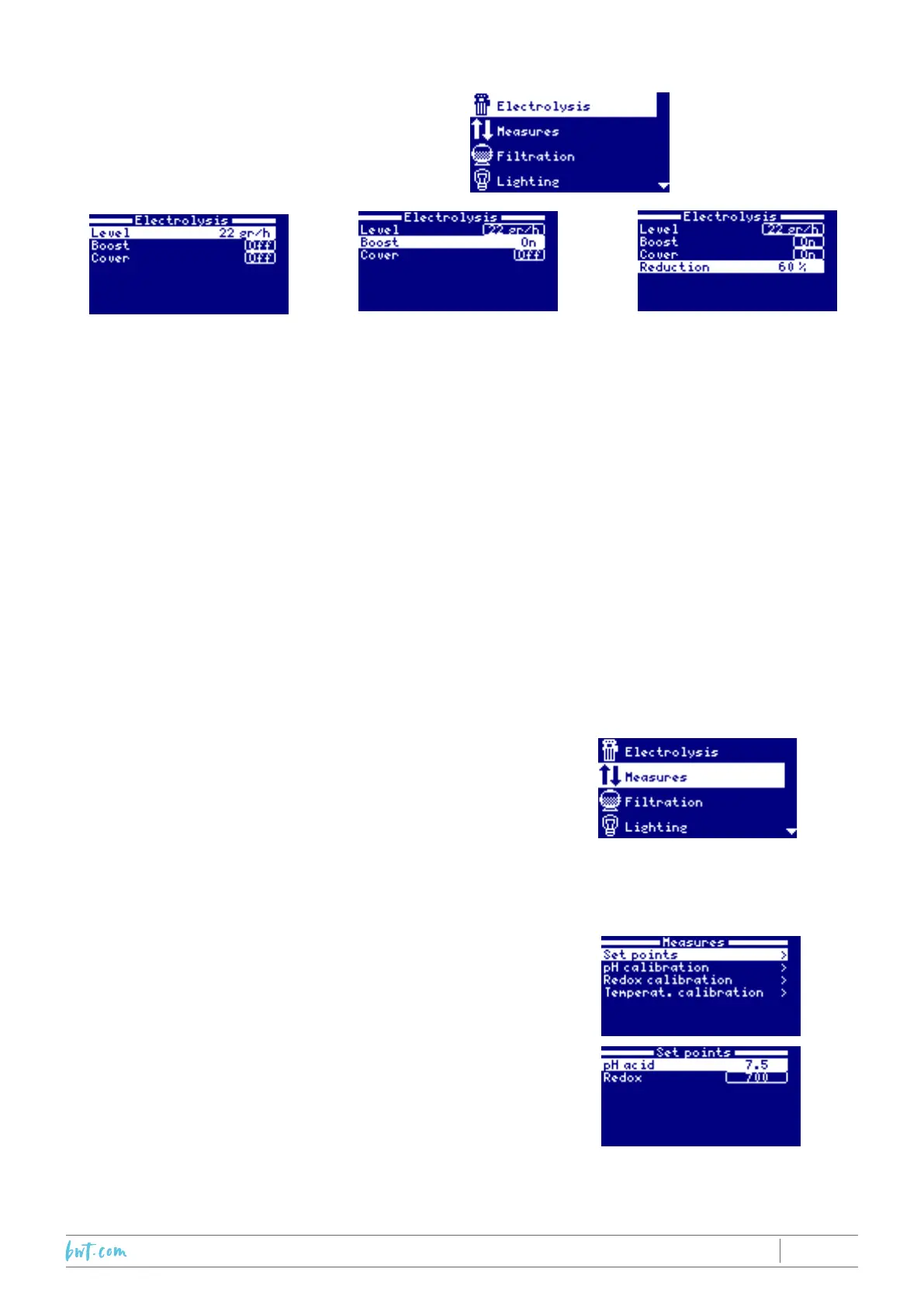
7.2 Production mode (electrolysis menu)
1.SelecttheElectrolysis
menu by highlighting it
(Up/Down arrows) iand
pressing OK.
2. The 'Level' sub-menu allows
you to select the Chlorine
productionleveling/hourforthe
ProAmodelandin%production
for the Pro Ls model up to the
maxthatcanbedeliveredbythe
device.
While'level”ishighlighted,press
theupanddownarrowstomodify
thevalue,pressOKtosave.
3. The 'Boost' sub-menu forces
thedevice onat max production
for 24 hours, subject to the
reservationthattheltrationpump
isalsorunningcontinuously.Ifthe
pump is slaved to the Chlorine
generator, ltration will run for
24 hours despite the ltration
'windows' programmed in 'Auto'
modeintheFiltrationmenu.
After 24 hours, the device
will return to the production
level selected, and the pump
programmingmodewilltakeover.
Deactivate the Redox set point
to allow the device to exceed it
duringthe24hourboost.
4. The 'Cover' sub-menu allows
the production of Chlorine to be
reduced to a set percentage of
thelevelprogrammed.IftheLevel
is 22g/h and Reduction is set to
60%, the device will produce at
0.6x22=13.2g/h.
Activate this sub-menu by
highlighting Cover (up/down
arrows), press Plus/ Minus to
display ON, then use the Plus/
Minuskeystoselecttherequired
value and press OK to save.
7.3 Settings (Measures menu)
Thismenuallowscalibrationofthedevicesmeasuringsensors:the
temperaturesensor,andthepHandredoxsensorsiftheseoptions
wereadded.
Inthecasethattheoptionalsensorswereinstalled,theirsetpoints
(maximumpHandminimumRedox)willneedtobeset.
Selectthe“Measures”menu.
7.3.1 Selecting the set points
ToselectthepHand/orRedoxpotentialsetpoints,choose
the"Setpoints'sub-menu,followedbytheparameterfor
whichyouwanttoselectasetpoint.
Tomodifythevalues,usethePlus/Minuskeys.PressOK
to save.
pH regulation:thepHsetpointisthemaximumvaluethatshouldbesurpassed,thegenerationof
Chlorinecausesaslow,gradualriseofthepH.IntheeventthatthepHsensordetectsavaluehigherthat
thesetpoint,thedevicewillcompensatebyinjectingacidintothewater,untilthevaluemeasuredfalls



 To Next Page