4
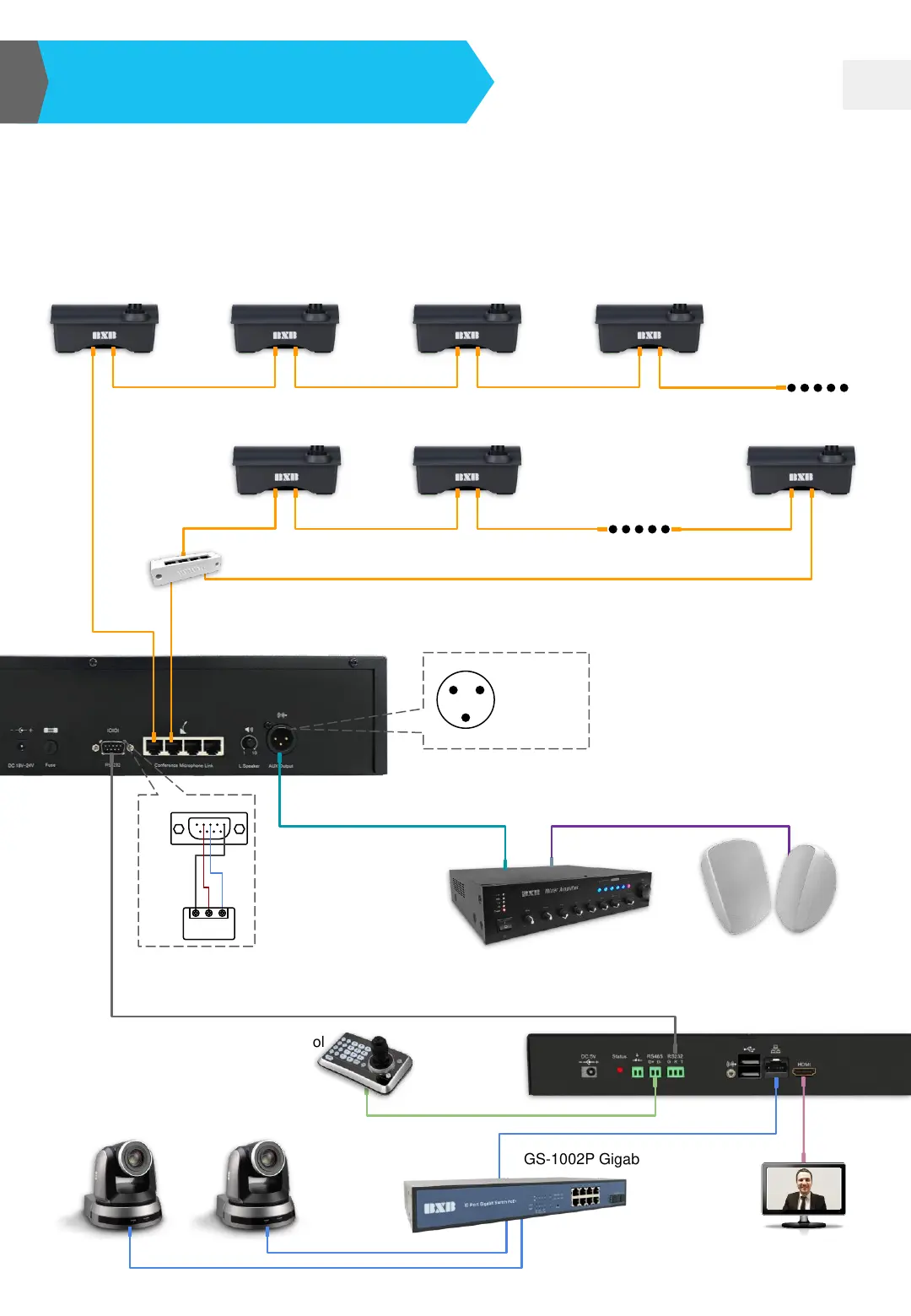
System Connection
EDC-2051 Instruction Manual
EDC-2051 Conference Main Control Unit
EDC-2011/2012
Table-top
Chairman/Delegate Unit
SW-003 RJ45 Distributor
CAT5E (loop distribution)
Amplifier
HDS-720
Network AV Controller
HCK-700 Camera Control
Keyboard
GS-1002P Gigabit POE Switch
HDC-713
HD IP Camera
CAT6
RS-232
Speaker CableAudio Cable
1 2
3
Aux Output (Unbalanced)
1: Ground
2: Sound(Aux)
3: Empty
Audio output pin (XLR)
Speaker’s Image Tracking
(optional)
Acoustic System
1 2 3 4
5
6 7 8 9
Pin 2:TXD
Pin 3:RXD
Pin 5:GND
G R T
HDS-720
• There are 4 microphone ports at the back of main control unit, which can be connected
randomly without sequence restriction.
• Microphone units are equipped with RJ45 ports x 2 for connecting Cat5e cables (STP).
• Chairman/delegate units can be positioned anywhere within the circuit.
• Please make sure the power is off before unplugging any unit. Re-start the unit after the
installation has been completed.
IOIOI Pin
RS-485
HDMI


 To Next Page