
EasyManua.ls Logo

Byan System G2M - User Manual

Byan System G2M
16 pages
Print Icon
To Next Page IconTo Next Page
Loading...
BYAN SYSTEM, INC.
413 LINDEN
LUSK, WY 82225
(800) 223-2926
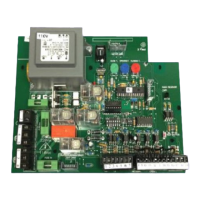
G2M Control Board
Installation and Operations Manual
Specifications
Power supply Single Phase 115V or 220V 50/60 Hz AC
Motor Power Consumption Up to 550W or 3/4 hp
Electric Lock Output 12V DC 1A max.
Accessory Power Output 24V AC 1A max.
Input Power Fuse 2A, 250V; 5mm x 20mm tubular glass
Motor Power Fuses 6A, 250V; 5mm x 20mm tubular glass
P.O. BOX 1384 FAX (307) 334-2028

Questions and Answers

  • M
    Megan DanielsAug 13, 2025
    What to do if safety devices are connected properly but not functioning properly in Byan System Controller?
    • E
      Emily TuckerAug 13, 2025
      If the safety devices connected to your Byan System Controller aren't functioning correctly, even when properly connected, it might be due to jumpers still being in place at terminals 8, 9, and 10, or the safety device itself might be malfunctioning. If you're using a car safe, ensure the jumper between accessory terminals 9 and 10 is removed. For people safe, remove the jumper between accessory terminals 8 and 9. Also, verify that the safety device is properly connected and working.
  • J
    Jean MercadoAug 16, 2025
    What to do if Byan System G2M Controller board is powered up but won’t function?
    • J
      Jose HerreraAug 16, 2025
      If your Byan System Controller board is powered up but not functioning, the issue may stem from loose or missing jumper wires in the accessory terminal, a malfunctioning safety device, or a blown operator fuse. Check all jumper wires to ensure they are correctly located and tightly connected. Verify that safety devices are free from obstructions and properly connected, noting that the G2M uses normally closed (N/C) safety contacts. Also, inspect the 6A fuses on the G2M.
  • R
    robert50Aug 20, 2025
    What to do if Byan System G2M operators run, but there is no piston movement?
    • M
      matthew29Aug 20, 2025
      If your Byan System Controller operators run, but there is no piston movement, the issue could be a bad or disconnected capacitor, or the bypass screw on the operator might be backed out. Check that the capacitors are properly hooked up. If you suspect a capacitor is faulty, try switching capacitors to see if the problem follows it. Ensure the bypass screw is screwed in and snug.
  • A
    Adam BeckAug 25, 2025
    Why Byan System G2M operations will not open or close fully?
    • G
      George RichardAug 25, 2025
      If the operations of your Byan System Controller will not open or close fully, it could be due to timers not being adjusted properly or dip switches being in the wrong position. Adjust the timers so that the operator pistons bottom out completely and then run for an additional 3 – 5 seconds. Make sure all dip switches are in the desired location and making good contact.
  • J
    jermainechenAug 28, 2025
    How to troubleshoot Byan System G2M Controller board that will not power up?
    • J
      Jennifer BallAug 28, 2025
      If your Byan System Controller board will not power up, it could be due to several reasons: the power may not be connected, the switch in the prewire might not be turned on, the board voltage could be incorrect, or the incoming power fuse might be blown. Ensure all connections are made and are tight. Make sure the switch in the prewire is on. Verify that the board voltage matches the incoming power. Check the 2A fuse on the G2M.
  • J
    John StuartAug 31, 2025
    What to do if Byan System Controller operators running the wrong direction?
    • C
      catherine14Aug 31, 2025
      If your Byan System Controller operators are running in the wrong direction, the directional wires may be switched. Reverse the black and red directional wires either at the operator or at the board.
  • P
    Paul BarnesSep 4, 2025
    What to do if free exit probe is not working on Byan System G2M?
    • J
      James WilliamsSep 4, 2025
      If the free exit probe on your Byan System Controller is not working, it could be due to the probe malfunctioning or being wired incorrectly. Ensure the probe is working properly and is connected correctly. The probe’s normally open (N/O) contacts must be connected across accessory terminals 16 & 18. If the probe uses 24V AC for power, it can be connected to accessory terminals 3 & 4.
  • C
    Clinton KellerSep 8, 2025
    Why Byan System G2M radio receiver will only open the gate?
    • J
      joshua41Sep 8, 2025
      If the radio receiver of your Byan System Controller will only open the gate, the receiver may be wired incorrectly. If the receiver is to be used as a reversing device, it must be wired across accessory terminals 16 & 19.

Summary

G2 M Control Board Overview

Specifications

Technical specifications of the G2M control board, including power, motor, and output details.

G2 M Control Board Layout and Terminals

Board Layout Diagram

Visual representation of component placement on the G2M control board.

Terminal Strips

Explanation of the power/motor and accessory terminal strips.

Power and Motor Run Terminals

Commercial Power Hook-Up

Detailed instructions for connecting commercial power to the board's terminal strip.

Accessory Terminal Connections

Accessory Terminal Table and Uses

A table listing accessory terminals and their possible uses.

Accessory Hook-Up Procedures

Common Accessory Connections

Instructions for connecting common accessories like radio receivers and relays.

Configuration and Settings

Adjustable Timers and DIP Switches

Details on timing potentiometers and DIP switch functions for board configuration.

DIP Switch Options and Prewire Conversions

DIP Switch S1 a and S2 Functions

Explanation of specific DIP switch behaviors and options.

G2 M to Byan Prewire Terminal Conversion

Tables converting G2M terminals to Byan prewire systems.

Prewire Terminal Conversion Tables

Power;Motor and Accessory Conversions

Conversion tables for power, motor, and accessory terminals to various prewire layouts.

Accessory Prewire Conversion Tables

Accessory Terminal to 24 x20 and 30 x24 Prewire

Conversion tables for accessory terminals to 24x20 and 30x24 prewire layouts.

Prewire Layout Diagrams

12 x10 and 20 x16 Wiring Layouts

Wiring diagrams for 12x10 and 20x16 prewire configurations.

24 x20 Prewire Layout Diagram

24 x20 Wiring Layout Breakdown

Wiring diagram breakdown for the 24x20 prewire layout, including exit/entry.

Troubleshooting Guide

Common Symptoms and Solutions

Lists common operational symptoms, their causes, and recommended solutions.

T2 M Leaf Delay Card

Card Description, Timers, and Installation

Overview of the card, its timers, and installation procedure.

T2 M Leaf Delay Card Adjustment

Adjustment Procedure

Step-by-step instructions for adjusting the open and close delay timers.

Product Warranty Information

Four-Year Limited Warranty Terms

Details the terms, conditions, and limitations of the product's four-year warranty.

Byan System G2M Specifications

General IconGeneral
BrandByan System
ModelG2M
CategoryController
LanguageEnglish