48 Rear Seat Infotainment
Viewing the Other Display
While the left or right screen is
connected by Miracast or DLNA, the
other screen can access the same
source by selecting View Screen 1
or View Screen 2 in the Wireless
Display menu.
Connecting Wireless Apple™
Devices
Apple does not support the Miracast
standard. Apple will support various
DLNA apps to allow the device to
connect to the RSI wirelessly.
Search the iTunes™ store for DLNA
applications to install on the Apple
device.
HDMI Input
An HDMI cable is required to
connect an HDMI device to the RSI
hub. The RSI HDMI input allows
connection to:
.
Video games, disc players,
cameras, smart phones, tablets,
A/V dongles that have HDMI
(version 1.4a) outputs.
.
Smart devices that support
Mobile High-Definition Link
(MHL) version 2.0.
The smart device may require an
adapter cable to support MHL. Refer
to your device owners guide.
Most RSI remote control commands
will be available to a smart device
connected through MHL.
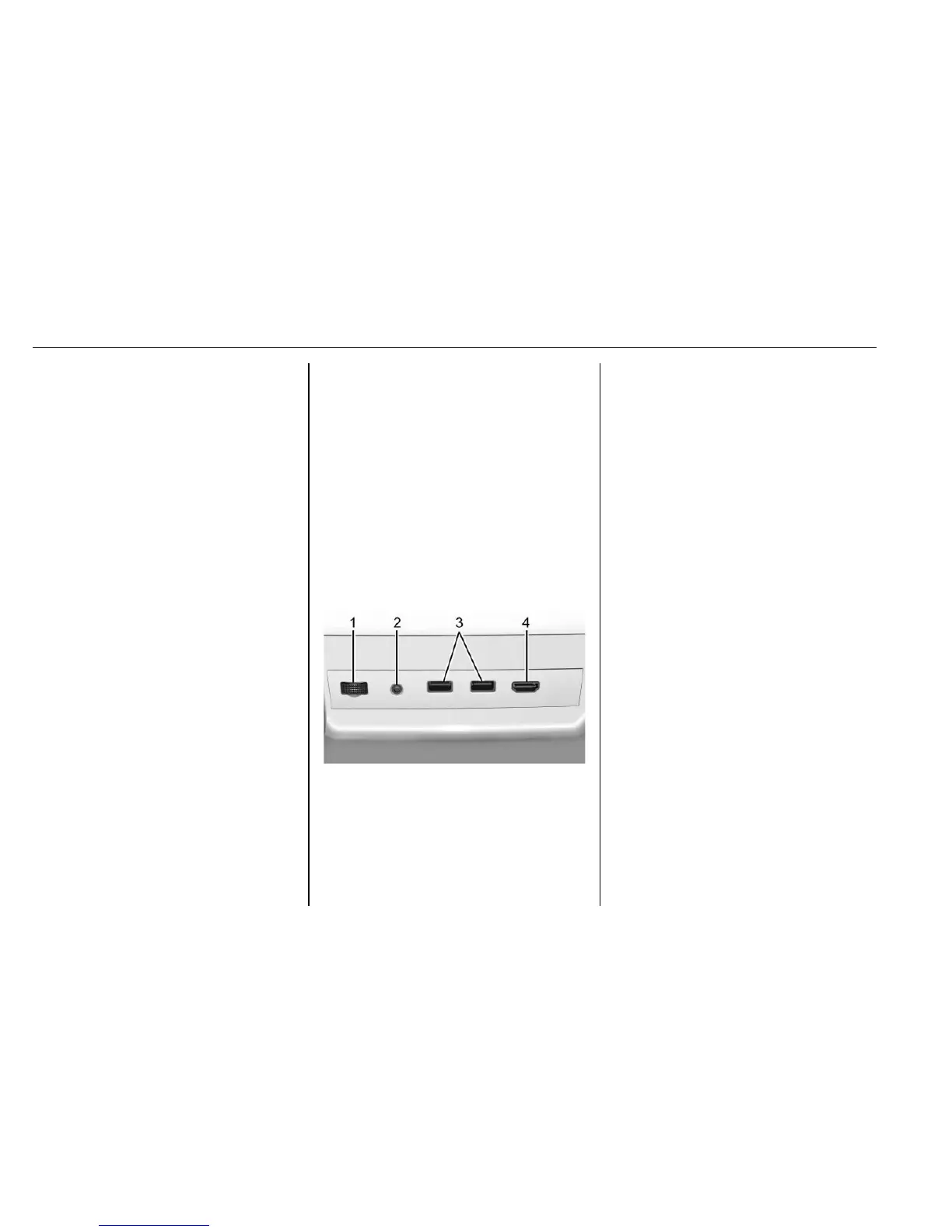
Auxiliary Inputs
Rear Media Connections
1. Volume Control for Wired
Headphones
2. Wired Headphone Jack
3. USB Ports
4. HDMI Input
If equipped with RSI, features above
will be inside the rear armrest or
above the right shoulder of the rear
left passenger.
HDMI
The HDMI jack allows an HDMI A/V
cable to be connected from an
auxiliary device such as a
camcorder, video game system,
or Apple device. A cable from Apple
is required for Apple devices.
Power for the auxiliary devices is
not supplied by the infotainment
system.
To use the HDMI input of the RSI
system:
1. Connect the auxiliary device
with an HDMI cable.
2. Power on both the auxiliary
device and the RSI video
screen.
3. Press
{ (Home) on the remote
control and use the arrows to
change the source to HDMI.








 To Next Page