2012 Portable Spa
LTR20121001, Rev. A
Water Quality Maintenance
www. c a l s p a s. c o m
29
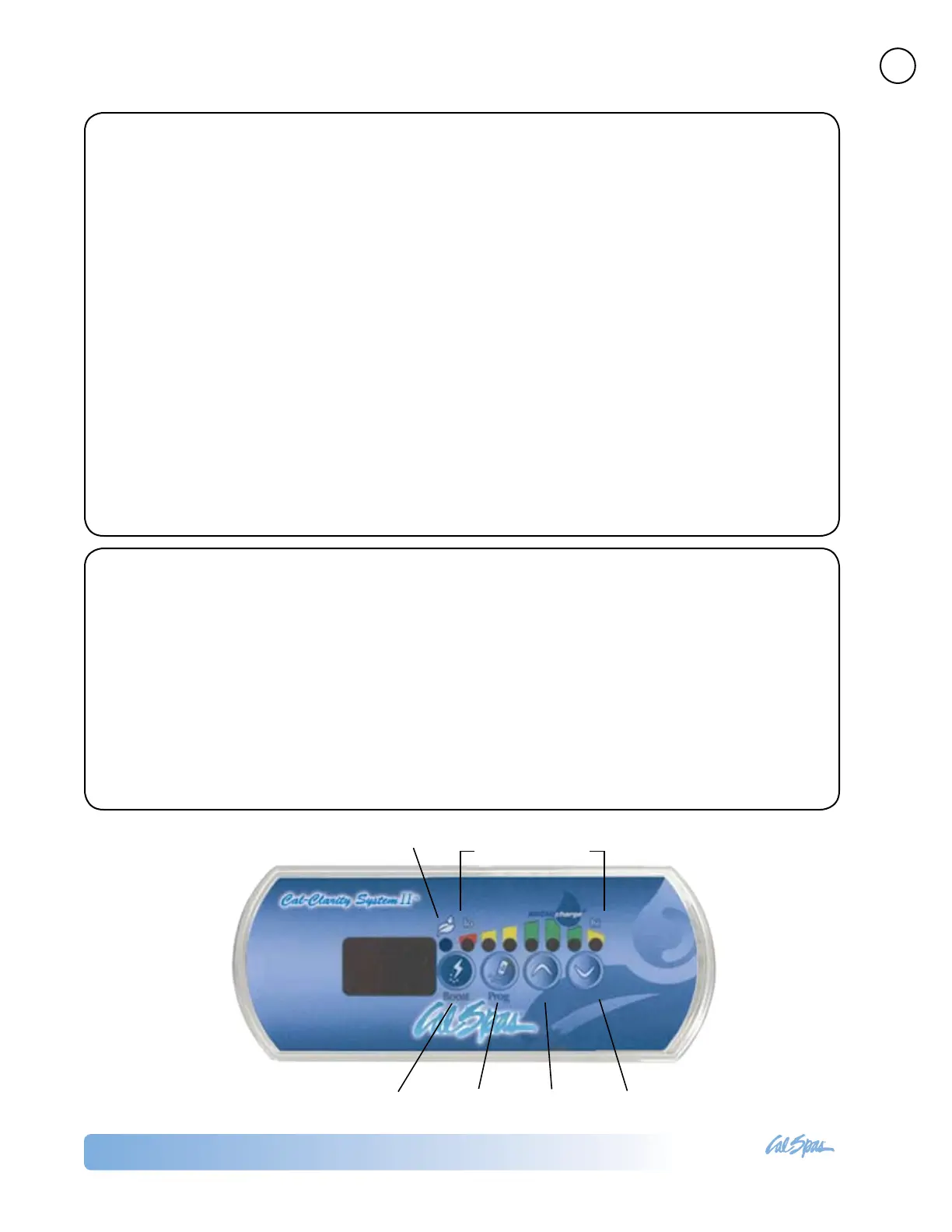
Boost level indicators
Bromine generator
ON indicator
ON / OFF / Boost
button
Diagnostics UP DOWN
Operating Modes
Maintenance Mode
Maintenance Mode is the “everyday” mode and is
automatically on when the system is activated.
Its primary function is to keep the bromine level at
a stable and acceptable range when the spa is not
being used.
Boost Mode
The Boost Mode is used each time you use the spa.
Boost Mode increases the bromine generation
rate to attack pollutants in the water. Activating the
Boost Mode when you enter the spa will prevent
inadequate bromine levels and will regenerate your
bromine to the proper residual level.
Diagnostic Mode
The Diagnostic Mode indicates the bromine level
of your spa. This is a useful tool when adding
BromiCharge™ to the water.
Keep the the boost level indicators lights in the green
zone and a 12.0 value for optimal performance.
Cal Clarity II Settings
Before entering the spa, the bromine level should
be tested. The bromine generator can only produce
bromine when the spa is running and your bromine
generator is in the proper mode.
1. ON / Maintenance Mode
Press the Boost button briey while the jets are
running. The system will activate in Maintenance
Mode and the word ON will appear on the display.
2. Adjusting the Maintenance Mode
To adjust the Maintenance Mode bromine level, press
and hold the Prog button for two seconds. A number
will ash showing the Maintenance Mode bromine
level. Press the UP or DOWN buttons to raise or lower
it. Press the Boost button to return Maintenance
Mode.
3. Boost Mode
The Boost Mode is used each time you use the spa.
Press the Boost button once to activate the Boost
Mode. A number with a dash before and after it will
ash for about ve seconds showing the boost level.
While the number is ashing, press the UP or DOWN
buttons to raise or lower it.
When the number stops ashing, the system will
remain in Boost Mode. Press the Boost button once
again to return to Maintenance Mode.
4. Using the Diagnostic Mode
Press and hold the Prog button for two seconds.
When the ashing number appears, press the Prog
button a second time. An animation will appear, and
within 10 seconds the bromine level will be shown.
5. Turning OFF
Press and hold the Boost button for two seconds. The
system will shut off and the word OFF will appear on
the display.





 To Next Page