³'
,0(16,21
0
$67(5
3
/86
Method 2
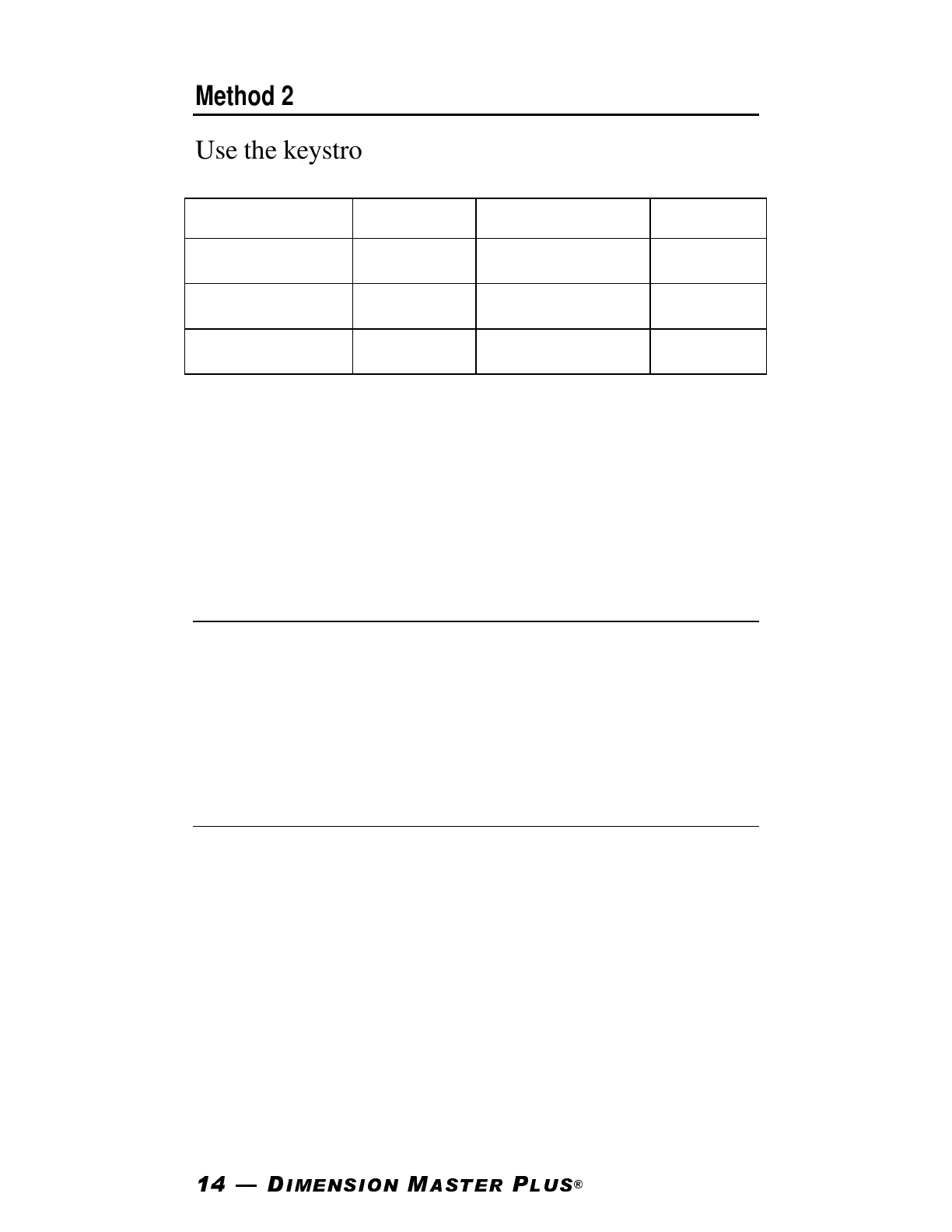
Use the keystrokes below to select and “set” the de-
sired fraction denominator setting:
KEYSTROKE SETTING KEYSTROKE SETTING
[Convert] [1] 1/16” [Convert] [2] 1/2”
[Convert] [3] 1/32” [Convert] [4] 1/4”
[Convert] [6] 1/64” [Convert] [8] 1/8”*
Note: 1/8” is the default setting. When a fraction
denominator setting other than the default setting of
1/8” is being used, a star (
★
) will appear on the
display when the unit is turned on.
Fractional Feet-Inch/Decimal Toggle
Now “Fractional Feet-Inch” values can be con-
verted to “Decimal” values and back by pressing
[Convert] and repeatedly pressing the [Feet] or
[Inch] key to toggle between formats.
Greater Storage Allocation
With the addition of extra storage registers, you can
now store [Length], [Width] and [Height] meas-
urements. Once stored, these values can be easily
recalled and used with other measurements when
calculating area and volume.












 To Next Page