39
UTOPIA OPERATING INSTRUCTIONS
GENEVA, NIAGARA, TAHITIAN
1st Press = Pump 2 on Low 2nd Press = Pump 2 on High
3rd Press = Both Pumps on High speed 4th Press = Pump 2 on Low, Pump 1 on High
5th Press = Pump 1 on High 6th Press = Pumps off
CANTABRIA (Three pump system)
1st press = Pump 1 on Low 2nd press = Pump 1 on High 3rd press = Pump 1 on High & Pump 2 on Low
4th press = Pump 1 on High & Pump 2 on High 5th press = Pump 1 on Low & Pump 2 on High 6th press = Pump 1 on Low & Pump 2 on Low
7th press = Pump 2 on Low 8th press = Pump 2 on High 9th press = Pumps Off
LOUNGE JETS (CANTABRIA MODEL ONLY)
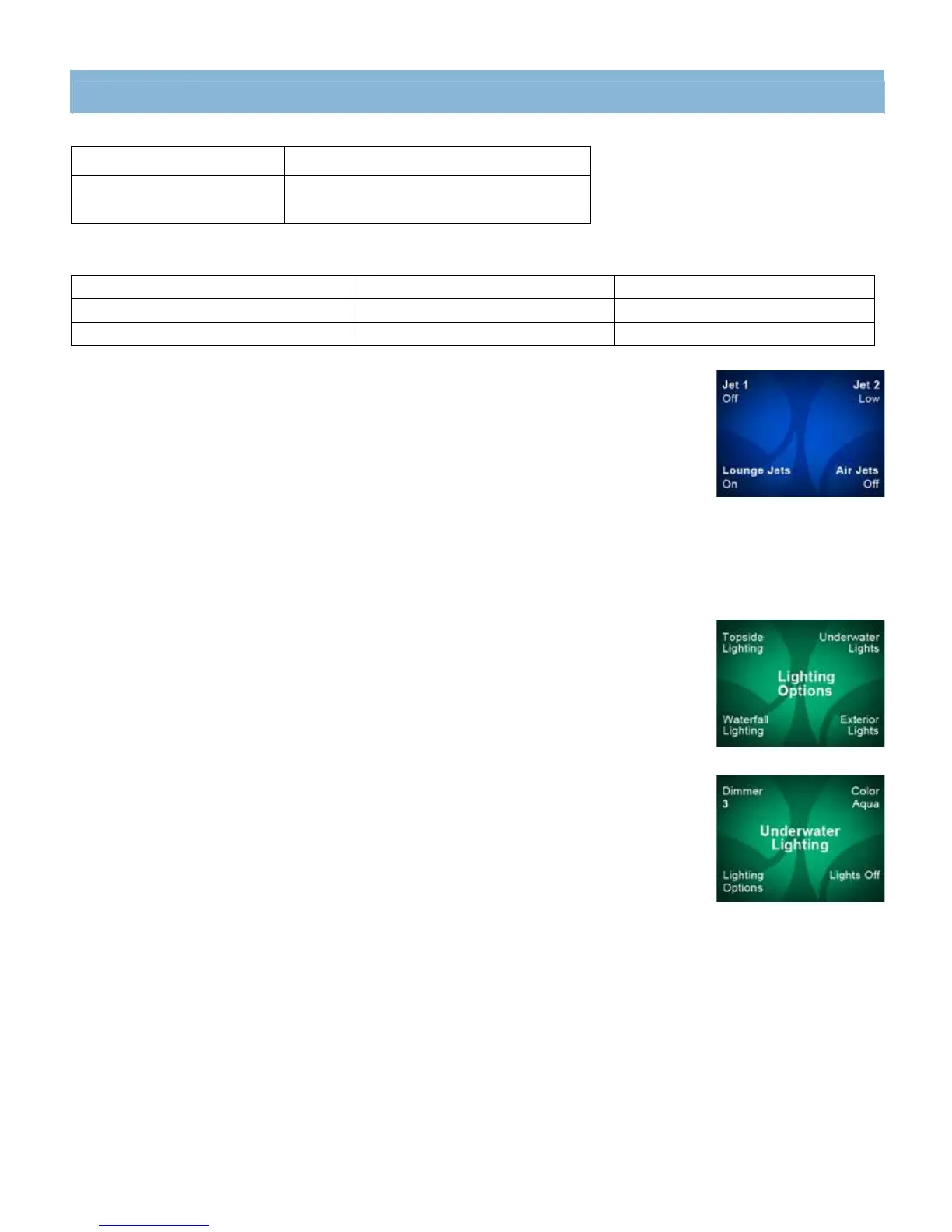
The Lounge Jets option will only be displayed if you own a CANTABRIA spa. This option is used to turn the Lounge jet pump On
and Off. To access Lounge Jet option, press the JETS hard button to enter the Jets Screen then press the soft button next to
Lounge Jets to activate the Lounge jet pump. Press the soft button next to Lounge Jets a second time to deactivate.
AIR JETS MODE
The Air Jet option allows air-only jets to operate throughout the spa when activated. To activate the air jets, press the JETS
hard button to enter the Jets Screen then press the soft button next to AIR JETS to turn the jets on. The air jets icon will then be
displayed. NOTE: The air jets icon will remain displayed while the air jets are active.
To stop the air jets press the soft button next to AIR JETS a second time to deactivate.
NOTE: The air jets will automatically stop after fifteen minutes.
LIGHT CONTROL
All UTOPIA spas are equipped with SpaGlo
®
multi-zone lighting system.
Press the LIGHTS hard button to activate all lights and display the Lighting Option screen.
The LIGHTS hard button can also be used to cycle through the light zones as follows:
1st press: All Lights On
2nd press: Topside lights Off
3rd press: Water Feature light Off
4th press: Underwater lights reduce to Brightness = 2; Exterior Lights remain On
5th press: Underwater lights reduced to Brightness = 1; Exterior Lights remain On
6th press: Underwater lights reduced to Brightness = 0 (Off); Exterior Lights remain On
7th press: All Lights Off
The Lighting Options screen will display four different light zones: Underwater, Topside, Waterfall, and Exterior.
Press the soft button next to the lighting zone you want to adjust to enter into the submenu for that specific zone.
Once in the submenu you can turn that specific zone ON or OFF, select the color for that zone (or choose LOOP to cycle through all
the colors), adjust the brightness of the color with the Dimmer function or return to the main Lighting Options menu.
Dimmer sequence is: Dimmer 3 = high light level, Dimmer 2 = medium light level, and Dimmer 1 = low light level.
Color sequence is: 1) Indigo 2) Aqua 3) Emerald 4) Gold 5) Ruby 6) Magenta 7) Loop On 8) Loop Off



 To Next Page