11
Operating and display elements
1
2
3
4
5
6
7
89
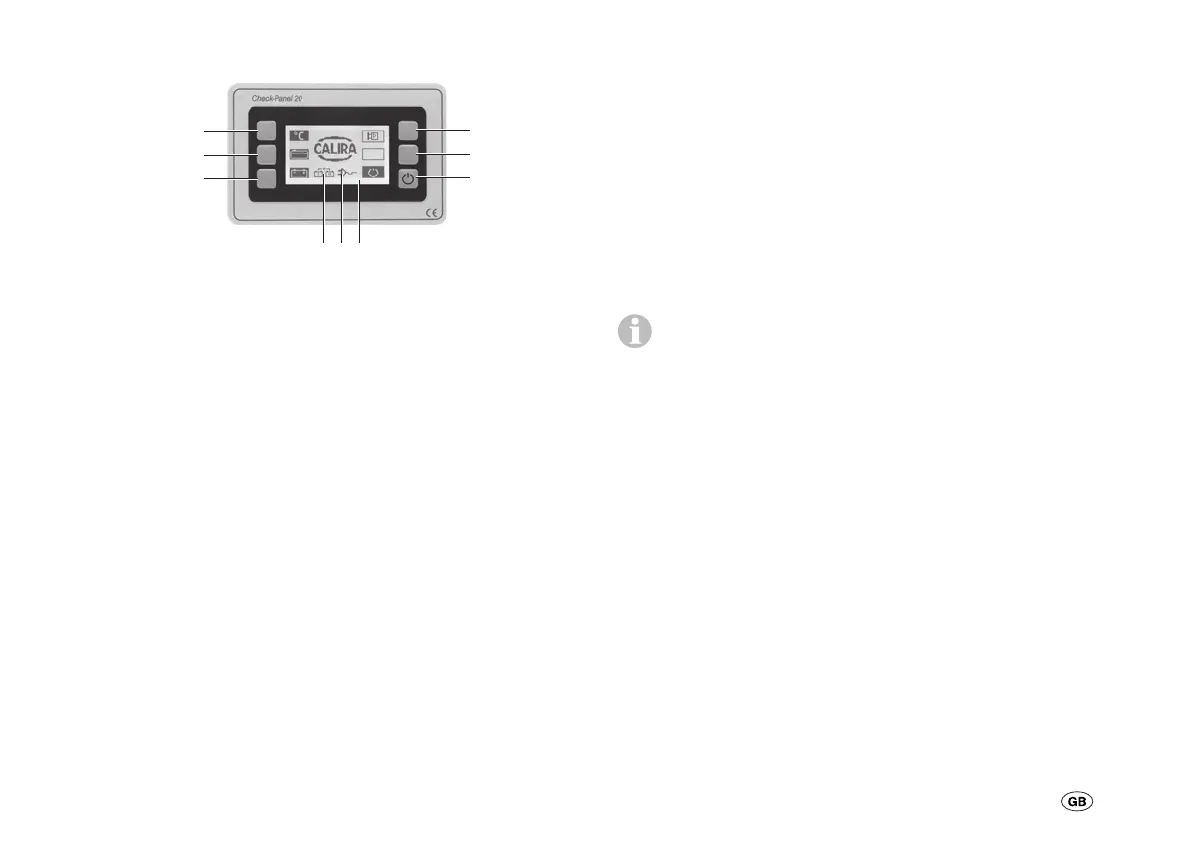
The operating elements have the following functions:
1 = Query the inside and outside temperature
2 = Query the filling level of the fresh water and
waste water tank
3 = Query the voltages of the battery I (starter battery) and
battery II (supply battery)
4 = Triggering of the pump relay in the power supply
5 = No function
6 = Main switch for the Check-Panel and control switch for
the consumer relay in the power supply
7 = Display
Dependent on the system status
8 = Battery charging via the 230 V mains supply
9 = Parallel circuit from battery I and battery II
Display
The display is a monochrome display (7) with an illuminated
background and a resolution of 128 x 64 pixels.
The display brightness is reduced in steps to save energy.
If no button is pressed within:
30 seconds = 40 % brightness
60 seconds = 20 % brightness
90 seconds = 10 % brightness
120 seconds = 0 % brightness
The switch function is only queried when the display has
100 % brightness (normal mode). If a button is pressed
when the display is dark, the brightness is increased again to
100 % – although no function is exercised.


 To Next Page