5
CXA60/80
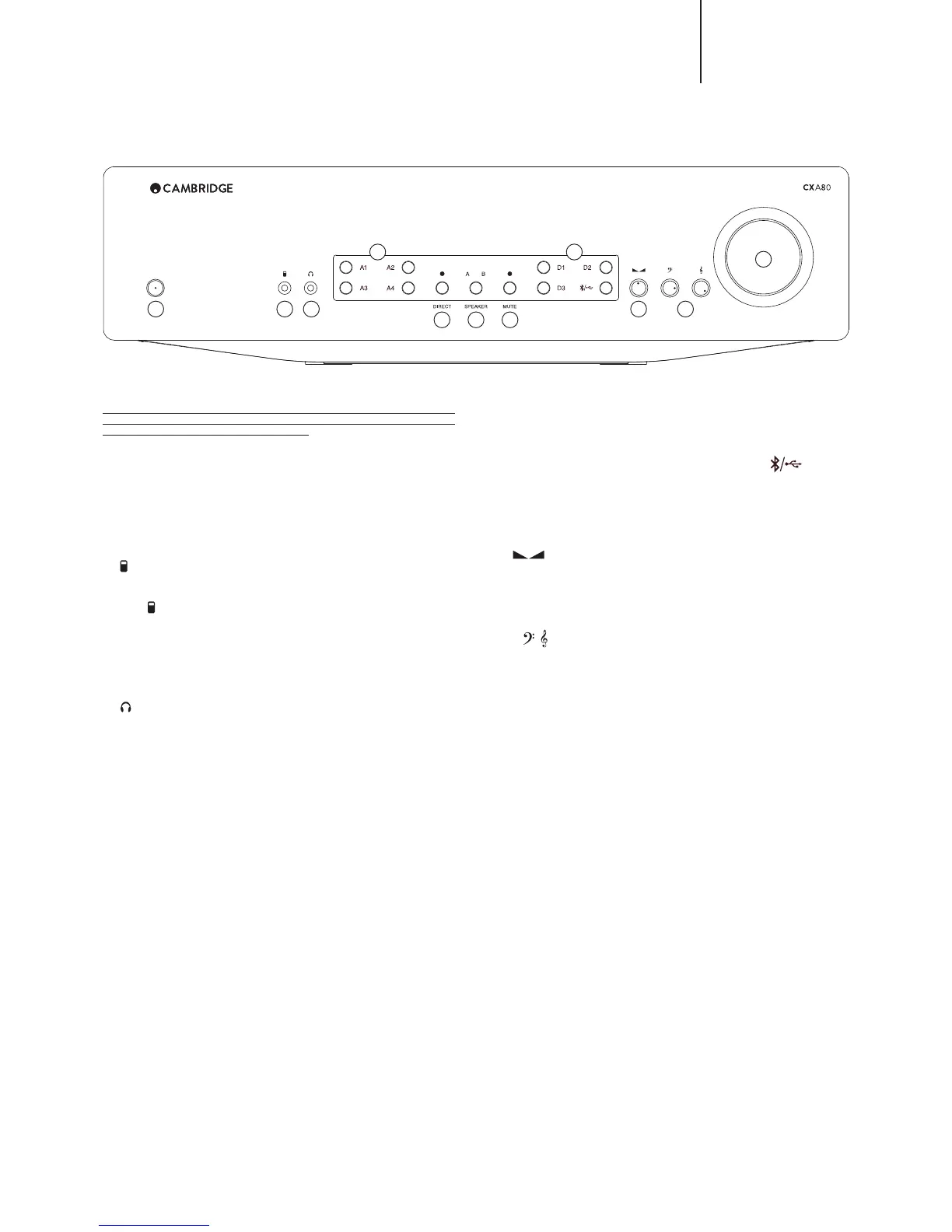
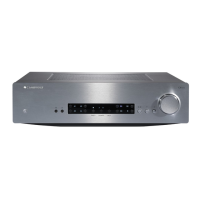
Front panel controls
1 2 3
4 8
9 10
11
5 6 7
Note: Selected sources and functions are represented by a Blue light. MP3
jack input is represented by an Orange ‘A4’ light. CXA80 has additional
Orange lights for USB and Balanced inputs.
1. Standby/On
:^P[JOLZ[OL\UP[IL[^LLU:[HUKI`TVKLPUKPJH[LKI`KPTWV^LY3,+HUK
6U PUKPJH[LK I` IYPNO[ WV^LY 3,+ :[HUKI` TVKL PZ H SV^ WV^LY TVKL
where the power consumption is less than 0.5 Watts. The unit should be left in
:[HUKI`TVKL^OLUUV[PU\ZL
;OPZWYVK\J[OHZ(7+(\[V7V^LY+V^ULUHISLKHZKLMH\S[(M[LYPUHJ[P]P[`
VM TPU\[LZ [OL WYVK\J[ ^PSS H\[VTH[PJHSS` Z^P[JO [V :[HUKI` :LL [OL
º:L[\WTLU\»ZLJ[PVUMVYM\Y[OLYKL[HPSZ
2. (MP3) input
This source input allows you to connect a portable audio device such as an
47 WSH`LY KPYLJ[S` PU[V [OL MYVU[ VM [OL \UP[ \ZPUN [OL TT Z[LYLVQHJR
(labelled ‘
º
>P[O[OL47QHJRJVUULJ[LK[V[OL*?(WYLZZ[OL(I\[[VU[^PJL[VZLSLJ[
the MP3 input so that the A4 light is Orange. The MP3 input can only be
ZLSLJ[LK^OLUHU47QHJRPZPUZLY[LK
Note: Plugging in a device into the front panel automatically selects the MP3
input, any other input can still be selected once this has been done. As a result
you may, if desired, leave a device permanently plugged into the front panel.
3. Headphones
(SSV^Z MVY [OL JVUULJ[PVU VM Z[LYLV OLHKWOVULZ ^P[O H TT QHJR
plug. Headphones with an impedance of between 8 and 600 ohms are
recommended.
Note: Plugging in headphones will automatically mute the loudspeaker, pre-
out, and sub outputs.
4. Source select buttons (A1-A4)
Push the appropriate input selection button to select the source that you wish
[VSPZ[LU[V0MHU47QHJRPZPUZLY[LKPU[V[OL47PUW\[[OLUWYLZZPUN[OL
A4 button a second time will select the MP3 input and will be represented by
an Orange light.
5. Direct
;OPZJVU[YVSNP]LZ[OLH\KPVZPNUHSHTVYLKPYLJ[WH[O[V[OLWV^LYHTWSPÄLY
Z[HNL VM `V\Y HTWSPÄLY I`WHZZPUN [OL [VUL JVU[YVS JPYJ\P[Z MVY [OL W\YLZ[
possible sound quality. When the light is on, the Direct mode is switched on,
and the tone controls are disabled.
6. Speaker A/B
Press to scroll through the speaker sets connected to the loudspeaker
[LYTPUHSZ VU [OL IHJR WHULS ZWLHRLY ZL[Z ( ) VY ( HUK ) ;OPZ JHU IL
\ZLKMVYSPZ[LUPUN[V HU L_[YHZL[VMSV\KZWLHRLYZ PU HUV[OLYYVVT:LL [OL
‘Connections’ section for further details.
7. Mute
Press to mute or unmute the loudspeakers, pre-out, sub, and the headphone
V\[W\[Z;OLSPNO[^PSSÅHZO[VZOV^[OLV\[W\[ZHYLT\[LK
8. Digital source select buttons (D1-D3 / )
Push the appropriate input selection button to select the source that you wish
to listen to.
Note: <:) ZV\YJL PZ VUS` H]HPSHISL VU [OL *?( HUK ^OLU ZLSLJ[LK ^PSS
IL YLWYLZLU[LK I` HU 6YHUNL SPNO[ 7YLZZPUN [OL )S\L[VV[O<:) I\[[VU
repeatedly will toggle between the two inputs.
9. Balance
;OPZ JVU[YVS HSSV^Z `V\ [V HKQ\Z[ [OL YLSH[P]L V\[W\[ SL]LSZ VM [OL SLM[ HUK
right channels. In the central position the output from each channel is equal.
;OPZJVU[YVSTVKPÄLZ[OLZV\UK[OYV\NO`V\YSV\KZWLHRLYZ[OLWYLV\[[OL
OLHKWOVULV\[W\[ZHUK^PSSHKQ\Z[[OLSL]LSVM[OLZ\IV\[W\[[VTH[JO[OL
overall speaker level change.
10. Bass and Treble
7YLZZ[VYLSLHZLHUKYV[H[L[VHSSV^HKQ\Z[TLU[Z[V[OL[VUHSIHSHUJLVM[OL
sound.
11. Volume
Use to increase/decrease the level of the sound from the outputs of the
HTWSPÄLY;OPZJVU[YVSHɈLJ[Z[OLSL]LSVMHSSV\[W\[Z


 To Next Page