6
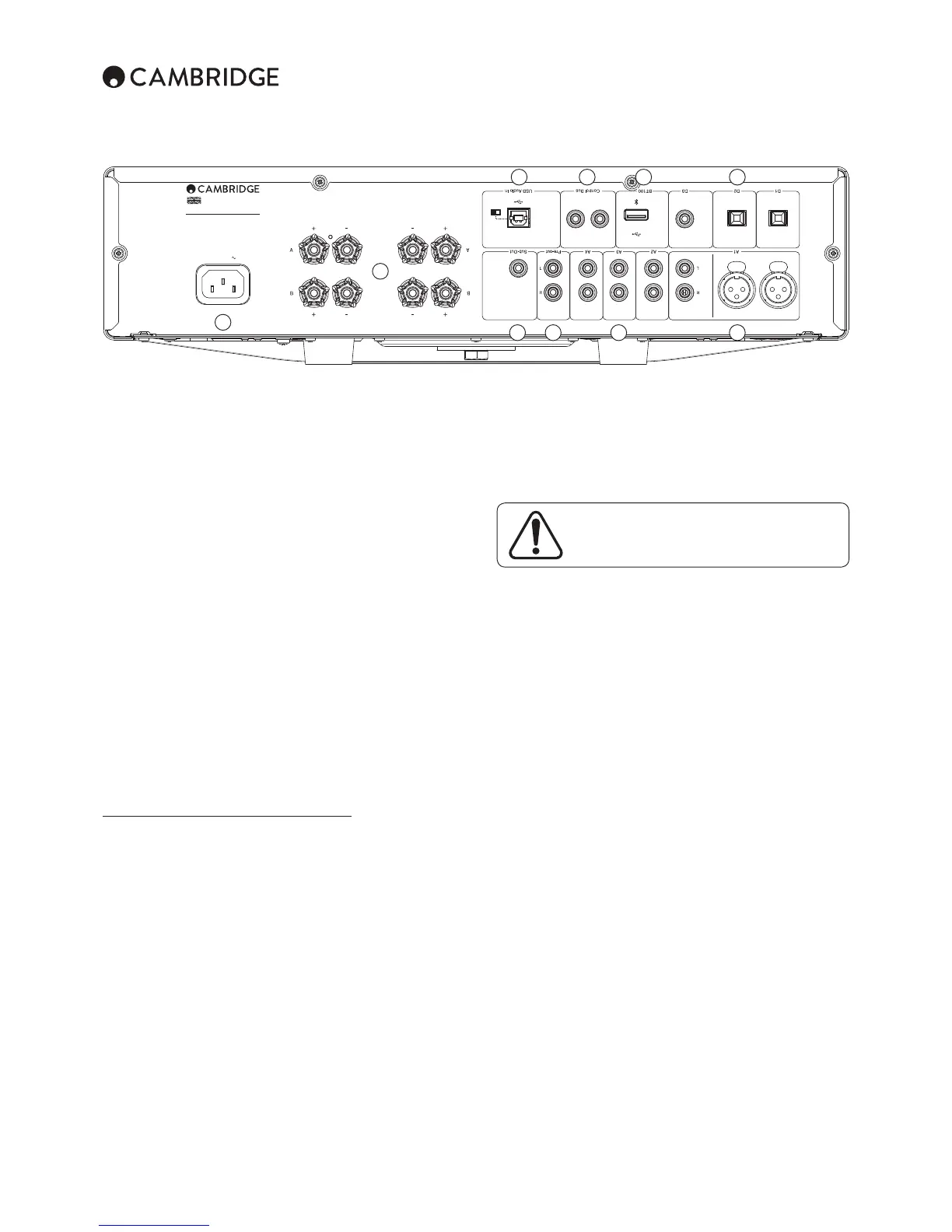
Rear panel connections
Power AC
Out In
OutIn
USB Audio In
D3BT100 D2 D1
LeftRight
Left Right
Power Rating: 220–230V AC ~ 50/60Hz
Max Power Consumption: 750W
Ground/Lift
Switch
LiftGnd
S/P DIF
Co-axial In
Toslink
Optical In
Toslink
Optical In
(Unbalanced)
(Unbalanced)
(Balanced)
(Balanced)
Right
Right
Left
Left
www.cambridgeaudio.com
CXA80 Integrated Amplifier
Designed & Engineered in UK
Made in China
Pre-out A2 A1A3A4Sub-Out
Control Bus
1
2
3 4 65
7 8 9 10
1. AC power socket
6UJL`V\OH]LJVTWSL[LKHSSJVUULJ[PVUZ[V[OLHTWSPÄLYWS\N[OL(*WV^LY
JHISLPU[VHUHWWYVWYPH[LTHPUZZVJRL[[OLUZ^P[JOVU@V\YHTWSPÄLYPZUV^
ready for use.
2. Loudspeaker terminals
Two sets of loudspeaker terminals are available, A (main loudspeaker
[LYTPUHSZHUK)ZLJVUKHY`SV\KZWLHRLY[LYTPUHSZ)V[OZL[ZVMZWLHRLYZJHU
IL[\YULKVUHUKVɈPUKLWLUKLU[S`*VUULJ[[OL^PYLZMYVT`V\YSLM[JOHUULS
loudspeaker to the Left + & - terminals, and the wires from the right channel
loudspeaker to the Right + & - terminals. In each case, the red terminal is the
positive output and the black terminal is the negative output.
Care should be taken to ensure no stray strands of wire short the speaker
outputs together. Please ensure that the loudspeaker terminals have been
tightened completely to provide a good electrical connection. It is possible for
[OLZV\UKX\HSP[`[VILHɈLJ[LKPM[OLZJYL^[LYTPUHSZHYLSVVZL
3. Sub Out
Connect to the input on an active subwoofer if required.
4. Pre-out
-VY JVUULJ[PVU [V [OL \UIHSHUJLK PUW\[Z VM H WV^LY HTWSPÄLY VY HJ[P]L
subwoofer.
5. Analogue inputs (A2, A3 and A4)
These inputs are suitable for any ‘line level’ source equipment such as CD
players, DAB or FM/AM tuners etc.
Note: These inputs are for analogue audio signals only. They should not be
connected to the digital output of a CD player or any other digital device.
6. A1 inputs
Note: Balanced (XLR) is available on the CXA80 only.
( PUW\[Z MLH[\YL LP[OLY \UIHSHUJLK WOVUV9*( VY IHSHUJLK ?39
connections. The balanced connection is the higher quality option and can
YLQLJ[UVPZLHUKPU[LYMLYLUJLPU[OLJHISL^OLU\ZLK^P[OV[OLYLX\PWTLU[[OH[
supports this function. An XLR connector is wired Pin 1 - Ground; Pin 2 - Hot
PUWOHZL"7PU*VSKWOHZLPU]LY[LK
7. USB interface (CXA80 only)
(<:))[`WLZVJRL[PZÄ[[LK[V[OL*?([VLUHISL[OLWSH`IHJRVMH\KPV
MYVTHWLYZVUHSJVTW\[LYY\UUPUNLP[OLY4PJYVZVM[>PUKV^ZVY(WWSL4HJ6:
?VWLYH[PUNZ`Z[LTZ:VTLI\PSKZVM3PU\_HYLHSZVZ\P[HISL
Note: (S^H`Z \ZL H OPNO X\HSP[` <:) JVUULJ[PVU JHISL JLY[PÄLK HZ <:)
/P:WLLK<:)JHISLJVUULJ[PVUZSVUNLY[OHUTTH`YLZ\S[PUPUJVUZPZ[LU[
audio performance.
Always turn the volume to minimum, switch to another
PUW\[VY[\YU[OL*?(VɈILMVYLWS\NNPUN\UWS\NNPUN
JHISLZ[V[OL<:)PUW\[VY^OPSZ[IVV[PUN\WZO\[[PUN
down your PC/Mac.
Ground/Lift switch
;OL.YV\UK3PM[Z^P[JOLUHISLZ[OL<:)PU[LYMHJLLHY[O[VILKPZJVUULJ[LK
MYVT[OL*?(JOHZZPZLHY[O+PZJVUULJ[PUNSPM[PUN[OLLHY[OJHUIL\ZLM\SPM
LSLJ[YVUPJO\TPZOLHYK[OYV\NO[OLZWLHRLYZ^OLU[OL<:)PUW\[PZZLSLJ[LK
The switch should otherwise be left in the Ground position.
8. Control Bus
RCA sockets used to send and receive power and volume commands from
V[OLY JVUULJ[LK *? :LYPLZ WYVK\J[Z -VY TVYL PUMVYTH[PVU VU [OL *VU[YVS
Bus, see Control Bus section.
9. BT100 (not supplied)
The Cambridge Audio BT100 Bluetooth adaptor should be plugged in here
HKKPUN^PYLSLZZZ[YLHTPUNIS\L[VV[O(+7(=9*7H\KPVJHWHIPSP[`KPYLJ[S`
MYVT TVZ[ WOVULZ [HISL[Z HUK SHW[VWZ :LL [OL º*VUULJ[PVUZ» ZLJ[PVU MVY
further details.
10. Digital inputs (D1, D2 and D3)
;6:3052HUK:7+0-JVH_PHSKPNP[HSPUW\[Z
Coaxial – Use a high quality 75 ohm digital RCA Phono interconnect cable
UV[VULKLZPNULKMVYUVYTHS H\KPV\ZL;OPZPUW\[PZ Z\P[HISLMVY IP[
content up to 192kHz.
;6:3052 Optical ¶<ZLHOPNOX\HSP[`;6:3052ÄIYLVW[PJPU[LYJVUULJ[JHISL
KLZPNULKZWLJPÄJHSS`MVYH\KPV\ZL;OPZPUW\[PZZ\P[HISLMVYIP[JVU[LU[
\W[V R/a;6:3052PZUV[YLJVTTLULKH[ R/aZHTWSPUNYH[LZ
Note: To obtain the best results from your system we recommend using only
high quality Cambridge Audio interconnects. This will ensure that you hear
your system as we designed it. Please ask you dealer for details.


 To Next Page