10
Setup menu
;VLU[LY [OL:L[\WTLU\W\[[OL*?(PUZ[HUKI`TVKL^OPSZ[VU:[HUKI`
TVKL WYLZZ HUK OVSK [OL :WLHRLY () I\[[VU \U[PS [OL () SPNO[Z ÅHZO
HS[LYUH[P]LS` HUK [OL ZV\YJLZ((SPNO[\W:LLILSV^ZV\YJL I\[[VUZ MVY
ZL[\WJVUÄN\YH[PVU!
Note: Button selected is represented by Blue light.
Auto power down (APD)
(VɈ(VɈ¶+PZHISLZ[OL(7+(\[VWV^LYKV^UM\UJ[PVU
(VU(VɈ¶:L[Z[OL(7+[PTL[VTPU\[LZ
(VɈ(VU¶:L[Z[OL(7+[PTL[VTPU\[LZ
(VU(VU¶:L[Z[OL(7+[PTL[VTPU\[LZ
Note: Auto power down is a power down function that automatically switches
the CXA into standby mode if there is no audio. The APD time represents
the amount of time required for there to be no audio before the CXA is
automatically put into the standby mode.
Clipping function
A3 on – Clipping function enabled. The volume nudges down if signal clipping
is detected.
(VɈ¶*SPWWPUNM\UJ[PVUPZKPZHISLK
USB mode (CXA80 only)
Note: The A4 source button has no setup function on the CXA60.
(VU¶7\[Z[OL*?(PU<:)*SHZZTVKL
(VɈ¶7\[Z[OL*?(PU<:)*SHZZTVKL
Notes:
¶;VZH]L[OLZL[\WZL[[PUNZHUKL_P[[OLZL[\WTLU\WYLZZ[OL:WLHRLY()
button.
¶7YLZZPUN[OL:[HUKI`6UI\[[VU^OPSLPU[OLZL[\WTLU\^PSSL_P[[OPZZL[\W
menu and will not save the setup settings.
Control Bus
The Control Bus allows any compatible Cambridge products to synchronise
^OLUWV^LYPUN\W[OL\UP[Z:LL[OLMVSSV^PUNKPHNYHTZ^OLUJVUULJ[PUN[OL
CXA using the provided Control Bus cable.
Another added feature with this Control Bus is the use of the Cambridge
Connect app. You can use the Cambridge Connect app to control the CXA
via the CXN.
Cambridge Connect app (via CXN)
>OLU\ZPUN[OLHWW[V[\YU[OL*?5VUVɈ[OPZ^PSSHSZV[\YU[OL*?(VUVɈ
The app can also be used to control the volume of the CXA. Connect the CXN
control bus out to CXA in. For more information, see the CXN manual.
ower A
ut
Ou
n
U
B Audio In
100
2
1
e
tRigh
Left Ri
h
ower Rating
220–230V A
~ 50/60H
Max Power Consumption: 750
round/Lif
Switc
Lif
nd
/P DIF
o-axial I
To
link
ptical I
To
link
ptical I
Unbalanced
Unbalanced
Balanced
Balanced
Rig
Rig
t
L
ft
ef
ww.cambridgeaudio.com
XA80 Inte
rated Amplifier
esigned & Engineered in U
Made in Chin
Pr
-
ut A2 A1A
A4
ub-
ut
Control Bu
Volta
e Ratin
: 100-230V A
~ 50/60Hz
ated Power
onsumption:
1
Toslink Optica
2
S/P DIF Co-axial
oslink O
ticalS/P DIF Co-axial
round/Lift
Switc
Righ
L
ft
Rig
t
f
i
nd
Eth
rn
tDi
ital Output
B Audio InDi
ital Input
B
F
r l
c
l m
i
n
u
ontrol Bu
Balanced Audio Output
Line Output
I
In
Wi-Fi Dongle
F
r l
c
l m
i
Wi-Fi Dongle
Power A
In
In
www.cambridgeaudio.com
CXA80 Integrated Amplifier
Designed & Engineered in UK
Made in China
Control Bus
Control Bus
Out
CXA with CXC
>OLU[\YUPUN[OL*?(VUVɈ[OPZ^PSSHSZV[\YU[OL*?*VUVɈ*VUULJ[[OL
CXA control bus out to CXC in.
ower A
ut I
Ou
n
U
B Audio In
1
2
1
ftRigh
Left Righ
ower Rating
22
–2
V A
~ 5
/
H
ax Power
onsumption: 750
Ground/Lif
Switc
Lif
nd
/P DIF
o-axial I
To
link
ptical I
To
link
ptical I
Unbalanced
Unbalanced
Balanced
Balanced
Rig
Rig
Left
L
f
ww.cambridgeaudio.com
CXA80 Integrated Amplifier
esigned & Engineered in U
Made in Chin
Pr
-
ut A2 A1A3A4
ub-
ut
Control Bu
ut
In
ut
Mains Volta
e Selector Switch
100-120V/220-240V A
~50/60H
S/P DIF
o-axia
Toslink
Optica
i
ital Output
IR InControl Bu
ower A
Out
Out
www.cambridgeaudio.com
CXA80 Integrated Amplifier
Designed & Engineered in UK
Made in China
Control Bus
In
In
Control Bus
Control Bus
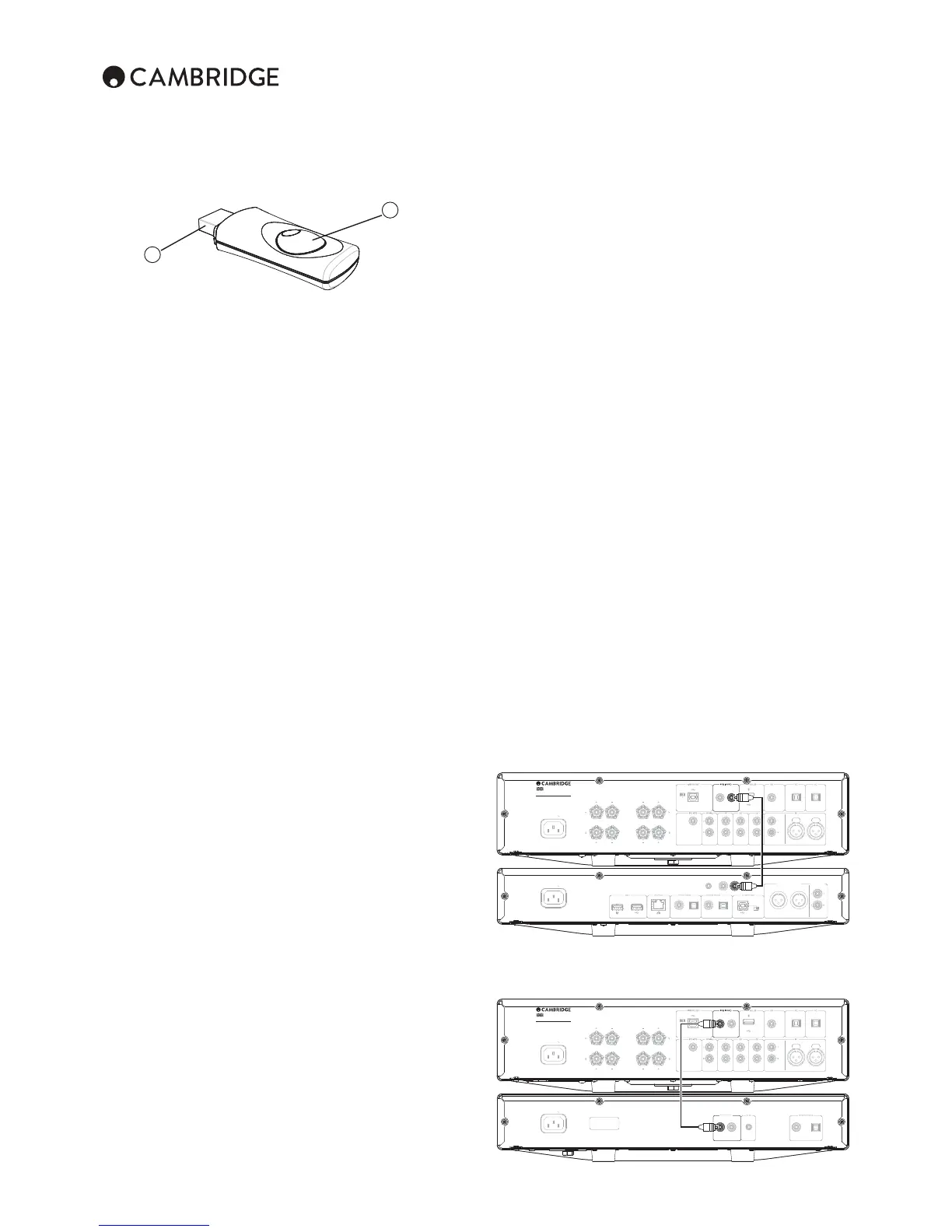
BT100 controls and connections
B
A
A. Pairing button/Status LED
Button performs pairing and related functionality. Integrated LED indicates
BT100 status.
B. USB plug
:[YLHTZOPNOX\HSP[`<:)H\KPVPU[V`V\Y*?(]PH[OLYLHYKLKPJH[LK);
<:)ZVJRL[
Pairing
To begin streaming high quality music from your chosen media source it will
ÄYZ[ULLK[VILWHPYLK^P[O[OL);
A. Double click the button on the BT100 to enter pairing mode, the BT100
PUKPJH[LZP[PZPU[OLWHPYPUNZ[H[LI`ÅHZOPUNYHWPKS`
B. Put your Bluetooth compliant audio source into pairing mode. Please
consult your manufacturer’s user manual on how to do this.
Pairing your BT100 and source establishes an authorised audio link that can
then be used again in the future without having to go through this stage again.
(M[LYWHPYPUN `V\JHUQ\Z[ZLSLJ[[OL )S\L[VV[OZV\YJLPUW\[HUKWSH`H[ HU`
[PTLHZSVUNHZ`V\Y)S\L[VV[O(+7JVTWH[PISLZV\YJLWOVULSHW[VWL[JPZ
within approx. 10m of the BT100.
Normally on your source you will need to select Bluetooth Pairing and then the
BT100 should appear as ‘Cambridge Audio BT100’ in a list of locally found
Bluetooth devices.
:LSLJ[[OH[P[LTPU[OLSPZ[[VÄUPZOWHPYPUN
*6UZ\JJLZZM\SWHPYPUN[OL);Z3,+NVLZVɈMVYHZLJVUKVY[^V[OLU
[YPWSLÅHZOLZX\PJRS`;OL3,+[OLUNVLZVɈHUKVUS`SPNO[Z\WPU[OLM\[\YL
when you are playing audio via Bluetooth.
D. To play back via a paired Bluetooth device, simply select the BT100 on
that device and start playing, then select Bluetooth in the CXA via the
front panel or remote control. The BT100 LED lights up constantly when
Z[YLHTPUN:)*VYVUHUKÅPJRZVɈL]LY`ZLJVUKZ^OLUZ[YLHTPUNHW[?
Notes:
– You can pair to more than one source up to a maximum of 8 sources at any
[PTL7HPYPUN[VH [OKL]PJL^PSSJH\ZL[OLÄYZ[VUL[VILMVYNV[[LUHUKZV
on. However as you would expect the BT100 can only play back from one
of these sources at a time.
¶>OLU `V\ OH]L ÄUPZOLK WSH`IHJR THU` ZV\YJLZ RLLW [OL )S\L[VV[O
link active for a time unless you actively tell them to stop by deselecting
WSH`IHJR]PH[OL);KVUV[\UWHPYHZ[OPZPZUV[ULJLZZHY`
This can prevent another source to be able to access the BT100.
To immediately use another source, simply deselect the BT100 for playback
VU`V\YÄYZ[ZV\YJLKL]PJLILMVYLZ[HY[PUN\WVUHZLJVUK
¶:VTLKL]PJLZZ[YLHTLTW[`KH[HHSS[OL[PTLL]LU^OLUWH\ZLKVYZ[VWWLK
These devices will cause the BT100s LED to be on even if playback is
currently stopped or paused.


 To Next Page
 Loading...