7
CXA60/80
Remote control
The CXA is supplied with a remote control handset that
duplicates the front panel control functions and is also
able to control other CX series products. The supplied
(((IH[[LYPLZT\Z[ILÄ[[LKILMVYL[OLYLTV[LJVU[YVSJHU
be used.
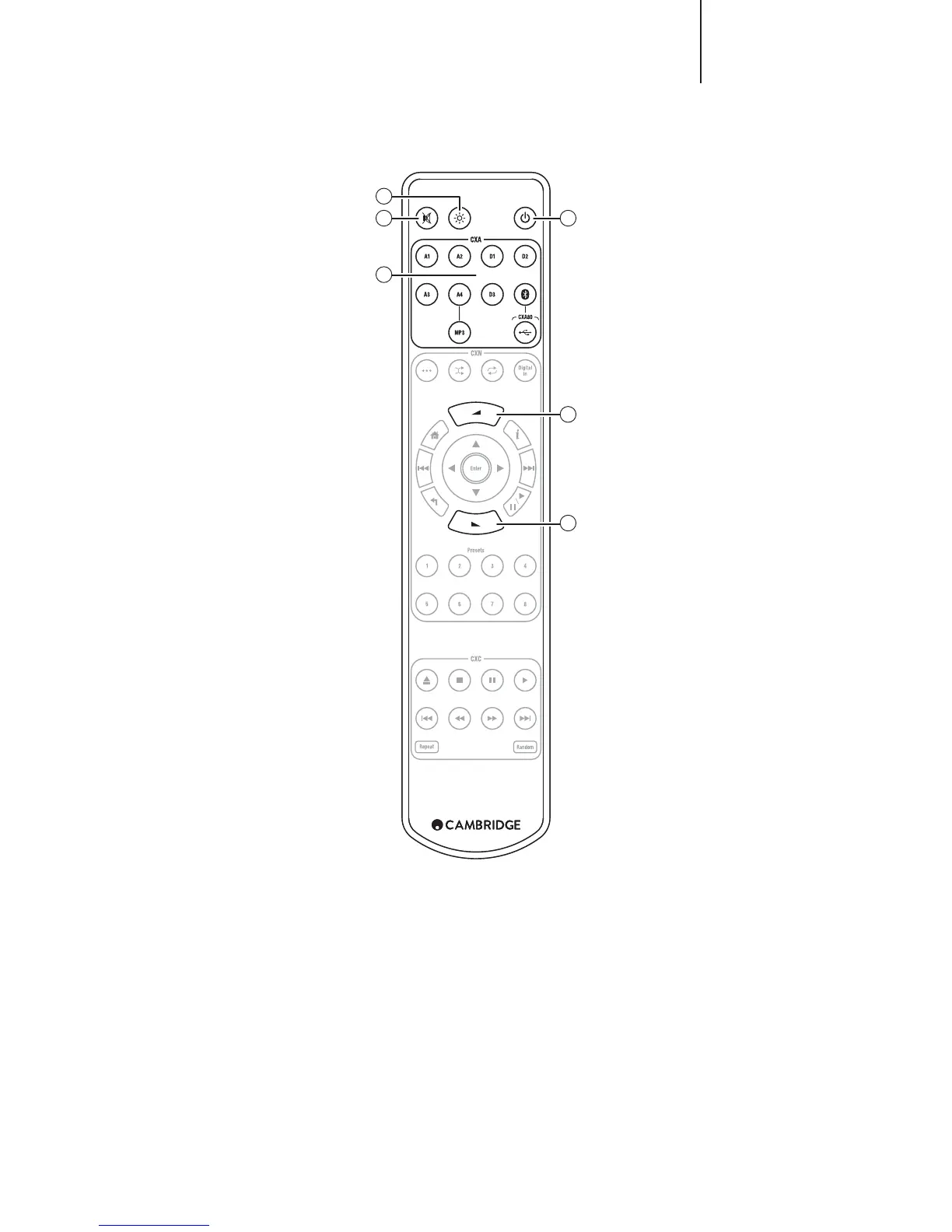
The handset buttons function as described below:
1. Brightness
Alters the brightness of the CXA display lights. There
HYL[^V IYPNO[ULZZSL]LSZHUK HUVW[PVU[V Z^P[JOVɈ[OL
backlight.
5V[L!>OLU[OL*?(KPZWSH`SPNO[ZHYLZLSLJ[LK[VILVɈ
ZLSLJ[PUN HU` VM [OL M\UJ[PVUZ ^PSS IYPLÅ` Z^P[JO VU [OL
lights to show the change.
2. Mute
Press to mute or unmute the loudspeakers, pre-out, sub,
HUK[OLOLHKWOVULV\[W\[Z;OLSPNO[^PSSÅHZOVU[OLMYVU[
of the unit to show the outputs are muted.
3. Standby/On
:^P[JOLZ[OL*?(IL[^LLU6UHUK:[HUKI`TVKL
4. Sources
Used to select the source inputs.
Note: For the CXA80, the A1 button has the double function
of selecting the balanced or unbalanced A1 input, and will
toggle between the two inputs when double pressing. The
47 ZV\YJL JHU VUS` IL ZLSLJ[LK ^OLU [OLYL PZ H QHJR
connected to the input.
5. Volume Up/Down
=VS\TLSL]LSHKQ\Z[TLU[
1
2
4
3
5
5


 To Next Page