8
Connections
>OLUKLZPNUPUNV\YHTWSPÄLYZ^LPUJS\KLMLH[\YLZ[OH[HSSV^`V\[VJVUULJ[
your system in various ways. The inclusion of features such as Pre-Out and
:WLHRLY ) JVUULJ[PVUZ TLHU [OH[ `V\ JHU ÅL_PIS` JVUÄN\YL `V\Y Z`Z[LT
depending on your requirements.
Basic connections
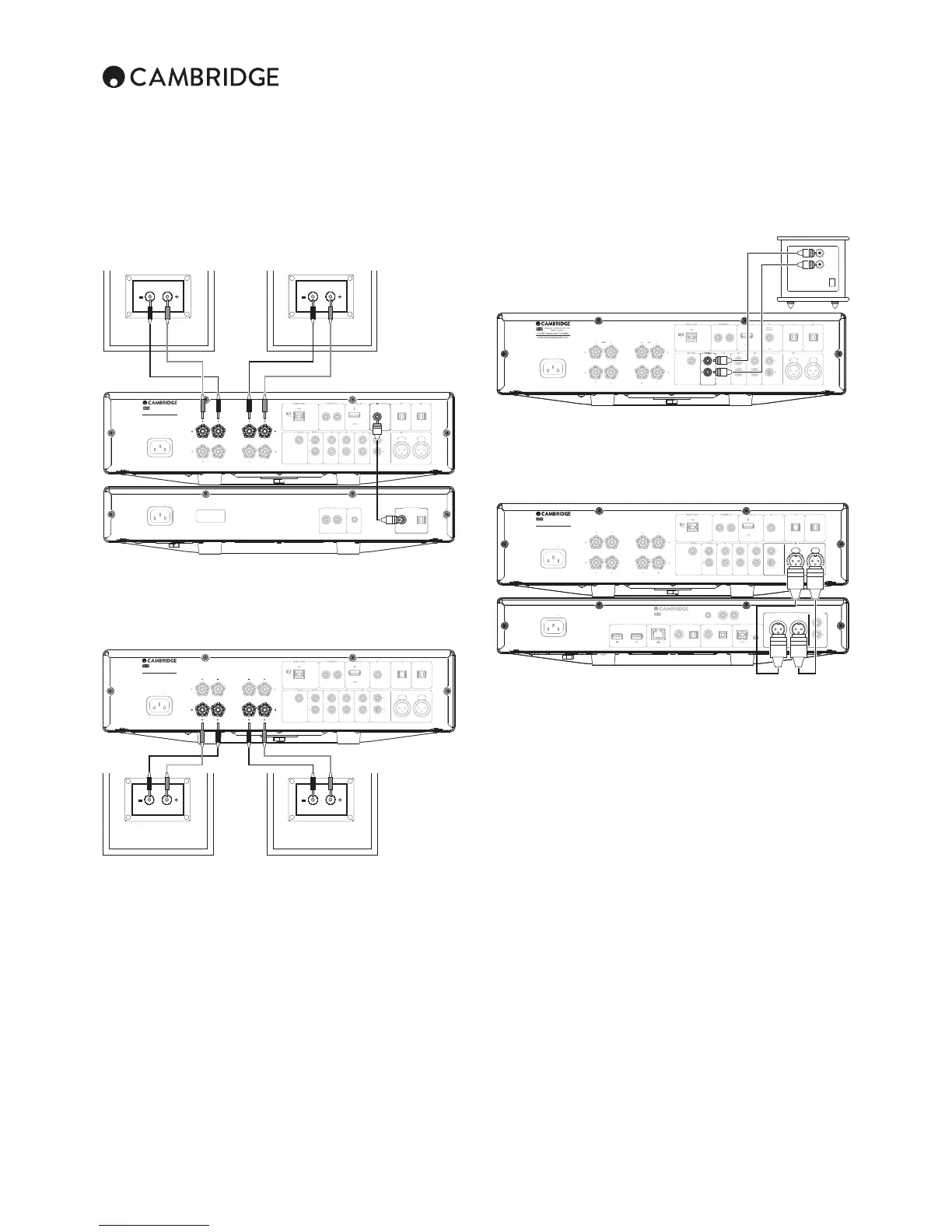
;OL KPHNYHT ILSV^ ZOV^Z [OL IHZPJ JVUULJ[PVU VM `V\Y HTWSPÄLY [V H *+
player using the D3 coaxial digital input source and a pair of loudspeakers.
Power AC
u
In
Ou
I
B Audio In
3
100
2
1
Le
ig
t
Left Righ
ower
at
n
220–230V A
~ 50/60Hz
Max Power
onsum
tion:
50
round/Lift
witc
ift
n
/P DIF
o-axial In
To
link
Optical In
To
link
Optical In
Unbalanced)
(Unbalanced
Balanced)
Balanced
Rig
Ri
ht
f
L
ft
www.cambridgeaudio.co
XA80 Integrated Amplifie
esi
ned & En
ineered in UK
Made in
hina
Pre-out A
A1A
A4Sub-
u
ontrol Bus
u
n
ut
ains Voltage
elector
witch
100-120V/220-240V AC~50/60H
/P DIF
o-axial
Toslin
ptica
Di
ital
utput
I
I
ontrol Bus
Power A
D3
Left Right
S/P DIF
Co-axial In
www.cambridgeaudio.com
CXA80 Integrated Amplifier
Designed & Engineered in UK
Made in China
S/P DIF
Co-axial
Digital Outputs
Digital Outputs
Speaker B connections
;OL:WLHRLY)JVUULJ[PVUZVU[OLIHJRVM[OLHTWSPÄLYHSSV^MVYHZLJVUKZL[
VMZWLHRLYZ[VIL\ZLKPLZWLHRLYZSVJH[LKPUHUV[OLYYVVT;OL:WLHRLY
A/B button on the front panel scrolls through the selection of speaker A only,
speaker B only, and speaker A and B together.
Power A
Ou
Ou
n
U
B Audio I
3
10
ft
i
ht
e
t Rig
t
Power Ratin
20–230V A
~ 50/60Hz
Max Power
onsumption: 750
Ground/Lift
witch
Lif
nd
S/P DIF
o-axial I
oslink
Optical I
oslink
Optical In
Unbalanced
Unbalanced
Balanced
Balanced
igh
Rig
ft
L
t
www.cambrid
eaudio.com
XA80 Inte
rated Amplifier
esigned
Engineered in UK
ade in China
Pr
-
u
A2 A1A
A
ub-
ut
Control Bu
LeftRight
Left Right
www.cambridgeaudio.com
CXA80 Integrated Amplifier
Designed & Engineered in UK
Made in China
Preamp Out connections
The Preamp Out sockets are for connecting to the input sockets of a power
HTWSPÄLYVYHJ[P]LZ\I^VVMLY;OLKPHNYHTILSV^ZOV^ZOV^[VJVUULJ[[OL
HTWSPÄLY[VHUHJ[P]LZ\I^VVMLY]PH[OL3PUL0UPUW\[ZVU[OLZ\I^VVMLY
Power A
ut I
u
I
USB Audio I
BT10
D
L
ftRi
ht
ower Rating
20–230V AC ~ 50/60H
Max Power
onsum
tion:
50
round/Lift
witch
Lif
n
To
link
ptical I
To
link
ptical I
(Unbalanced)
Unbalanced
(Balanced)
Balanced
Right
Righ
f
L
t
re-out A
A1A3A
ub-Out
ontrol Bu
3
eft
Ri
t
/P DI
o-axial I
ww.cambridgeaudio.co
XA80 Inte
rated Amplifie
CXA80 Integrated Amplifier
esigned & Engineered in U
Designed & Engineered in UK
Made in
hin
www.cambridgeaudio.com
CXA80 Integrated Amplifier
Designed & Engineered in UK
Made in China
www.cambridgeaudio.com
CXA80 Integrated Amplifier
Designed & Engineered in UK
Made in China
Line
In
Pre-out
Balanced audio connections (CXA80 only)
The diagram below shows how to connect the CXA80 to the CXN Network
player using the Balanced Audio inputs via three pin XLR connectors.
The CXA80 can also be connected to non-Cambridge Audio sources with
balanced outputs.
Power AC
ut I
Ou
I
B Audio In
D
BT1
2
L
ftRi
t
Le
ig
t
ower Rating
22
–2
V A
~ 5
/
Hz
ax Power Consumption: 750
round/Lift
witch
Li
t
nd
/P DI
o-axial In
Toslink
tical In
Toslink
tical In
Unbalanced
Unbalanced
Balanced
Balanced
Ri
h
Right
L
ft
L
ft
www.cambridgeaudio.co
XA80 Integrated Amplifie
Designed & Engineered in UK
ade in China
Pr
-
ut A
1A
A4
ub-Out
ontrol Bu
o
tage
at
ng: 100-230V A
~ 50/60Hz
ated Power Consum
tion:
1
Toslink Optical
D2
/P DIF Co-axial
Toslink Optical
/P DIF Co-axial
round/Lif
witch
Ri
h
L
f
i
ht
ft
i
tGnd
Et
ernet
i
ital Outputs USB Audio In
i
ital InputsUSB
or local media
I
ut
ontrol Bus
Balanced Audio Output
Line Outpu
R In
Wi-Fi Dongle
F
r l
c
l m
i
Wi-Fi Don
le
Power A
XN Network Playe
Designed & Engineered in UK
Made in
hina
www.cambridgeaudio.com
CXA80 Integrated Amplifier
Designed & Engineered in UK
Made in China
www.cambridgeaudio.com
CXA80 Integrated Amplifier
Designed & Engineered in UK
Made in China
(Balanced)
(Balanced)
Right
Right
Left
Left
A1
Right Left
RightLeft
Balanced Audio Output
Balanced Audio Output
)HSHUJLK JVUULJ[PVUZ PU HU H\KPV Z`Z[LT HYL KLZPNULK [V YLQLJ[ LSLJ[YPJHS
UVPZLMYVTWV^LY ^PYPUNL[JHUK HSZV [OLLɈLJ[ZVMUVPZL J\YYLU[ZÅV^PUN
through ground connections. The basic principle of balanced interconnection
is to get the signal you want by subtraction, using a three-wire connection.
6ULZPNUHS^PYL[OLOV[VYPUWOHZLJHYYPLZ[OLUVYTHSZPNUHS^OPSLV[OLY[OL
JVSKVYWOHZLPU]LY[LKJHYYPLZHUPU]LY[LK]LYZPVU;OLIHSHUJLKPUW\[ZLUZLZ
[OL KPɈLYLUJL IL[^LLU [OL [^V SPULZ [V NP]L [OL ^HU[LK ZPNUHS (U` UVPZL
voltages that appear identically on both lines (these are called common-mode
ZPNUHSZHYLJHUJLSSLKI`[OLZ\I[YHJ[PVU
The CXA80 is designed to work at its highest performance when a balanced
interconnect is used.
Note: To select the balanced input on the CXA80, press the A1 button twice
on the front panel or on the remote control so that the A1 light on the front
panel display lights up Orange. Repeatedly pressing the A1 button will toggle
between balanced and unbalanced inputs.


 To Next Page