2
Make sure you register your purchase.
Visit: www.cambridgeaudio.com/vip
%\UHJLVWHULQJ\RXOOEHWKHðUVWWRNQRZ
about:
Future product releases
Software upgrades
1HZVHYHQWVDQGH[FOXVLYHRσHUVSOXV
competitions!
© Copyright Cambridge Audio Ltd 2015.
Contents
Remote control ................................................................................................ 2
Front panel controls ........................................................................................ 3
Rear panel connections ................................................................................... 3
Connections .................................................................................................... 4
Setup menu ..................................................................................................... 5
Control Bus ..................................................................................................... 5
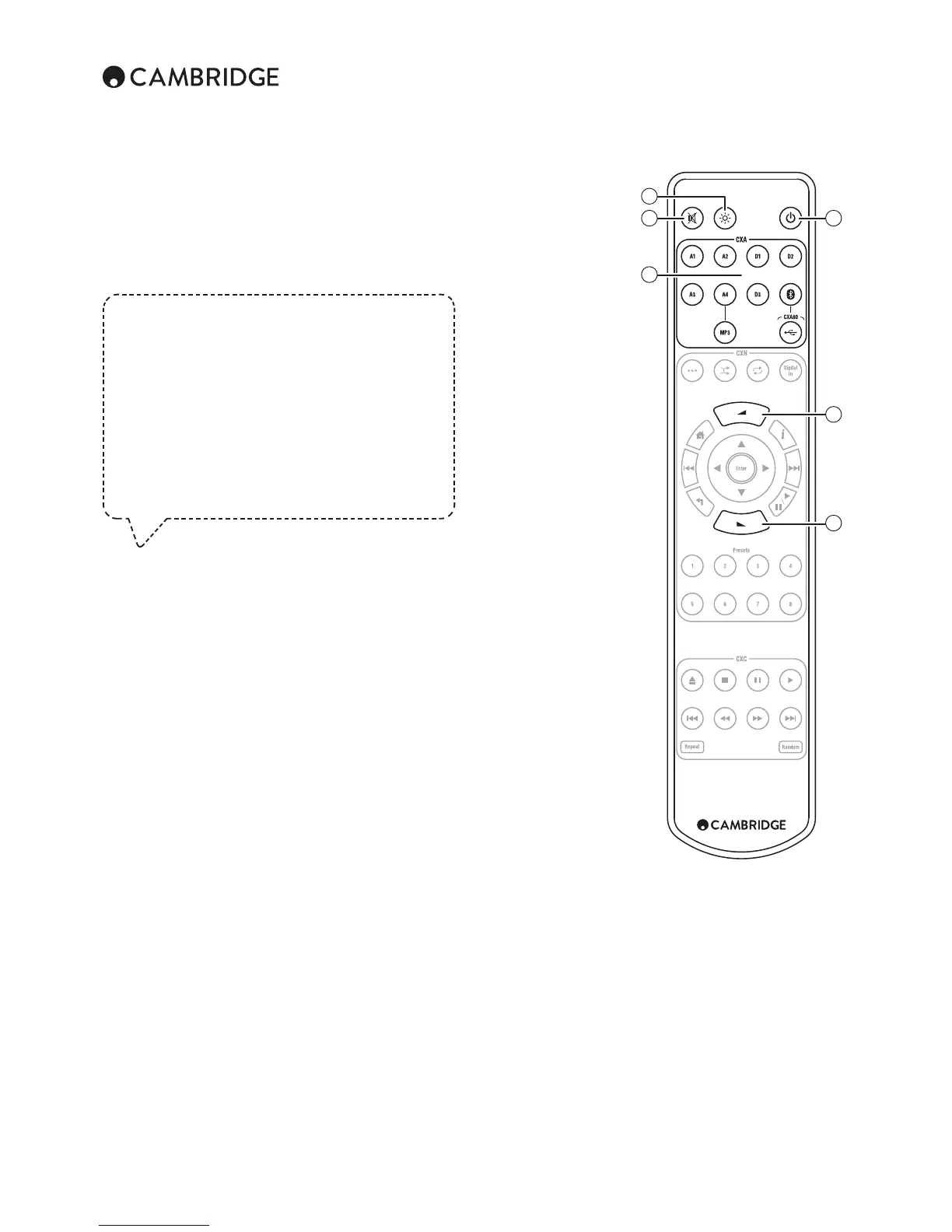
Remote control
1. Display
brightness
Adjusts the brightness of the
front panel display.
2. Mute
3. Standby/On
4. Sources
Press to access the input
source directly.
5. Volume up/down
1
2
4
3
5
5


 To Next Page