5
21
8
11
12
14
5
21
8
11
12
14
5
21
8
11
12
14
5
21
8
11
12
14
Page 9 - Manual FA0142 5- EN - 08/2020 - © CAME S.p.A. - The contents of this manual may be changed, at any time, and without notice. - Translation of the original instructions
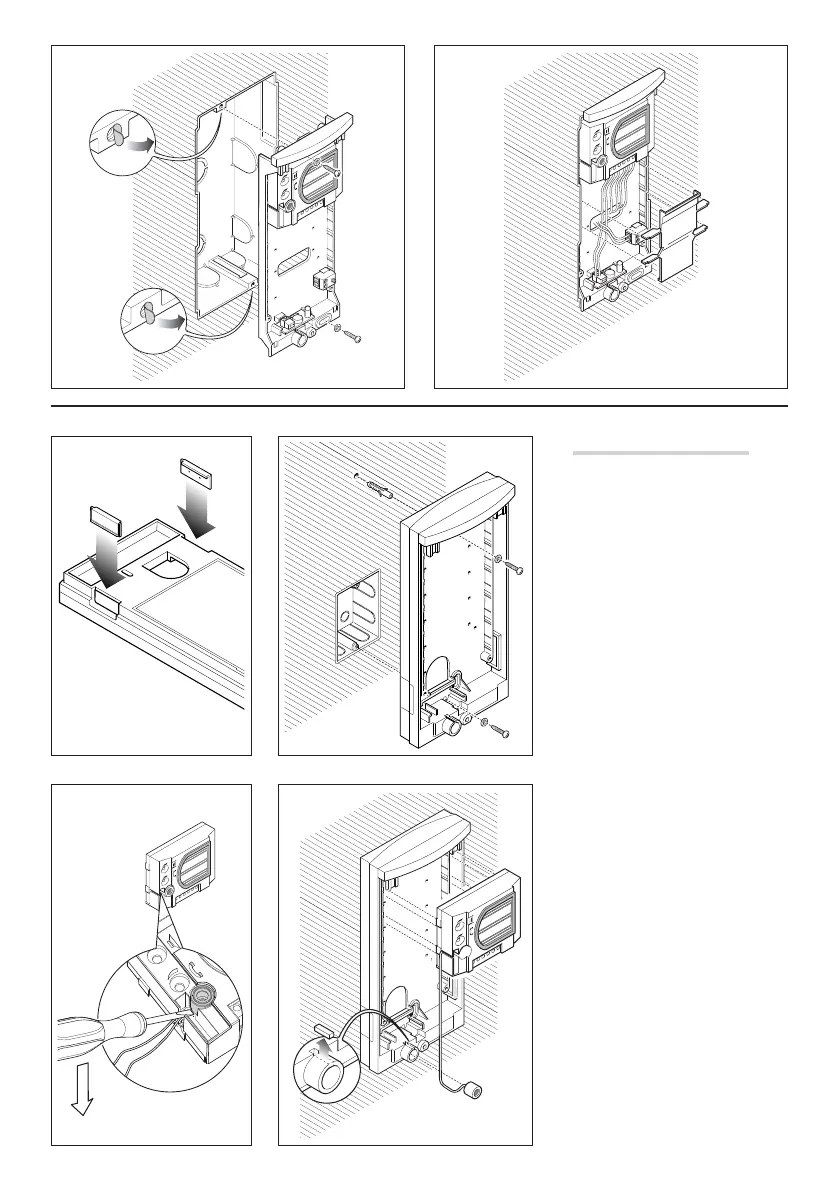
Wall-mounted installation
Fix the two hole covers to the base .
Attach the recessed box (with 3 modules
or round Ø 65 mm) fl ush with the wall
and at a suitable height; fi x the base to
the wall using the screws and expansion
plugs provided .
In systems where the Larsen e ect
might occur, the microphone can be
mounted remotely .
To remove the microphone from its
housing, pry it o its base using a
small screwdriver, taking care not to
damage the cabling .
Before inserting the microphone in the
bottom part of the back-box, use pliers
to remove the part that is highlighted .
Insert the audio unit near the top of the
base .
Fit the microcontact (bottom right) into
the correct housing . The front plate
is equipped with a common call for
the microcontacts, to be used when
other buttons are to be installed
(maximum of 4) .
Insert the lighting unit in the relevant
housing .
Make the connections and secure the
cables using the cable holder .
The cable holder must be located near
to the audio unit.



 To Next Page
 Loading...