3sec
... beep!
Page 6 - Manual FA01429-EN - 07/2020 - © CAME S.p.A. -The contents of this manual may be changed, at any time, and without notice. - Translation of the original instructions
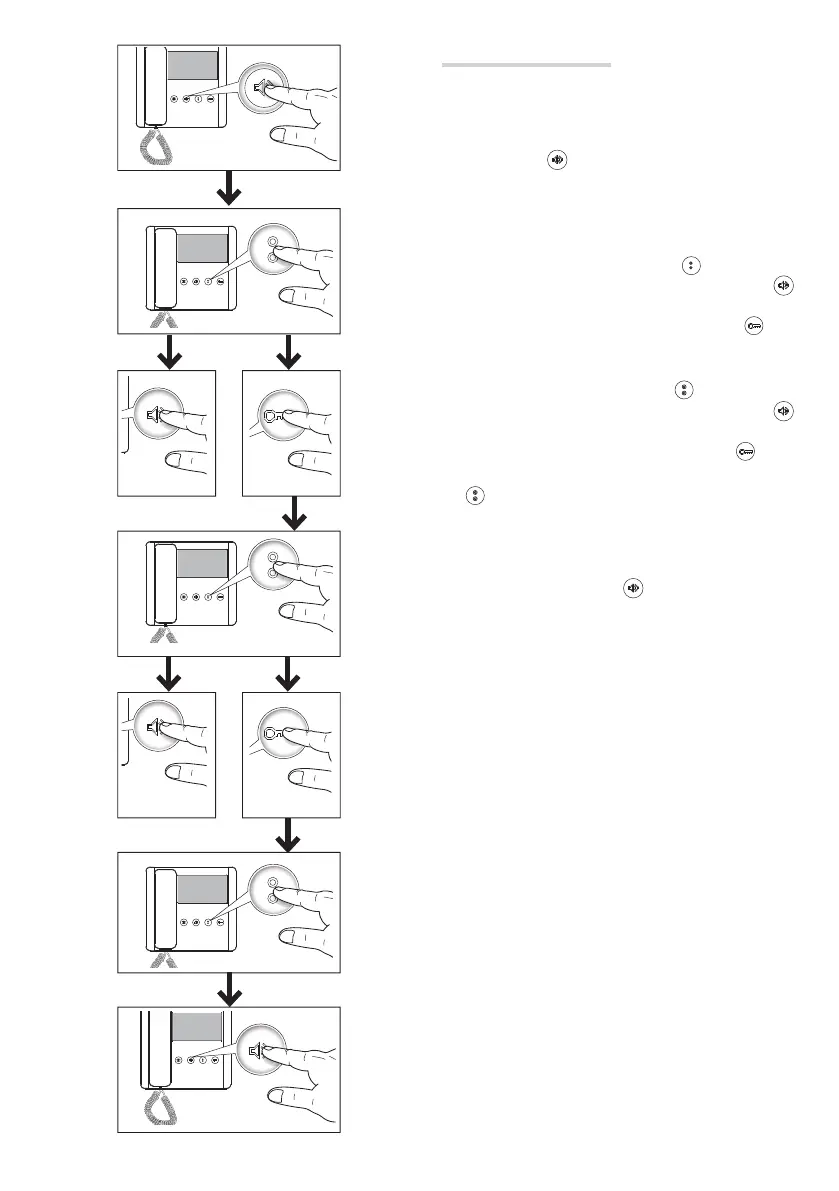
Configuring melodies
☞ Perform each of the following programming-steps, in suc-
cession:
1-Enter programming mode.
Press and hold the
button for 3 seconds. A short buzzing
sound and a red fl ashing LED confi rm that you have entered pro-
gramming mode .
2-Programming the melody associated with the call from
the entry panel.
To listen to the melodies in sequence, press
.
To select the melody and exit the programming mode, press
.
To select the melody and continue programming, press .
3- Programming the melody associated with a call from the
landing.
To listen to the melodies in sequence, press
.
To select the melody and exit the programming mode, press
.
To select the melody and continue programming, press .
4-Programming the number of rings per call.
Press
as many times as the number of rings you want (from
1 to 12 rings) .
Three seconds after the key was last pressed, the selected call is
played back with the chosen number of rings.
To exit programming mode, press
.
☞ To program a call, please see the entry panel manuals.



 To Next Page
 Loading...