EN 18 EN 19
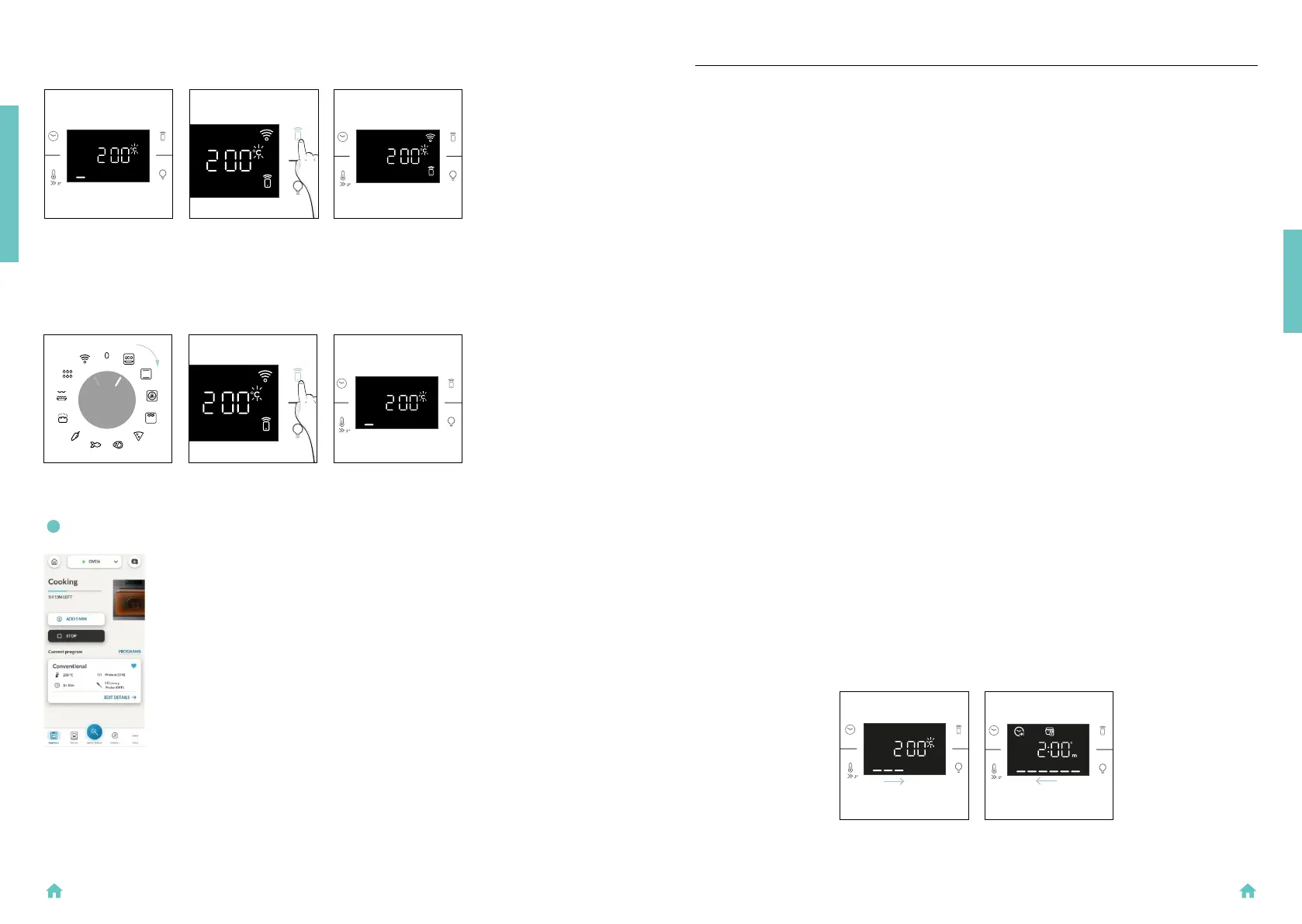
It’s also possible to activate Remote Control during cooking process by pressing related button.
PRESS REMOTE
CONTROL
How to stop Remote Control:
While the cooking program is in progress, it can be stopped directly from the product itself by rotating
the function knob to a different position. These actions interrupt the cooking process.
Another way is by pressing the corresponding button of Remote Control that came with your appli-
ance. These actions interrupt the cooking process.
You can also stop the cooking program remotely using the app by clicking the ‘STOP’ Button on display
device. The oven will automatically stop the cooking.
NOTE: If the user stops the cooking in progress from the oven, simultaneously the stopped cooking
will be seen in the App.
PRODUCT INTRODUCTION
When you rst turn on the oven, you might notice some smoke. Don’t worry, just wait for the smoke to
clear before using the oven.
How door works
For functions that use the grill, thanks to the door switch technology the oven will automatically pause
the heating elements when you open the door and continue cooking once you close it.
This feature is available only on specic oven congurations. All the pyro models have it.
During the pyrolytic cleaning process, the oven door remains locked at all times. If it’s not locked, the
oven will display error code 24 and pause the cleaning function.
How illumination works
The oven cavity is illuminated by one or more light bulbs, typically activated each time a cooking func-
tion begins.
For ovens equipped with a door switch (see below), the light automatically turns on when the door is
opened.
For ovens equipped with lamp button, it can also be used to activate the lighting.
If the oven door remains open for more than 10 minutes, the lights will automatically turn off.
During pyrolytic cleaning process light remains off. *
How cooling fan works
The cooling fan is responsible for dissipating the heat, keeping the oven and its surroundings from
getting too hot, as well as protecting kitchen appliances from the effects of high temperatures. For
this reason, the cooling fan remains audible for a period of time even after the oven is turned off.
It operates during and after cooking cycle in relation to the internal temperature of the oven.
When the cooling fan is operational, it usually generates a gentle humming or whirring noise. You may
also notice a warm airow emanating from the gap between the oven door and the control panel.
During pyrolytic cleaning and when door is locked, cooling fan is switched on. *
During ECO function the light will remain off.
(*only for pyro ovens)
How status bar works
The status bar, based on the set programs, simplies monitoring of temperature and time. Specif-
ically, for functions involving preheating, it displays the temperature increase during this phase. In
cooking programs and the pyrolytic cleaning function, it shows the countdown of cooking time and
the cleaning cycle, respectively.
3. BEFORE STARTING
3.1. INFORMATION TO START
BEFORE STARTING
PYROLYSISPREHEATING


 To Next Page