EN 14 EN 15
HOW TO INTERACT WITH THE APP
Your appliance may be connected to your home wireless network and operated remotely using the
app. Connect your appliance to ensure it stays up to date with the latest software and features.
NOTE
• Once the oven is turned on, the WIFI icons blinks for 30 minutes. During this period it's possible
to enroll the product.
• Ensure your home Wi-Fi network is turned on.
• You will be given step by step guidance on both your appliance and mobile device.
• It may take up to 10 minutes to connect your oven.
• For further guidance and troubleshooting, please refer to the app.
Download on your smartphone.
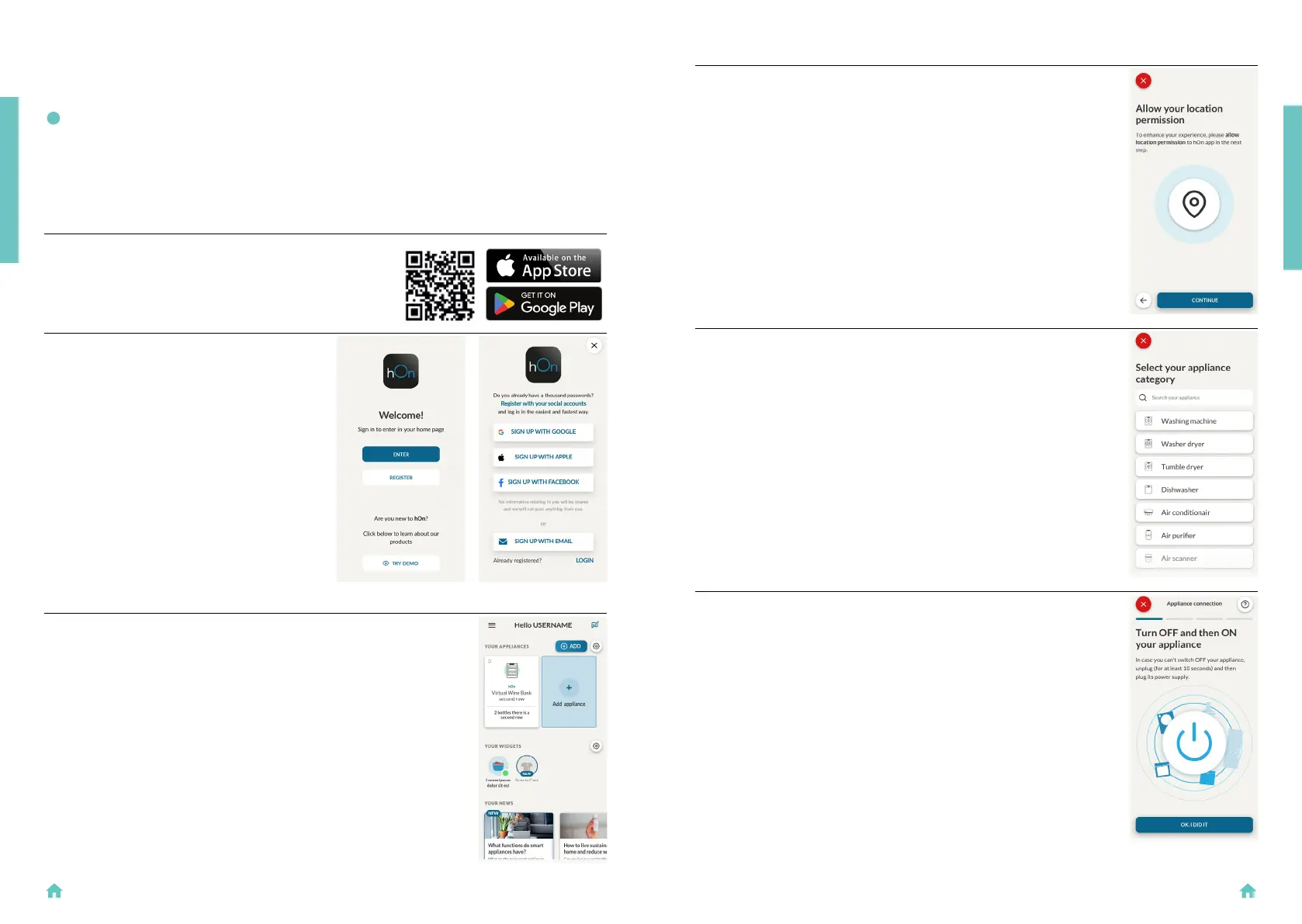
NEW USER REGISTRATION
• Click on “Register”
• You can register through social accounts
or sign up with your personal email
QUICK PAIR ENROLLMENT
Step 1
• Select “Add appliance”.
PRODUCT INTRODUCTION
Step 2
• Allow your location permission.
Step 3
• Select oven from the appliance category.
Step 4
• Turn on your appliance; if it is already on,
turn it off and on again.
PRODUCT INTRODUCTION


 To Next Page