EasyManua.ls Logo

Canon 550ex - Page 33

Canon 550ex
49 pages
Print Icon
To Next Page IconTo Next Page
To Previous Page IconTo Previous Page
Loading...
Using
Flash
in
Other Camera
Modes
O
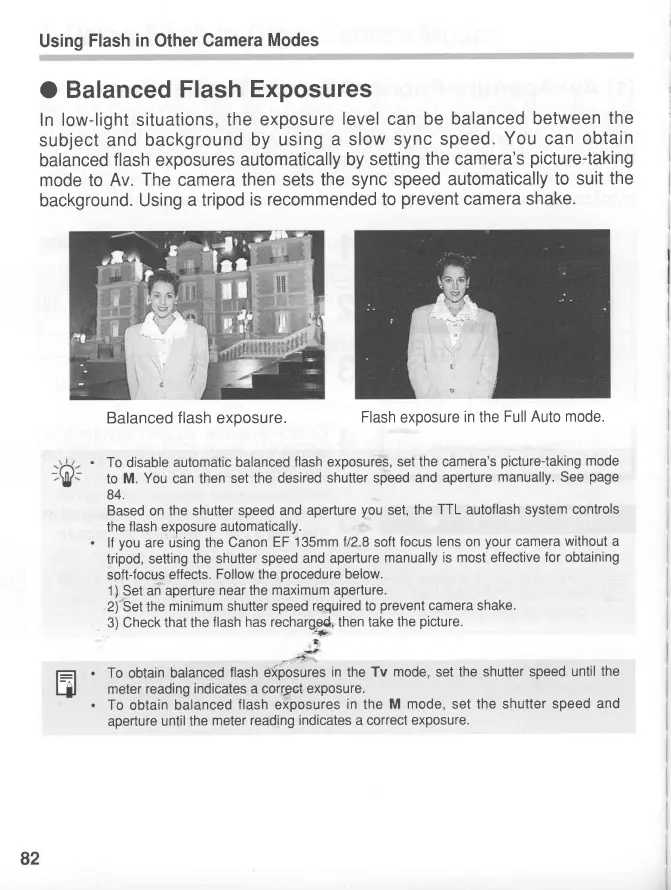
Balanced
Flash
Exposures
In
low-light
situations,
the
exposure
level
can
be balanced
between
the
subject
and
background
by
using
a slow sync
speed.
You
can
obtain
balanced
flash exposures
automatically
by
setting
the camera's
picture-taking
mode to
Av.
The
camera
then sets
the
sync speed
automatically
to suit
the
background.
Using
a tripod
is
recommended to
prevent
camera
shake.
Balanced
flash
exposure.
Flash
exposure
in
the
Full Auto
mode.
To
disable automatic
balanced
flash exposures,
set the camera's
picture-taking
mode
to
M.
You
can then
set the desired
shutter speed
and
aperture
manually.
See
page
84.
Based
on
the shutter
speed and
aperture
you
set,
the
TTL
autoflash
system
controls
the
flash exposure
automatically.
lf
you
are using
the Canon
EF 135mm
t12.8
soft
focus
lens
on
your
camera
without a
tripod, setting
the shutter
speed
and aperture
manually
is most
effective
for obtaining
soft-focus
effects.
Follow the
procedure
below.
1)
Set an
aperture
near
the
maximum aperture.
2) Set the
minimum
shutter
speed
required
to
prevent
camera
shake.
3) Check
that the
flash has recharg*, then
take the
picture.
j
To
obtain
balanced
flash ,*joJr"s
in
the
Tv
mode,
set the
shutter speed
until
the
meter
reading
indicates
a
corrpct exposure.
To obtain
balanced
flash
exposures
in
the
M mode,
set
the shutter
speed
and
aperture
until the
meter
reading indicates a correct
exposure.
82
www.orphancameras.com

Related product manuals