Using
Flash
in
Other Camera
Modes
(2)
Tv:
Shutter Speed-Priority
AE
and
TTL
Autoflash
By
selecting the shutter speed,
you
can obtain
various
effects
with flash. You
can set the shutter speed
from
30 sec.
to
the
top sync speed.
The
camera
then sets the aperture automatically to obtain a correct exposure
for
the
background.
The TTL
autoflash system controls the
flash
exposure based on
the camera-selected
aperture.
1
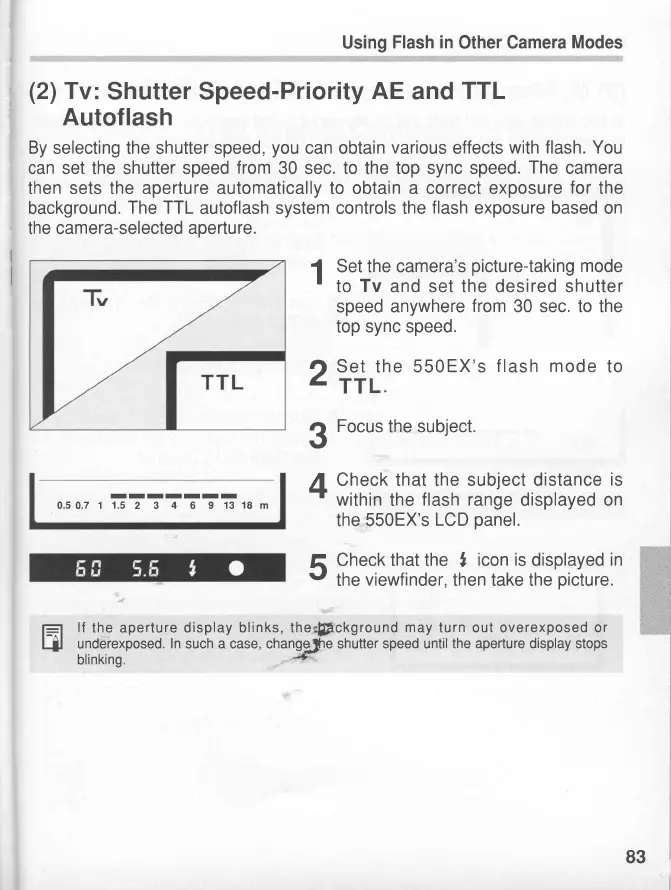
Set the camera's
picture-taking
mode
'
to
Tv
and set the desired shutter
speed anywhere
from
30 sec. to the
top sync speed.
O Set the 550
EX's
f lash mode
to
-
TTL.
3
Focus
the
subject.
L
Check that the subject distance
is
-t
within
the
flash range
displayed
on
the 550EX's
LCD
panel.
v
the
viewfinder,
then take the
picture.
f_:71
lf
the aperture display
blinks, the,#Fckground
may
turn out overexposed or
Hl
underexposed.
In
such a case, changefie shutter speed until
the aperture display stops
blinking.
"H
ffi
IIIII-I
0.50.7 1 1.5
2 3
4
6 9
13 18 m
83





 To Next Page