EasyManua.ls Logo

Canon 550ex - Page 35

Canon 550ex
49 pages
Print Icon
To Next Page IconTo Next Page
To Previous Page IconTo Previous Page
Loading...
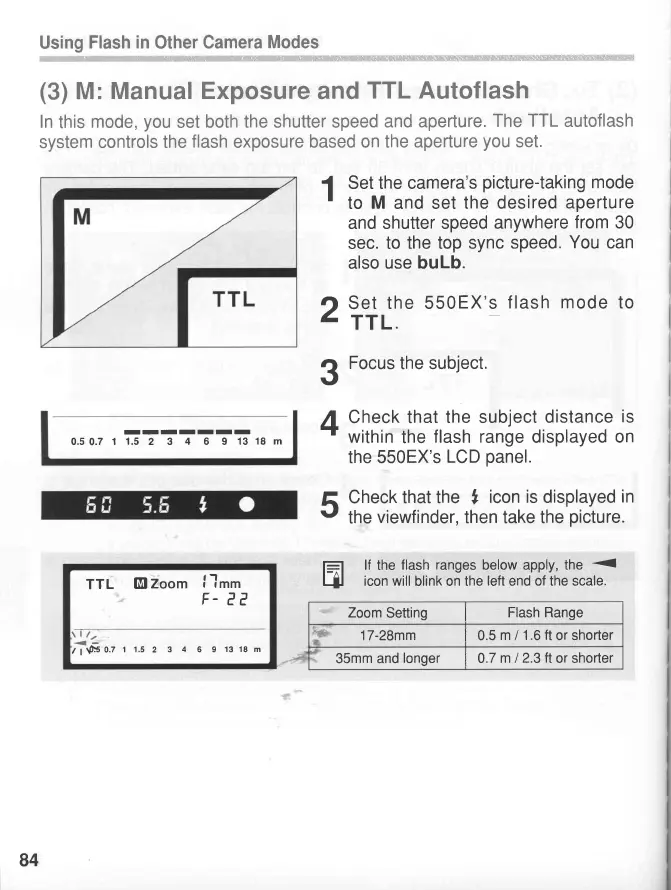
(3)
M: Manual
Exposure
and
TTL Autoflash
In
this
mode,you
set both
the shutter speed
and aperture.
The
TTL
autoflash
system controls
the
flash
exposure
based on the
aperture
you
set.
1
Set the camera's
picture-taking
mode
'
to
M
and set
the desired
aperture
and shutter speed
anywhere
from
30
sec. to
the top sync
speed.
You
can
also
use buLb.
O
Set
the 550EX's
flash
mode
to
I
rrl.
3
Focus
the subject.
A
Check that
the subject
distance
is
rf
within
the
flash range
displayed
on
the 550EX's
LCD
panel.
tr
Check
that the
,
icon is
displayed
in
t'
the
viewfinder, then take the
picture.
f_=l
lf
the
flash
ranges
below apply, the
lJJ
icon will
blink on the
left end of the scale.
Zoom
Setting
I
Flash Range
f'C
17-28mm
I
0.5
m
I
1.6
ft
or shorter
35mm and
longer
|
0.7
m
I
2.3
ft
or shorter
TTL
El
Zoom
I
Itm
F-
ee
\a t/,
<_
t;
sso.z
t 1.5
2
3 4 6 9
13 18 m
IIIIIII
0.50.7 1
1.5
2 3
4
6 9
13
18 m
84
www.orphancameras.com

Related product manuals