EasyManua.ls Logo

Canon 550ex - Page 40

Canon 550ex
49 pages
Print Icon
To Next Page IconTo Next Page
To Previous Page IconTo Previous Page
Loading...
IIIIIII
0.50.7 1
1.5
2 3
4 6 9 13 18 m
FEB
(Flash
Enposure Bracketing)
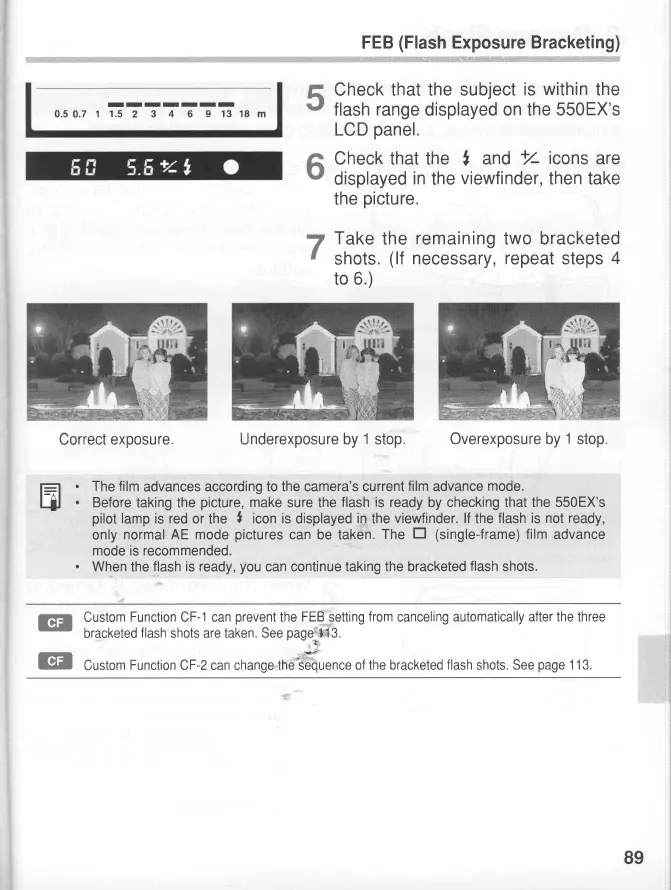
Check that the subject
is within
the
flash range
displayed on the
550EX's
LCD
panel.
Check that the
,
and
+r4
icons
are
displayed
in
the
viewfinder,
then take
the
picture.
Take
the
remaining
two bracketed
shots
(lf
necessary, repeat
steps
4
to
6.)
Underexposure by
1
stop.
Overexposure by
1
stop.
f=
.
The film
advances according
to the camera's current
film
advance
mode.
Hl
.
Before
taking the
picture,
make
sure the
flash
is
ready
by checking
that the 550EX's
pilot
lamp
is red
or the
I
icon is
displayed
in
the
viewfinder.
lf
the
flash is not ready,
only
normal
AE
mode
pictures
can be taken.
The
tr (single-frame)
film
advance
mode is recommended.
.
When
the
flash is ready,
you
can continue
taking the bracketed
flash
shots.
5
6
7
@
@
Custom
Function
CF-1
can
prevent
the
FEB
setting
from
canceling
automatically after the three
bracketed
flash
shots
are taken. See
page
+13.
Custom
Function
CF-zcan change tne SJiuence
of the bracketed
flash
shots. See
page
1 13.
Correct exposure.
89

Related product manuals