EasyManua.ls Logo

Canon 550ex - Page 39

Canon 550ex
49 pages
Print Icon
To Next Page IconTo Next Page
To Previous Page IconTo Previous Page
Loading...
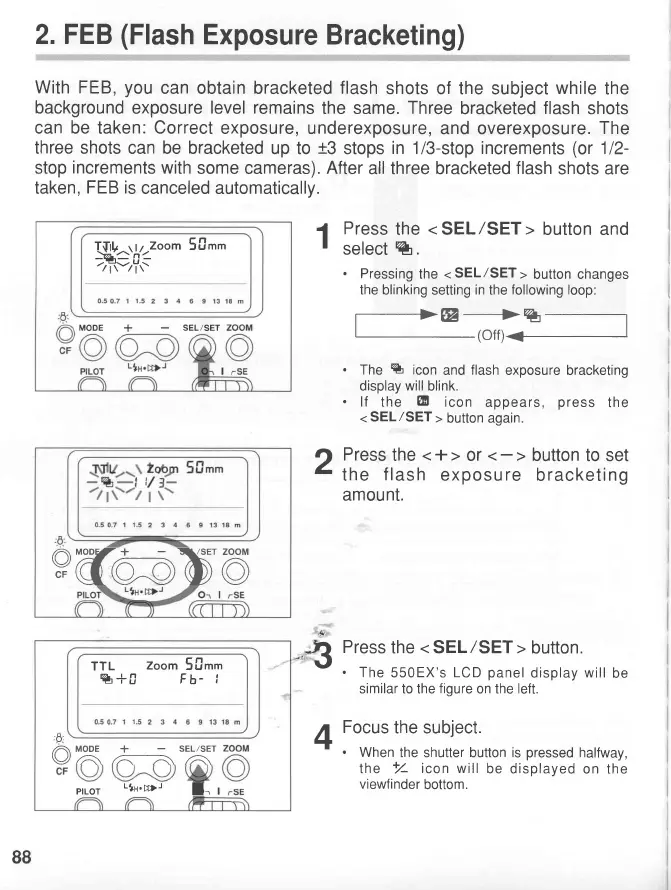
2. FEB
(Flash
Exposure
With
FEB,you
can obtain bracketed
flash
shots of
the subject
while
the
background
exposure
level remains
the same.
Three
bracketed
flash
shots
can be taken: Correct
exposure,
underexposure, and overexposure.
The
three shots
can be bracketed
up to
t3
stops
in 1/3-stop increments
(or
112-
stop
increments
with
some cameras).
After
all three bracketed
flash
shots are
taken,
FEB is
canceled automatically.
I
Press
the
<
SEL/SET>
button and
I
select %.
'
Pressing
the
<
SEL/SET
>
button changes
the
blinking setting
in
the
following loop:
7*lfr-^:
.
The
%
icon
and
flash
exposure bracketing
display
will
blink.
.lf
the
@
icon
appears,
press
the
<
SEL/SET
>
button again.
?t
Press
the
<+>
or
I
the
f lash
exposu
re
bracketing
amount.
-,$
Press
the
<SEL/SET>
button.
\'
.
The
550EX's
LCD
panel
display
will
be
similar to the
figure
on the left.
A
Focus
the subject.
1+l
'
.
When
the shutter button is
pressed
halfway,
the
+//-
icon will
be displayed
on the
viewfinder
bottom.
Bracketing)
,lbry]_oorn
50.'
tz-tt-zTt-
MODE
+
SEL/SET
ed6-b@
TTL
zoom
5[]t.
%+fr Fb-
i
,6'-
/A
MODE
+
SELzSET
v/A\
A--- \
pfLOT
-1n-,,.D-
l-,
,
88
www.orphancameras.com

Related product manuals