EasyManua.ls Logo

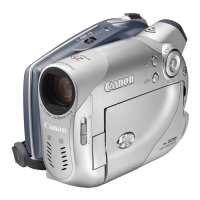
Canon DC301 - User Manual

Canon DC301
87 pages
Print Icon
To Next Page IconTo Next Page
Loading...
The information on this manual is verified as of February 2008.
PUB. DIE-304A
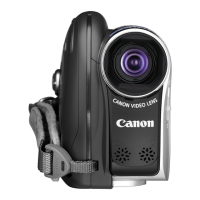
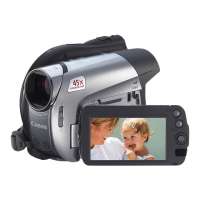
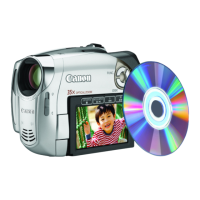
DVD Camcorder
Instruction Manual
PAL
Canon Europa N.V.
P.O. Box 2262, 1180 EG Amstelveen, The Netherlands
Canon UK Ltd.
CCI Service Centre, Unit 130
Centennial Park, Borehamwood, Hertfordshire, WD6 3SE, England
Telephone 0870-241-2161
Canon Australia Pty. Ltd.
Info-Line: 131383
www.canon.com.au
Canon New Zealand Ltd.
Customer Care: (09) 489 0470
www.canon.co.nz
Canon Singapore Pte. Ltd
1 HarbourFront Avenue, #04-01 Keppel Bay Tower, Singapore 098632
Tel: (65) 6799 8888
Fax: (65) 6799 8882
Canon Hongkong Company Ltd
19/F., The Metropolis Tower, 10 Metropolis Drive, Hunghom,
Kowloon, Hong Kong
Canon Latin America, Inc.
Sales & Enquiries: 703 Waterford Way Suite 400 Miami, FL 33126 USA
0116W293 PUB. DIE-304A © CANON INC. 2008
DIE-304
COPY
Downloaded From VideoCamera-Manual.com Manuals

Table of Contents

Questions and Answers

  • Y
    Yesenia McdowellAug 21, 2025
    How to fix Canon DC301 Camcorder that will not turn on?
    • E
      Elizabeth RussellAug 22, 2025
      If your Canon Camcorder will not turn on or turns off unexpectedly, try these steps: First, replace or fully charge the battery pack. Second, ensure the battery pack is correctly attached. Finally, try using the compact power adapter.
  • C
    Collin JohnsonSep 4, 2025
    What to do if Canon Camcorder is on but unresponsive?
    • D
      David CollinsSep 4, 2025
      If your Canon Camcorder is on but unresponsive, it may have exceeded its operational temperature. Turn off the camcorder and allow it to cool down before resuming use.
  • D
    Daisy RothSep 2, 2025
    What to do if Canon DC301 Camcorder disc cannot be recognized?
    • K
      Krystal CalhounSep 2, 2025
      If the disc cannot be recognized by your Canon Camcorder, try cleaning the disc with a soft lens-cleaning cloth; if the problem continues, replace the disc. Also, check that the disc is correctly loaded. Finally, verify that your camcorder supports the type of DVD disc you inserted.
  • C
    Charles DaughertySep 1, 2025
    How to fix blurred viewfinder picture on Canon Camcorder?
    • B
      Brian NolanSep 1, 2025
      If the viewfinder picture on your Canon Camcorder is blurred, adjust the viewfinder with the dioptric adjustment lever.
  • A
    Alyssa NealAug 30, 2025
    Why Canon DC301 charge indicator flashes rapidly?
    • M
      Michael StricklandAug 30, 2025
      If the charge indicator on your Canon Camcorder flashes rapidly, this is not a malfunction. However, if you suspect the compact power adapter or the battery pack is faulty, consult a Canon Service Center.
  • J
    Joseph MillsAug 29, 2025
    How to fix Canon DC301 Camcorder video noise on TV screen?
    • B
      Bridget RobinsonAug 29, 2025
      If video noise appears on the TV screen when using your Canon Camcorder, keep a distance between the compact power adapter and the power or antenna cables of the TV.
  • C
    Christopher SchultzAug 27, 2025
    How to eliminate video noise on Canon Camcorder screen?
    • C
      Chelsea ThomasAug 27, 2025
      If video noise appears on your Canon Camcorder screen, keep a distance when using the camcorder near devices that emit strong electromagnetic fields.
  • T
    tbeckerAug 27, 2025
    Why Canon DC301 recording suddenly stops?
    • D
      Daniel BarberAug 27, 2025
      If the recording on your Canon Camcorder suddenly stops shortly after starting, clean the disc with a soft lens-cleaning cloth and replace it if the problem persists. The camcorder may have exceeded its operational temperature; turn it off and let it cool down before resuming use.
  • E
    Edward HernandezAug 25, 2025
    Why Canon DC301 Camcorder battery pack will not charge?
    • D
      debbieforbesAug 25, 2025
      If your Canon Camcorder battery pack will not charge, make sure you are charging it in temperatures between 0 °C and 40 °C. If the battery pack has become hot during use, wait until its temperature is below 40 °C for charging to begin. Check that the compact power adapter is correctly connected to the camcorder. If the issue persists, try using a different battery pack, as the current one might be damaged.
  • A
    Andrew MorganAug 23, 2025
    Why Canon DC301 Camcorder will not focus?
    • A
      andreamooreAug 23, 2025
      If your Canon Camcorder will not focus, try focusing manually. If you are using the viewfinder, adjust it with the dioptric adjustment lever. Also, clean the lens with a soft lens-cleaning cloth; never use tissue paper.

Summary

Important Usage Instructions

Safety Warnings and Precautions

General safety advice for operating the camcorder and avoiding hazards.

How to Select a DVD Disc

Components Guide

Screen Displays

Preparations

Getting Started

Initial steps for powering and setting up the camcorder.

Basic Operation of the Camcorder

Explains power, modes, and joystick controls.

First Time Settings

Guide for setting date, time, language, and time zone.

Video

Basic Recording and Shooting Video

Step-by-step guide to capture video footage.

Photos

Basic Photo Recording

Guide on capturing still images.

External Connections

Additional Information

Troubleshooting Guide

Solutions for common operational problems.

Handling Precautions

Safety and care instructions for the device and accessories.

Troubleshooting

Power Source and Camcorder Issues

Addresses problems with power, unresponsive camcorder.

Recording;Playback and Disc Issues

Covers button failures, disc errors, and video noise.

Memory Card and Message Errors

Deals with memory card problems and error message explanations.

Handling Precautions

Camcorder and Battery Pack Care

Guidelines for safe handling and maintenance of the device and battery.

Specifications

Canon DC301 Specifications

General IconGeneral
Recording MediaMini DV
Optical Zoom10x
Digital Zoom200x
Video Resolution720 x 480
LCD Screen Size2.5 in
Optical Sensor Resolution0.8 MP
TypeCamcorder
InterfaceIEEE 1394 (FireWire)

Related product manuals