I
64 I Basic Operations
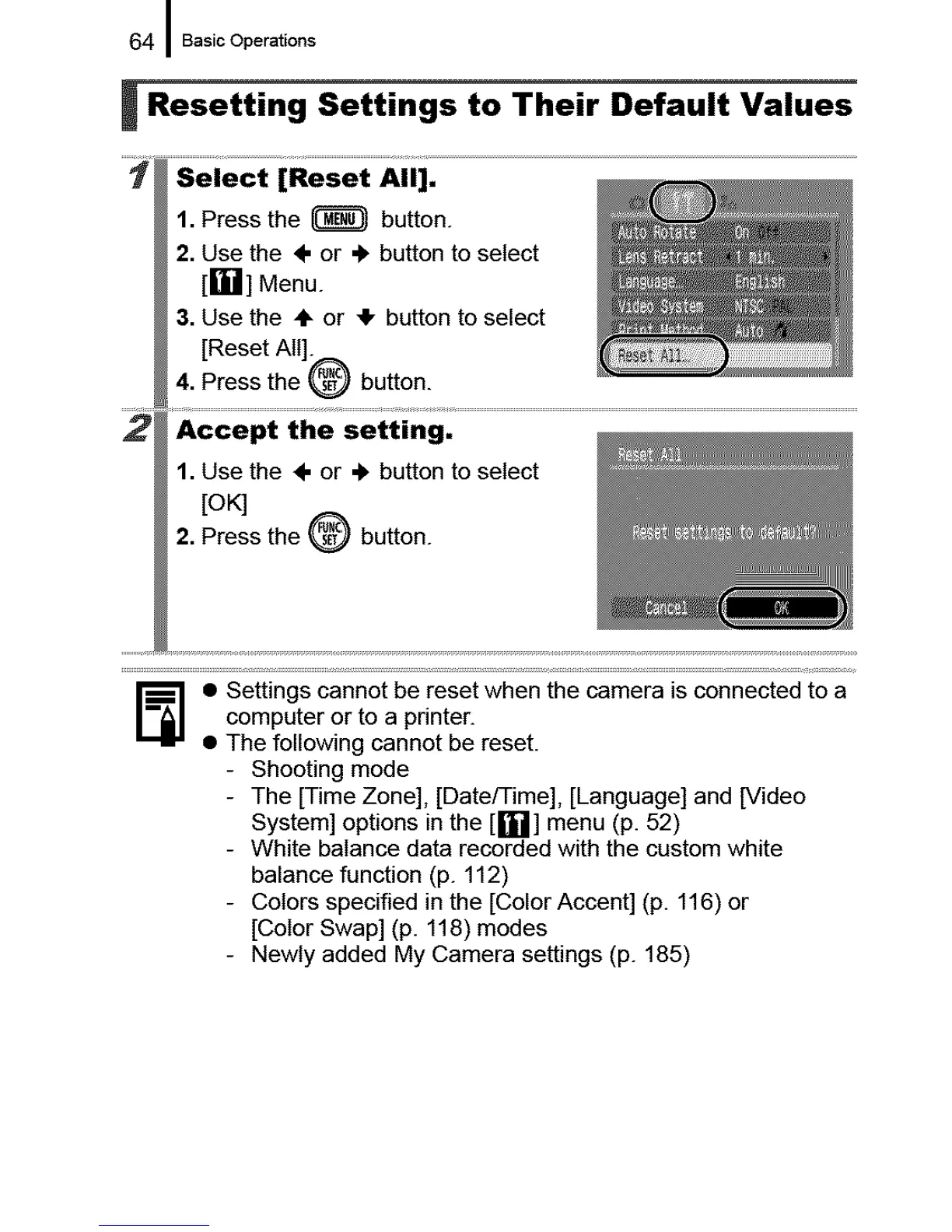
i Resetting Settings to Their Default Values
1. Press the _ button.
2. Use the ÷ or ,_ button to select
[rll"d] Menu.
3. Use the ÷ or 4, button to select
[Reset All].
4. Press the _ button.
1. Use the ÷ or .I, button to select
[OK]
2. Press the _ button.
_] • Settings cannot be reset when the camera is connected to a
computer or to a printer.
• The following cannot be reset.
- Shooting mode
- The [Time Zone], [Date/Time], [Language] and [Video
System] options in the [_i]] menu (p. 52)
- White balance data recorded with the custom white
balance function (p. 112)
- Colors specified in the [Color Accent] (p. 116) or
[Color Swap] (p. 118) modes
- Newly added My Camera settings (p. 185)










 To Next Page