I
72 _ Commonly Used Shooting Functions
_ _ Shooting Close-Ups/Infinity Shot
[][][]
[]See Functions Available in Each Shooting Mode (p. 238).
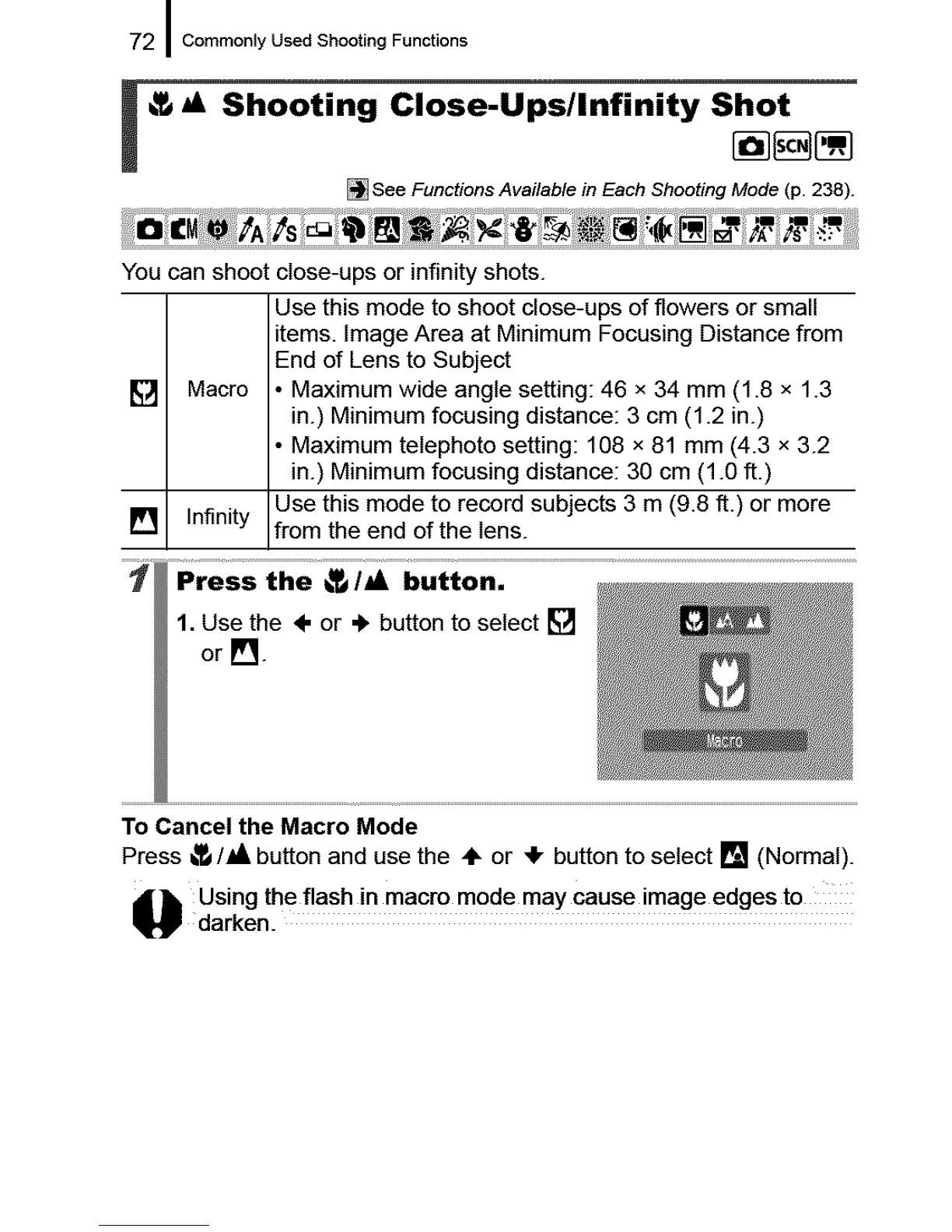
You can shoot close-ups or infinity shots.
Use this mode to shoot close-ups of flowers or small
items. Image Area at Minimum Focusing Distance from
End of Lens to Subject
[] Macro • Maximum wide angle setting: 46 x 34 mm (1.8 x 1.3
in.) Minimum focusing distance: 3 cm (1.2 in.)
• Maximum telephoto setting: 108 x 81 mm (4.3 x 3.2
in.) Minimum focusing distance: 30 cm (1.0 ft.)
[] Infinity Use this mode to record subjects 3 m (9.8 ft.) or more
from the end of the lens.
1. Use the ÷ or ._ button to select []
or [].
To Cancel the Macro Mode
Press _/_l, button and use the ,IF or _1,button to select [] (Normal).
_ sing the flash in mac ro mode may cause image edges t0
darken.










 To Next Page