78 I Commonly Used Shooting Functions
i Embedding the Date in the Image Data [][_
[]See Functions Avaitable in Each Shooting Mode (p. 238).
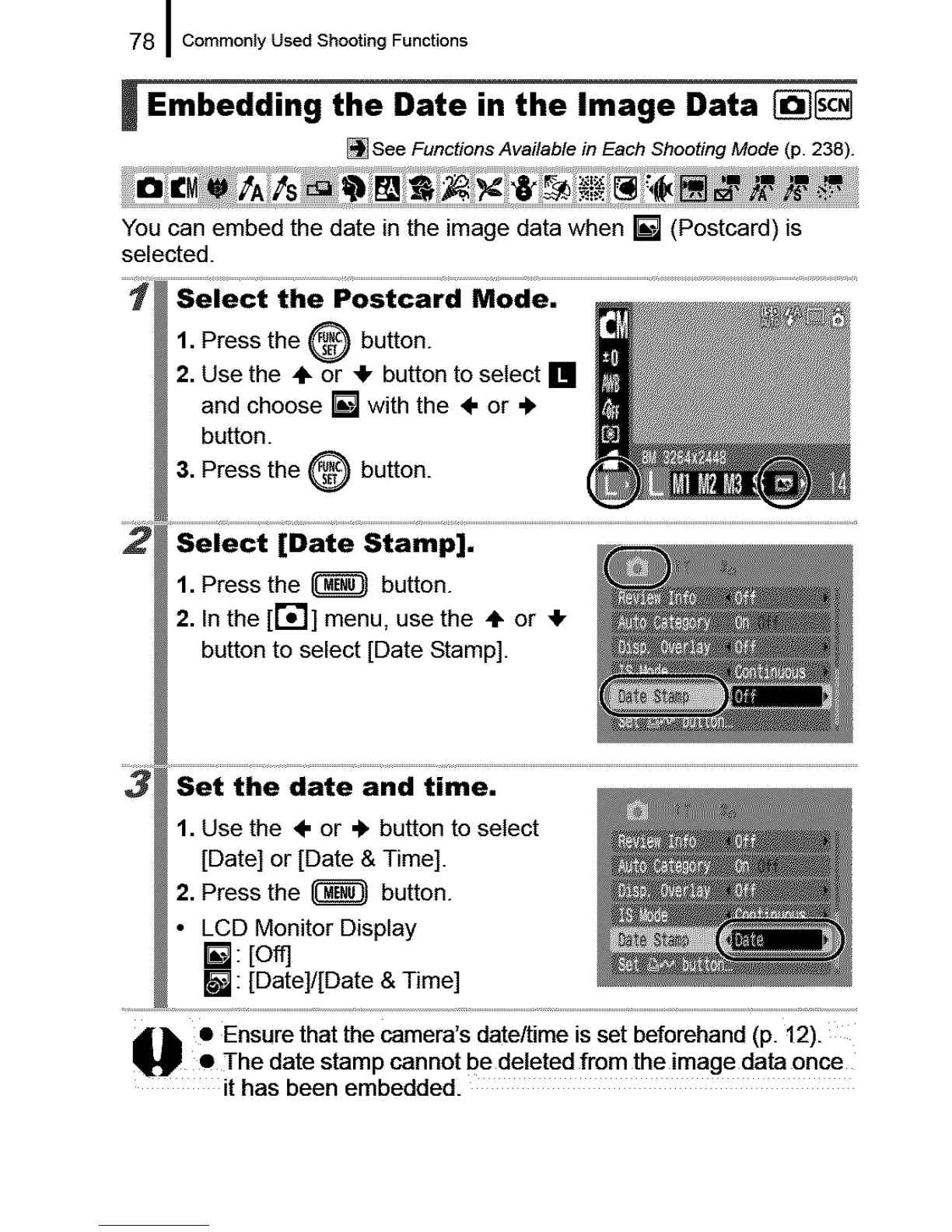
You can embed the date in the image data when [] (Postcard) is
selected.
1. Press the _ button.
2. Use the ÷ or _!, button to select []
and choose [] with the ÷ or ÷
button.
3. Press the _ button.
1. Press the _ button.
2. In the [r_] menu, use the ,1_or 4,
button to select [Date Stamp].
1. Use the ÷ or ,_ button to select
[Date] or [Date & Time].
2. Press the _ button.
• LCD Monitor Display
[]: [off]
[] : [Oate]/[Date & Time]
_k • Ensure that the camera's date/time is set beforehand (p. 12).
P • The date stamp cannot be deleted from the image data once
it has been embedded.










 To Next Page