I
Commonly Used Shooting Functions _ 79
To imprint the date on images for all but postcard size images,
use the supplied software (ZoomBrowser EX or
lmageBrowser) or printer settings. For detaiIs, please see the
user guide for each product.
_ Setting the Image Stabilizer Function
[][][]
[] See Functions Available in Each Shooting Mode (p. 238).
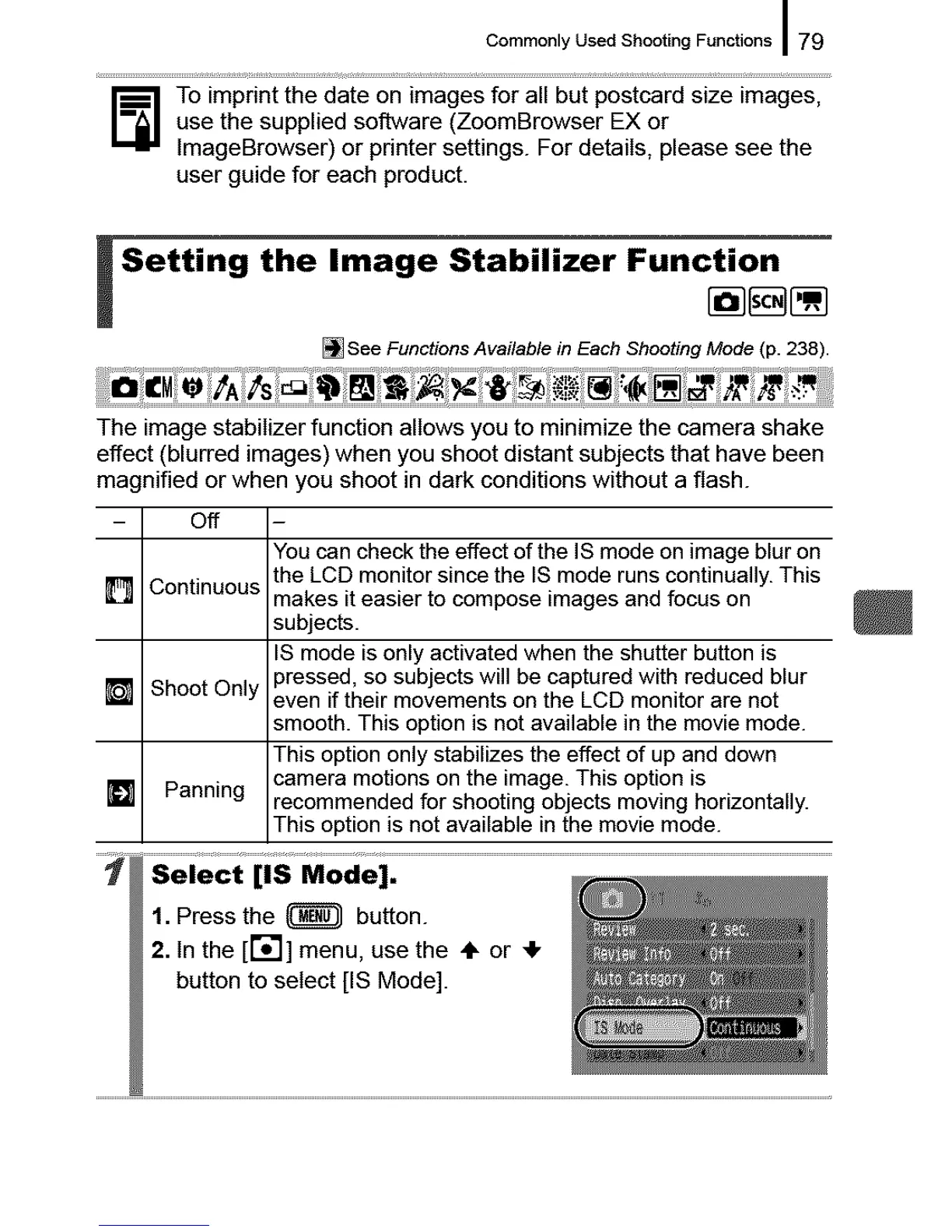
The image stabilizer function allows you to minimize the camera shake
effect (blurred images) when you shoot distant subjects that have been
magnified or when you shoot in dark conditions without a flash.
- off
[] Continuous
[] Shoot Only
[] Panning
1. Press the _ button.
2. In the [r';'l] menu, use the ÷ or _1,
button to setect [IS Mode].
You can check the effect of the IS mode on image blur on
the LCD monitor since the IS mode runs continually. This
makes it easier to compose images and focus on
subjects.
IS mode is only activated when the shutter button is
pressed, so subjects will be captured with reduced blur
even if their movements on the LCD monitor are not
smooth. This option is not available in the movie mode.
This option only stabilizes the effect of up and down
camera motions on the image. This option is
recommended for shooting objects moving horizontally.
This option is not available in the movie mode.










 To Next Page