Commonly Used Shooting Functions I 73
I® Using the Self-Timer [][_
[] See Functions Available in Each Shooting Mode (p. 238).
You can set the time delay and the numbers of shots you wish to take
in advance.
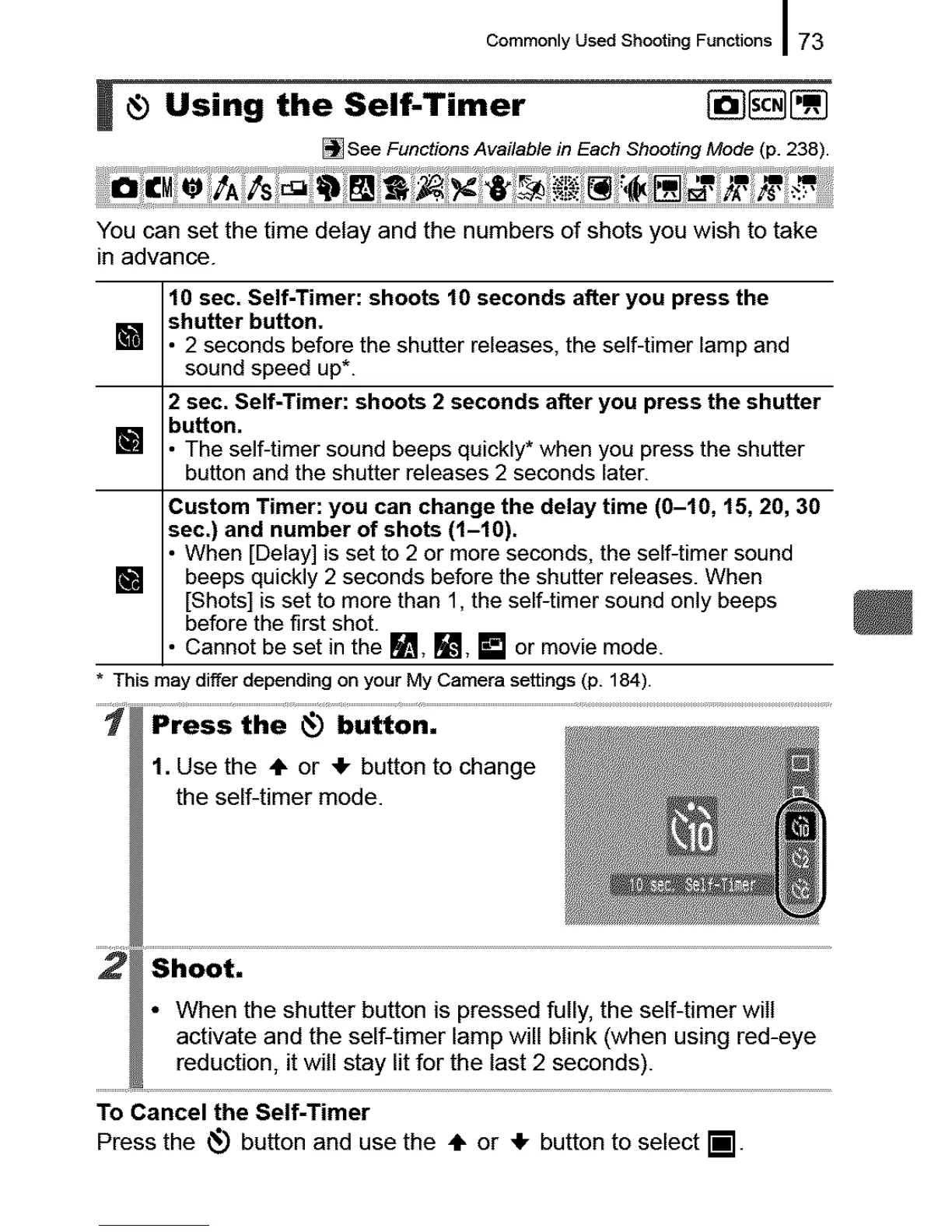
10 sec. Self-Timer: shoots 10 seconds after you press the
[] shutter button.
2 seconds before the shutter releases, the self-timer lamp and
sound speed up*.
2 sec. Self-Timer: shoots 2 seconds after you press the shutter
[] button.
The self-timer sound beeps quickly* when you press the shutter
button and the shutter releases 2 seconds later.
Custom Timer: you can change the delay time (0-10, 15, 20, 30
sec.) and number of shots (l-f0).
When [Delay] is set to 2 ormore seconds, the self-timer sound
[] beeps quickly 2 seconds before the shutter releases. When
[Shots]is set to more than 1, the self-timer sound onlybeeps
before the first shot.
Cannot be set in the _1_, [], [] or movie mode.
* ThismaydifferdependingonyourMyCamerasettings(p. 184).
.....1 button. ..................................................................................................................................................................................................................................
1. Use the ,IF or _1-button to change
the self-timer mode.
Shoot.
• When the shutter button is pressed fully, the self-timer will
activate and the self-timer lamp will blink (when using red-eye
reduction, it will stay lit for the last 2 seconds).
To Cancel the Self-Timer
Press the _ button and use the ,IF or ,Ik button to select il.










 To Next Page