Commonly Used Shooting Functions I 75
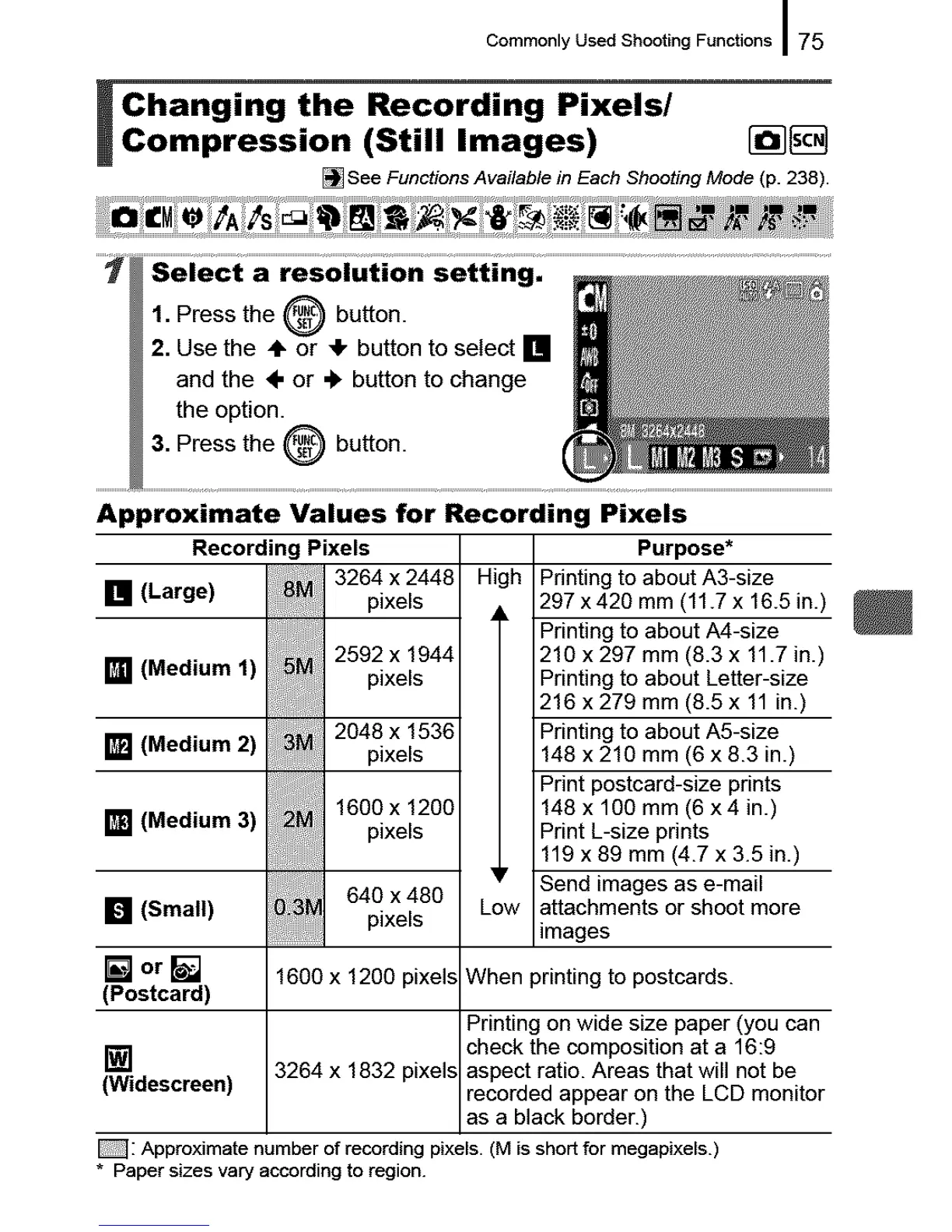
Changing the Recording Pixels/
Compression (Still Images) [_[]
[] See Functions Available in Each Shooting Mode (p. 238).
Approximate Values for Recording Pixels
Recording Pixels
3264 x 2448
[] (Large) pixels
2592 x 1944
[] (Medium 1)
pixels
2048 x 1536
[] (Medium 2)
pixels
1600 x 1200
[] (Medium 3)
pixels
[] (Small)
[] orl
(Postcard)
640 x480
............................pixels
Purpose*
High Printing to about A3-size
297 x426 mm (11.7x 16.5 in.)
Printing to about A4-size
218 x 297 mm (8.3 x 11.7 in.)
Printing to about Letter-size
216 x 279 mm (8.5 x 11 in.)
Printing to about A5-size
148 x 218 mm (6 x 8.3 in.)
Print postcard-size prints
148 x 100 mm (6 x4 in.)
Print L-size prints
119 x 89 mm (4.7 x 3.5 in.)
Send images as e-mail
Low attachments or shoot more
images
1600 x 1200 pixels When printing to postcards.
Printing on wide size paper (you can
check the composition at a 16:9
[] 3264 x 1832 pixels aspect ratio. Areas that will not be
(Widescreen) recorded appear on the LCD monitor
as a black border.)
_: Approximate number of recording pixels. (M is short for megapixels.)
* Paper sizes vary according to region.










 To Next Page