91
Synchronizing with an External Device
1
You can use the [¤ TC/UB Setup ] > [Time Code] > [24P TC/Sync] setting to select [Normal] or [XF Legacy].
2
You can switch between the P and PsF setting for output.
Time Code Signal Output
The time code will be output from the TIME CODE terminal as an SMPTE-standard LTC timing signal. The user
bit will also be output. Before connecting the device, set [¤ TC/UB Setup] > [Time Code] > [TC In/Out] to
[Out] to change the TIME CODE terminal to output (A 89). The embedded time code will be output from the
3G-SDI terminals, MON. terminals and HD/SD SDI terminal.
NOTES
• The user bit of the time code signal is output while the camera is recording in mode or during playback
of a clip recorded on a CF card in mode. For the HD/SD SDI terminal, when the frame rate is set to
[23.98P] and the [¤ TC/UB Setup] > [User Bit] > [Output Mode] setting is set to [Pulldown], the user bit
will be 2:3 pulldown data. In other words, when a 23.98P recording is output from the HD/SD SDI terminal, the
signal is converted to 59.94i using the 2:3 pulldown method. An external device can receive the data used in
this conversion (2:3 pulldown data) to convert the signal to the original 23.98P specifications.
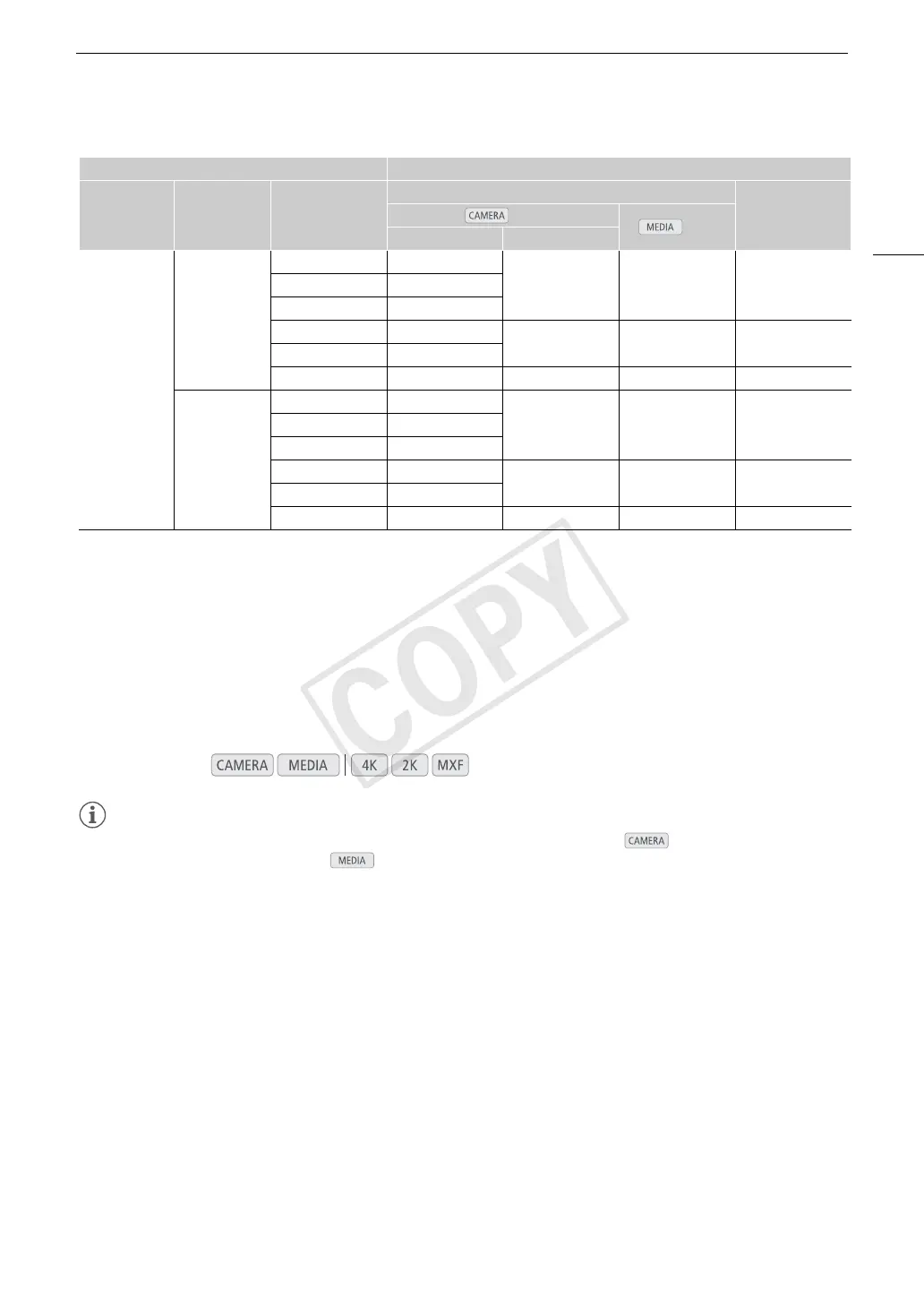
Video configuration SYNC OUT terminal
System priority Resolution Frame rate
HD Sync
1
Blk Burst mode
mode
Normal
2
XF Legacy
MXF
1920×1080
59.94i 1080/59.94i
1080/59.94i 1080/59.94i 480/59.94i29.97P 1080/29.97 (P/PsF)
23.98P 1080/23.98 (P/PsF)
50.00i 1080/50.00i
1080/50.00i 1080/50.00i 576/50.00i
25.00P 1080/25.00 (P/PsF)
24.00P 1080/24.00 (P/PsF) 1080/60.00i 1080/60.00i –
1280×720
59.94P 720/59.94P
720/59.94P 720/59.94P 480/59.94i29.97P 720/29.97P
23.98P 720/23.98P
50.00P 720/50.00P
720/50.00P 720/50.00P 576/50.00i
25.00P 720/25.00P
24.00P 720/24.00P 720/60.00P 720/60.00P –
Operating modes:



 To Next Page