Setting Up a Computer as a File Server
5-14
5
Using a NetBIOS Network
5
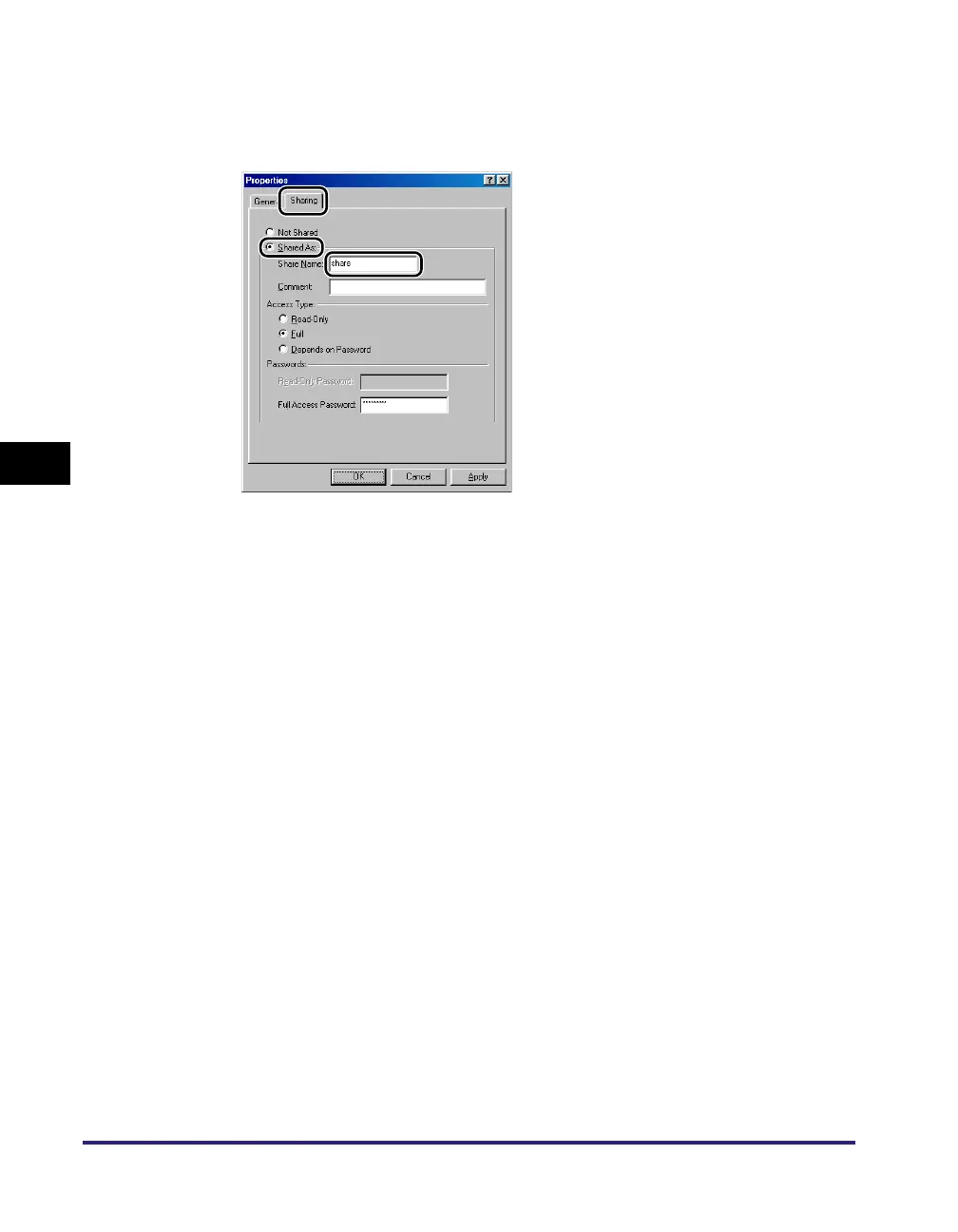
Open the properties dialog box of the folder you want to share
➞ on the [Sharing] sheet, click [Share As] ➞ enter the share
name in [Share Name].
If [Share-level access control] is selected in step 3 for [Access Type], select
either [Full] or [Depends on Password] ➞ enter a password not longer than 14
alphanumeric characters. If [Depends on Password] is selected, enter a
password for full access.
If [User-level access control] is selected in step 3, click [Add] to display the [Add
Users] dialog box. From the left list select the users to whom you want to give
access to the shared folder ➞ add them to the right list.
6
Set a recipient address using the machine's control panel.
There are three methods for specifying the recipient address; selecting the
desired address from the list that appears when you press [Browse], searching
for the address by pressing [Host Search], or entering the address using the
keyboard on the touch panel display.
Sample recipient setting:
• Server side settings (set and confirmed in the above step.):
[Computer name]: swan
[Share Name]: share
Create a folder called 'Images' within share, and then specify Images as the
recipient for sending.















 To Next Page