Protocol Settings
3-30
3
Using a TCP/IP Network
Registering a Key Pair File and Server Certificate File Installed from
a Computer
You can install a key pair from a computer in order to use encrypted SSL
communication for IPP printing, e-mail and I-faxes, the Remote UI, MEAP functions
via a web browser, and device information delivery, or confirm Department IDs and
passwords.
A key pair file and server certificate file created on a computer can be installed in
the machine using a web browser (Remote UI).
The procedure for registering installed files in the machine using the control panel
is as follows:
IMPORTANT
Up to two key pairs can be registered.
NOTE
For instructions on how to install a key pair file and server certificate file, see the Remote
UI Guide.
1
On the TCP/IP Settings screen, press [Certificate Settings] ➞
[Register Key and Certificate] ➞ specify the following.
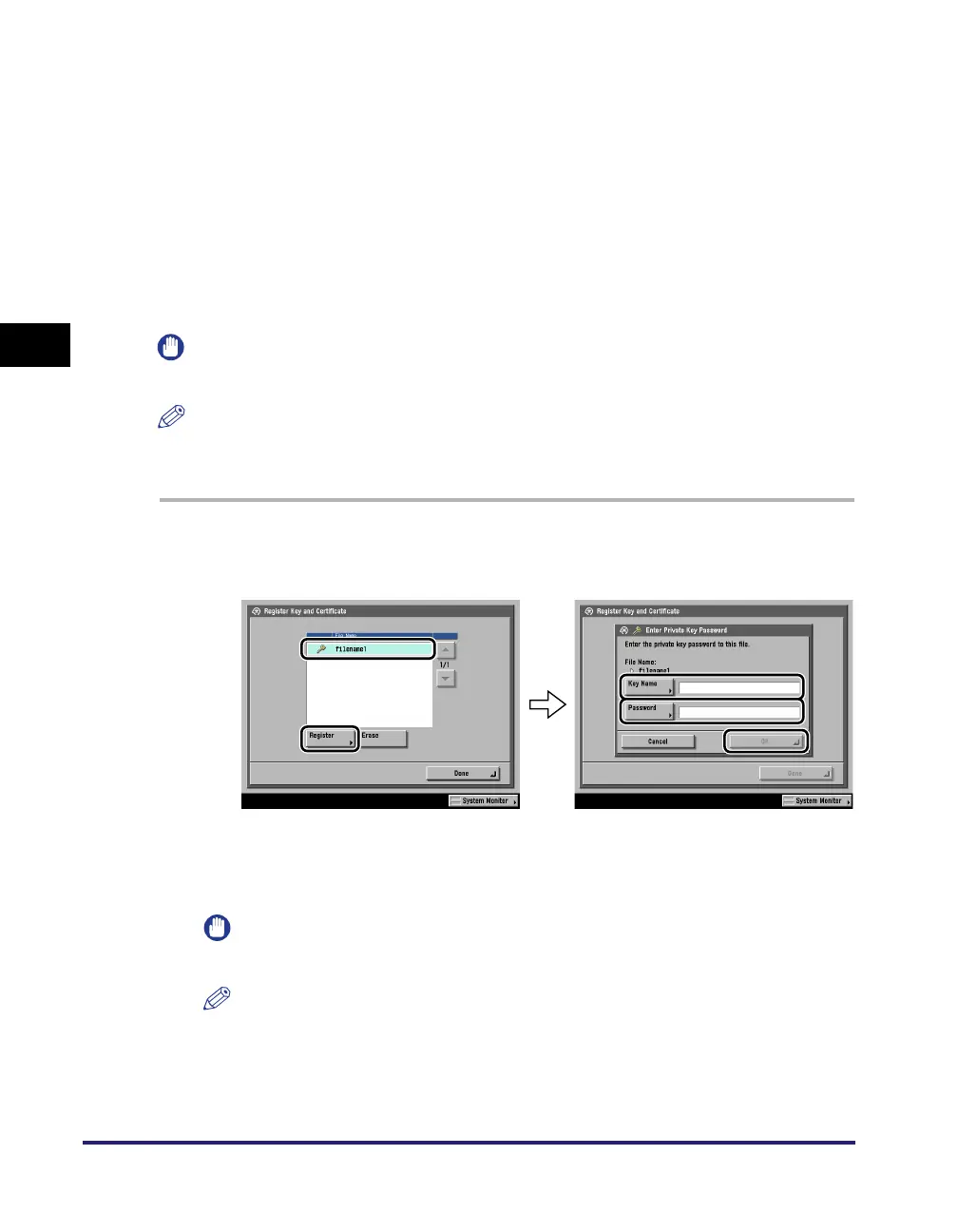
Select the file to register ➞ press [Register] ➞ enter the name of the private key in
[Key Name], and the password for the private key in [Password].
To erase an unnecessary file, select the file ➞ press [Erase].
IMPORTANT
You can register only key pair files which use the RSA algorithm.
NOTE
For instructions on how to confirm a registered key pair and server certificate, see
"Editing Key Pairs and Server Certificates," on p. 3-31.















 To Next Page