1
Introduction
Thank you for purchasing the Canon ScanFront 220e/220eP network scanner.
Please read this manual thoroughly before using the device to familiarize yourself with its capabilities, and to make the most of its
many functions. After reading this manual, store it in a safe place for future reference.
About ScanFront 220e/220eP
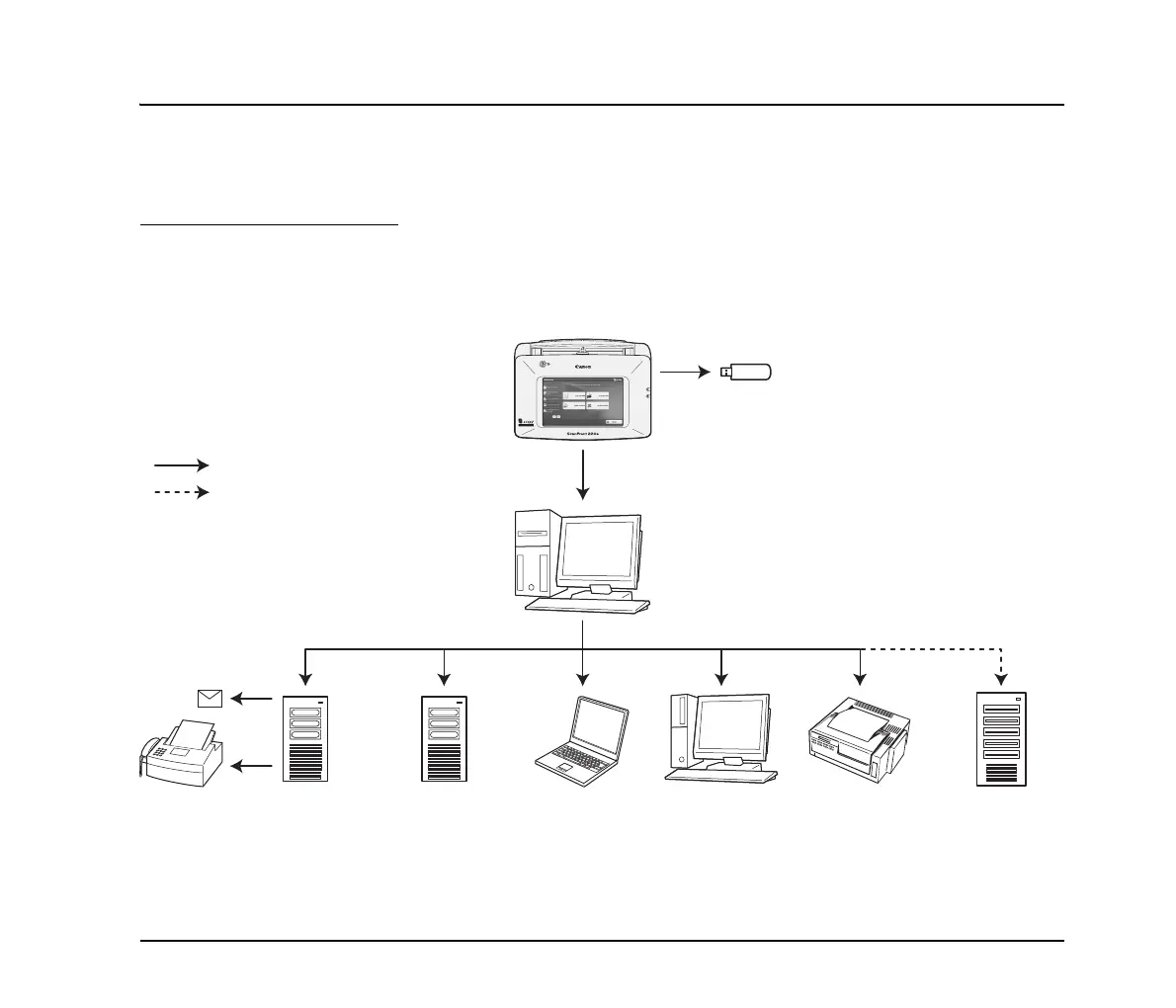
The ScanFront 220e/220eP is a network scanner that allows you to scan paper documents and send scanned images to eCopy
ShareScan Services Manager, which then forwards the scanned images to multiple destinations, such as the Shared Folder, Mail
Server (SMTP/Notes), FTP Server, Printer, Fax (via Email), or USB flash drive attached to the device.
Mail Server
: Data route.
ScanFront
USB flash drive
FTP Server PC
(Shared folder)
PC
(eCopy Desktop)
Printer Backend
System Server
: Requires optional Connector.
eCopy ShareScan
• ShareScan Services Manager
• ShareScan Administrator console
• Connector (optional)
FAX
Mail








 To Next Page