16
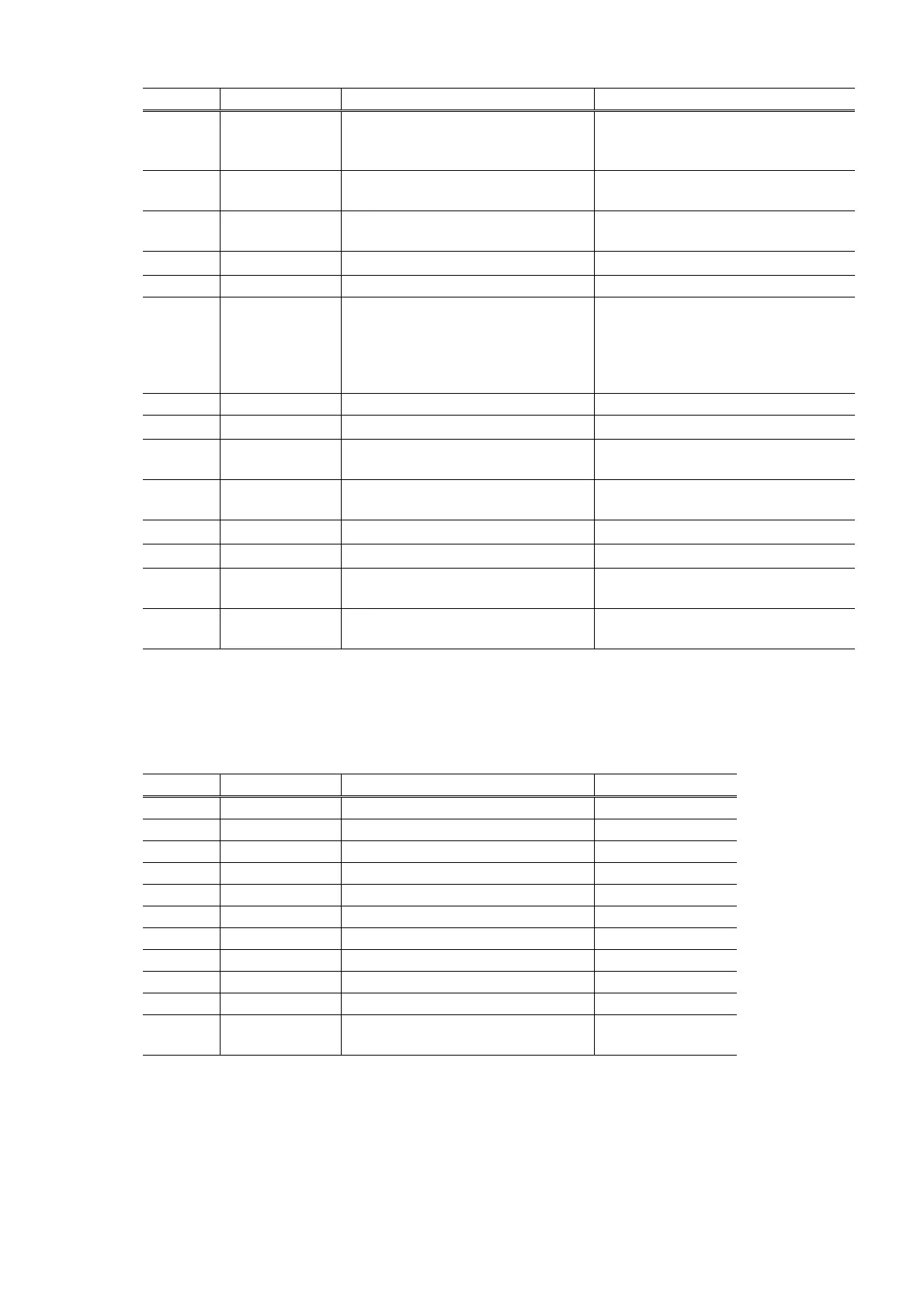
Time(s) LED indication Function Remarks
0 times Green (Power) Power off When the print head is not installed,
the carriage returns and locks in the
home position capped.
1 time Orange (Alarm) Service test print See APPENDIX 1, SERVICE TEST
PRINT.
2 times Green (Power) EEPROM information print See APPENDIX 2, EEPROM
INFORMATION PRINT.
3 times Orange (Alarm) EEPROM initialization
4 times Green (Power) Ink absorber counter resetting
5 times Orange (Alarm) Destination settings After entering the destination
settings mode, press the
Resume/Cancel button the specified
number of time(s) to select the
destination.
6 times Green (Power) Print head deep cleaning (Cleaning of both black and color)
7 times Orange (Alarm) CD / DVD check pattern print Not used in servicing.
8 times Green (Power) CD / DVD print position correction
(horizontal: X direction)
Not used in servicing.
9 times Orange (Alarm) CD / DVD print position correction
(vertical: Y direction)
Not used in servicing.
10 times Green (Power) LF correction
11 times Orange (Alarm) Left margin correction
12 to 15
times
Green / Orange
(Power / Alarm)
Return to the menu selection
16 times
or more
Orange (Alarm) Return to the menu selection
Note: If the Resume/Cancel button is pressed 16 or more times, the Alarm LED lights steadily without
any changes.
<Destination settings procedures>
In the destination settings mode, press the Resume/Cancel button the specified number of time(s)
according to the destination listed in the table below, and press the Power button.
Time(s) LED indication Destination CD / DVD print
0 times Green (Power) No change of the destination
1 time Orange (Alarm) Japan Supported
2 times Green (Power) Korea Not supported
3 times Orange (Alarm) US Not supported
4 times Green (Power) Europe Supported
5 times Orange (Alarm) Australia Supported
6 times Green (Power) Asia Supported
7 times Orange (Alarm) China Supported
8 times Green (Power) Taiwan Supported
9 times Orange (Alarm) Canada / LAM Supported
10 times
or more
Green (Power) Return to the menu selection
Note: After setting the destination, confirm the model name in service test print or EEPROM
information print. (See APPENDIX 1, SERVICE TEST PRINT or APPENDIX 2, EEPROM
INFORMATION PRINT.)
<LF correction procedures>
After replacement of the feed roller ass'y or logic board ass'y in repair servicing or in refurbishment
operation, adjust the line feeding.







 To Next Page