17
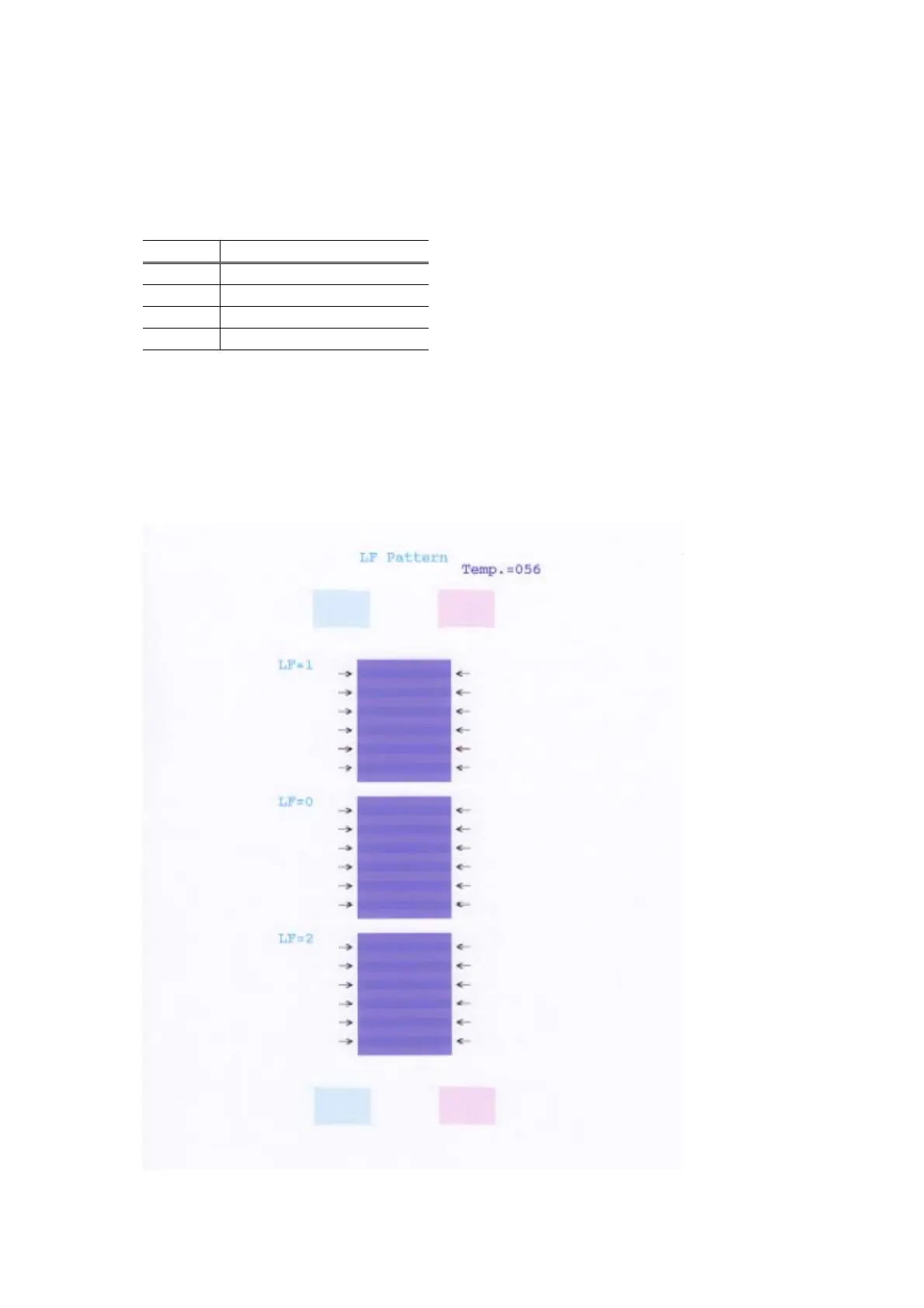
Details: Print the LF correction pattern on a sheet of paper. Select the Pattern No. (0 to 2) in which
streaks or lines are the least noticeable, press the Resume/Cancel button the same number
of time(s) as the selected Pattern No., then press the Power button.
1) In the LF correction mode, press the Resume/Cancel button the specified number of times
according to the paper to be used in LF correction listed in the table below, then press the Power
button. (Set a sheet of selected paper in the ASF.)
Time(s) Paper
1 time HR-101
2 times GF-500, Office Planner
3 times HP BrightWhite
4 times Canon Extra, STEINBEIS
Note: - Each time the Resume/Cancel button is pressed, the Alarm and Power LEDs light
alternately, Alarm in orange and Power in green.
- If the Resume/Cancel button is NOT pressed, and only the Power button is pressed, the
printer remains in the LF correction mode.
- If the Resume/Cancel button is pressed 5 times or more, then the Power button is
pressed, the printer returns to the service mode menu selection.
2) The LF correction pattern for the selected paper is printed.







 To Next Page