Inverting Original Images (Nega/Posi)
2-57
2-572-57
2-57
Useful Copy Functions
2
22
2
Inverting Original Images
Inverting Original Images Inverting Original Images
Inverting Original Images
(Nega/Posi)
(Nega/Posi)(Nega/Posi)
(Nega/Posi)
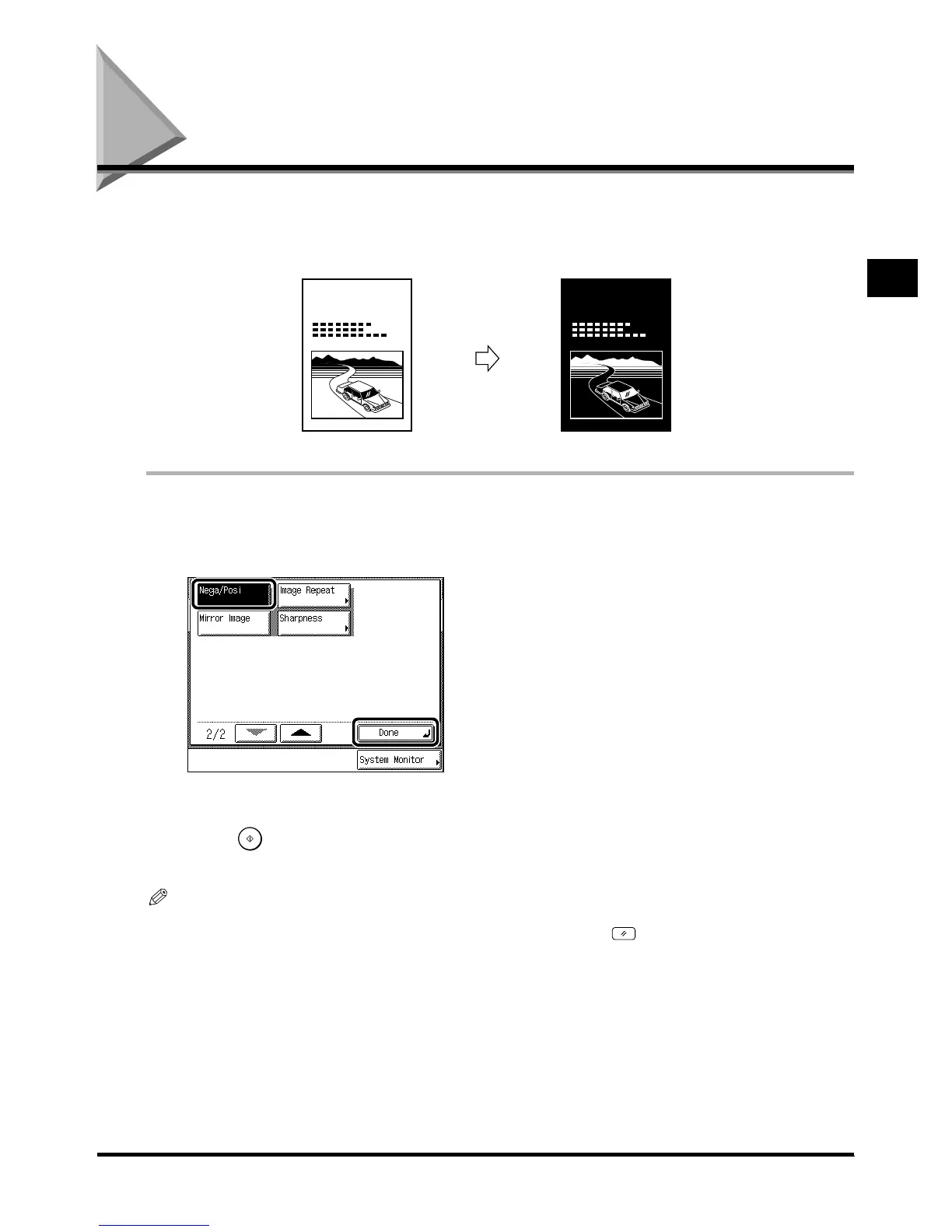
This function enables you to make copies of the original image inverting the black and the white
areas.
1
11
1
Place your originals, and press [Special Features]
Place your originals, and press [Special Features] Place your originals, and press [Special Features]
Place your originals, and press [Special Features]
→
press [
press [ press [
press [
t
].
].].
].
2
22
2
Press [Nega/Posi], and press [Done].
Press [Nega/Posi], and press [Done].Press [Nega/Posi], and press [Done].
Press [Nega/Posi], and press [Done].
The specified mode is set and the display returns to the Basic Features screen.
3
33
3
Press .
Press . Press .
Press .
Copy starts.
NOTE
•
••
•
To cancel the setting, press the [Special Features]
→
[
t
]
→
[Nega/Posi]. in this order.
•
••
•
To cancel all settings and return the machine to the Standard mode, press .
SCENE SCENE
Original
OriginalOriginal
Original
Copy
CopyCopy
Copy







 To Next Page