Revision-1,
MAR.
1980
OPERATION
PROCEDURE
Before
operating
the
LBP-10,
confirm the following items.
Power
plug
is
connected to
AC
outlet.
Emergency
stop
switch is
turned on.
Front
access
door
is
completely closed.
Top
access
door is
completely closed.
Interface
cable
is connected.
1
.
Turn
on the
power
switch.
CAUTION:
«
When power switch
is
once
turned
off,
wait at least 2 seconds
before turning
on the
switch
again.
When the power switch
is turned off, it may
take
sometime for the
machine
comes
to
complete stop
depending on the machine control sequence.
2.
Turn on the
select switch.
3.
When the
READY/WAIT indicator lights
continuously,
the LBP-10 is
ready to
use.
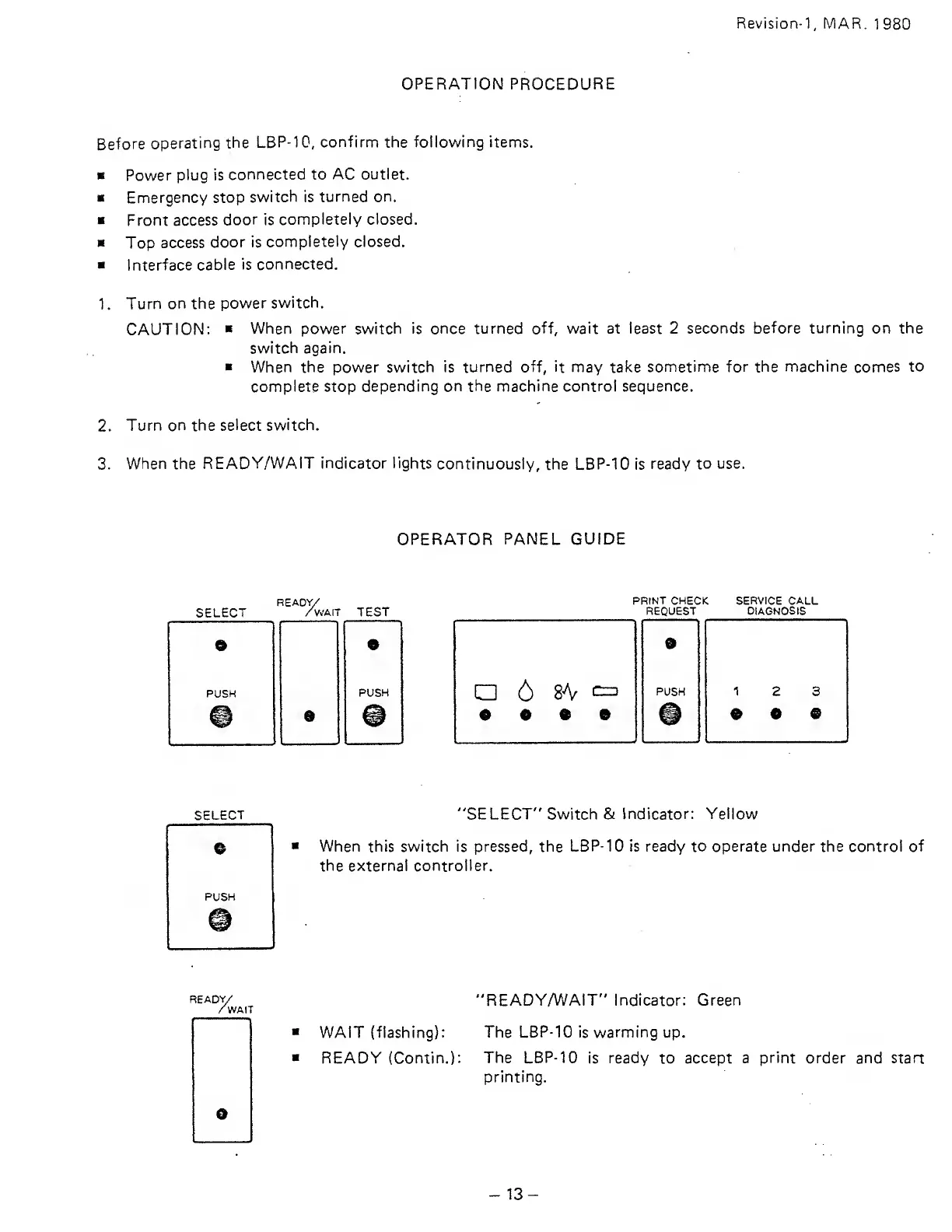
OPERATOR
PANEL GUIDE
SELECT
READY/
''WM-
TEST
PUSH
9
PRINT CHECK
REQUEST
6
8A^
c^
e
« • e
SERVICE CALL
DIAGNOSIS
SELECT
"SELECT" Switch & Indicator:
Yellow
When this switch is pressed,
the
LBP-10
is ready to operate under the control of
the external controller.
READY/
WAIT
"READY/WAIT" Indicator: Green
WAIT (flashing):
The LBP-10 is warming up.
READY (Contin.):
The
LBP-10
is
ready
to
accept a
print
order
and
start
printing.
13-




 To Next Page