(5) User mode
MP620 / MP628 --- 3. REPAIR TABLE OF CONTENTS
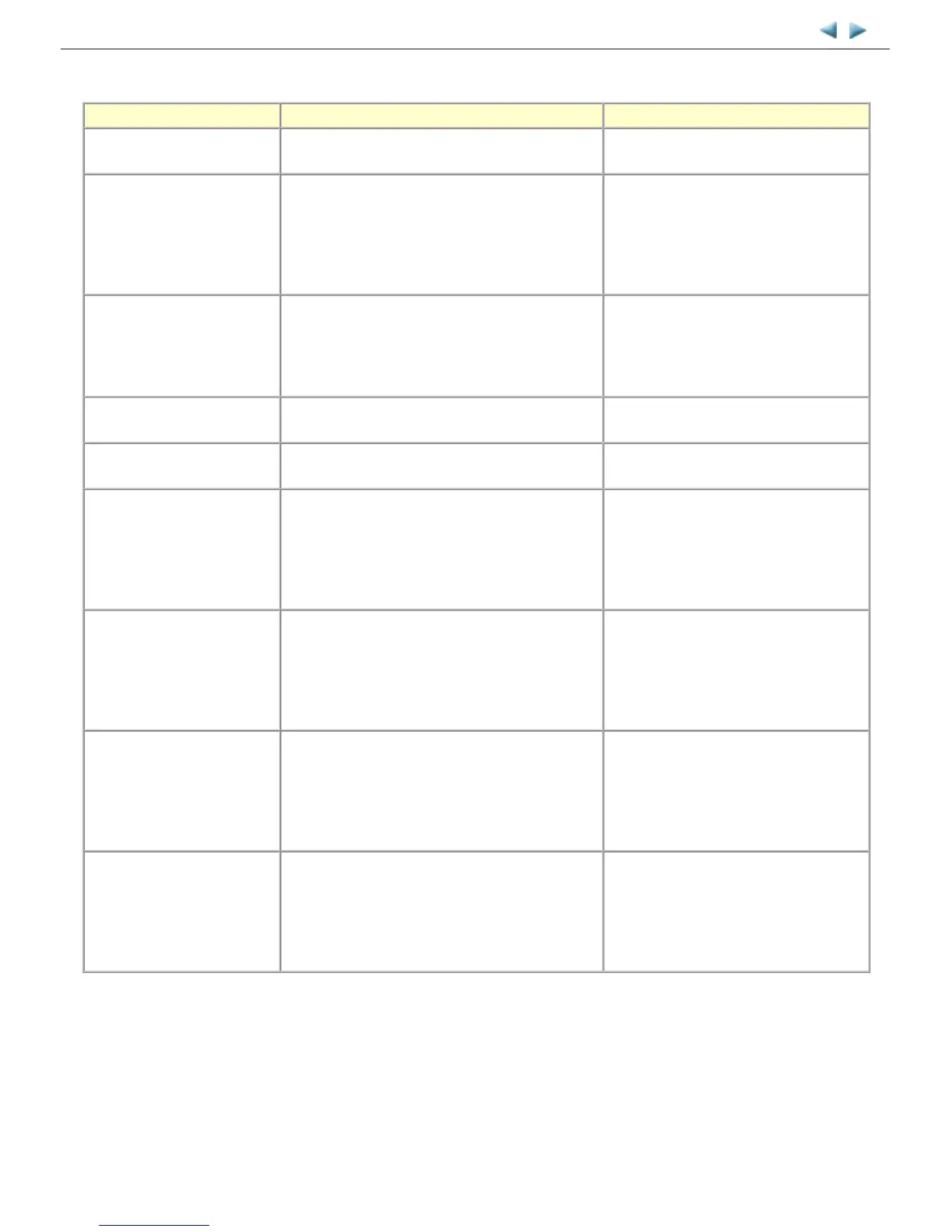
Function Procedures Remarks
Nozzle check pattern printing Perform via the machine operation panel, or from the
MP driver Maintenance tab.
Set a sheet of plain paper (A4 or Letter) in
the cassette, or the rear tray if selected.
Print head manual cleaning - Cleaning both Black and Color:
Perform via the machine operation panel.
- Cleaning Black or Color separately, or both Black
and Color:
Perform from the MP driver Maintenance tab.
Unclogging of the print head nozzles, and
maintenance to keep the print head
conditions good.
If there is a missing portion or white streaks
in the nozzle check pattern printout, perform
this cleaning.
Print head deep cleaning Perform via the machine operation panel, or from the
MP driver Maintenance tab.
If print head manual cleaning is not
effective, perform this cleaning. Since the
deep cleaning consumes more ink than
regular cleaning, it is recommended to
perform deep cleaning only when necessary.
Manual print head alignment Perform via the machine operation panel, or from the
MP driver Maintenance tab.
Set 3 sheets of plain paper (A4 or Letter) in
the cassette, or the rear tray if selected.
Print head alignment value
printing
Perform via the machine operation panel, or from the
MP driver Maintenance tab.
Confirmation of the current print head
alignment values.
Paper feed roller cleaning Perform via the machine operation panel, or from the
MP driver Maintenance tab.
The paper feed rollers of the selected paper
source (the rear tray or the cassette) rotate
while being pushed to the paper lifting
plate. Since the rollers will wear out in this
cleaning, it is recommended that you
perform this only when necessary.
Bottom plate cleaning Perform via the machine operation panel, or from the
MP driver Maintenance tab.
Cleaning of the platen ribs when the back
side of paper gets smeared.
Fold a sheet of plain paper (A4 or Letter) in
half crosswise, then unfold and set it in the
rear tray with the folded ridge facing down.
(No paper feeding from the cassette)
LAN resetting Perform via the machine operation panel, or using IJ
Network Tool on the computer.
Reset the LAN settings to the ones when the
machine was purchased, via the machine
operation panel (by selecting
Settings
,
Device settings
,
LAN setting
, then
Reset
LAN settings
), or using IJ Network Tool on
the computer.
LAN setting information
display
Perform via the machine operation panel, or using IJ
Network Tool on the computer.
Confirm the wired or wireless LAN settings,
via the machine operation panel (by
selecting
Settings
,
Device settings
,
LAN
setting
, then
Wired LAN setting list
or
Wireless LAN setting list
), or using IJ
Network Tool on the computer.



 To Next Page